

Leaderboard


Popular Content
Showing content with the highest reputation on 10/31/2026 in Files
-
Version 1.0
114 downloads
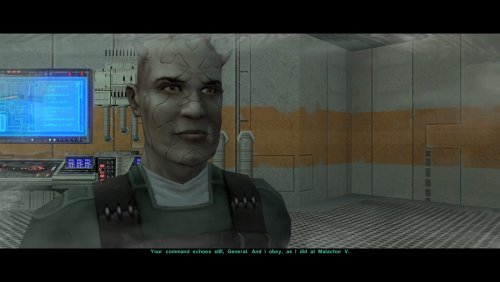
One of the many threads left hanging by KOTOR 2's incomplete ending is that Bao-Dur mysteriously disappears just before the Battle of Telos with very little indication of what might have happened to him. This mod attempts to fill the narrative gap with a pair of cutscenes showing Bao-Dur accompanying HK-47 to the Telos underground base and retrieving data from the Republic's database while HK-47 continues alone to the HK factory. It also adds a brief cutscene after the battle showing him staying behind on Citadel Station as the player departs. If the player does not rebuild HK-47 or if the HK factory is not located, essentially the same scenes occur but without HK-47. I have taken some general inspiration from KOTOR 2 writer Chris Avellone's comments on Bao-Dur's intended fate, but I have chosen to go in a different direction with much of it. Thank you for downloading, and I hope you enjoy this mod! ------------------------------------------------------------------- INSTALLATION If you are using any of the mods noted in the "Compatibility" section below, install them first. Afterwards, run "INSTALL.exe", and select the Main Installation option. After the installation is complete, if you are using my mod "Equip Party for Malachor, rerun "INSTALL.exe", and select the option for the compatibility patch. If you are using The Sith Lords Restored Content Mod (TSLRCM) from the Steam Workshop, see this guide for how to combine installer-based mods with the Workshop: https://steamcommunity.com/sharedfiles/filedetails/?id=488641307. ------------------------------------------------------------------- COMPATIBILITY This mod requires The Sith Lords Restored Content Mod (TSLRCM) (https://deadlystream.com/files/file/578-tsl-restored-content-mod/). It is also compatible with the KotOR 2 Community Patch (K2CP) (https://deadlystream.com/files/file/1280-kotor-2-community-patch/). If you are using any of the following mods, they must be installed prior to this mod: - TSLRCM - PartySwap by DarthTyren and Leilukin (https://deadlystream.com/files/file/544-partyswap/) - Equip Party for Malachor by me (https://deadlystream.com/files/file/3128-equip-party-for-malachor/) - Any other mods which overwrite pcdead2.dlg in the module 003ebo.mod.(*) This mod is currently incompatible with M4-78. It is also incompatible with mods other than those mentioned above which edit the following files: - a_221load.ncs - a_901jump.ncs - a_escape_851.ncs - a_hand_pc_end.ncs (*)This mod may be incompatible with mods which alter pcdead2.dlg significantly compared to the TSLRCM version. ------------------------------------------------------------------- CREDITS KotorBlender by seedhartha tpcview and tga2tpc by ndix UR NWNSSCOMP by Torlack and tk102 K-GFF by tk102 DLGEditor by tk102 TSL Patcher by stoffe and Fair Strides ERFEdit by stoffe and Fair Strides Kotor Tool by Fred Tetra Holocron Toolset by Cortisol and th3w1zard1 2DA Editor by VarsityPuppet SithCodec by JCarter426 Reone Toolkit by seedhartha Edited vanilla and TSLRCM scripts are based on the K2CP team's repository of unaltered, decompiled vanilla scripts, which may be found at https://github.com/KOTORCommunityPatches/Vanilla_KOTOR_Script_Source. Thanks to N-DReW25 for suggesting that I might try addressing Bao-Dur's fate in some fashion. Thanks to Leilukin for granting permission to include modified versions of scripts from PartySwap for compatibility. ------------------------------------------------------------------- VERSION HISTORY 1.0 - Initial Release ------------------------------------------------------------------- DISCLAIMER AND PERMISSIONS This modification is provided as-is and is not supported by Disney, Lucasarts, or Obsidian. Use at your own risk. The author shall not be held responsible for damage to your game installation, computer, or saved games resulting from the use of this mod. This mod shall not be reposted, in whole or in part, on any sites other than Deadly Stream without the author's permission. Scripts from this mod may be modified and redistributed for the purpose of compatibility with this mod as long as credit is given to this mod's author. Otherwise, assets from this mod shall not be redistributed in other modifications without the author's permission. Assets containing work by other authors also require the permission of those authors.1 point -
Version 3.0
507 downloads
BIGGER DIALOG FONT ━━━━━━━━━━━━━━━━━━━━━━━━━━━━━━━━━━━━ DESCRIPTION Bigger Dialog Font increases dialogue and menu description font size in KOTOR 2 for better readability on modern displays. The main download includes all available font sizes: 20% Bigger 25% Bigger 30% Bigger 40% Bigger 50% Bigger 60% Bigger 70% Bigger 80% Bigger Choose whichever size works best for your resolution and setup. The download also includes an optional Font Upscaled folder. Increasing the original font size can make the text appear low-resolution or blurry, so these upscaled font textures can be used to make the larger text look clearer. ━━━━━━━━━━━━━━━━━━━━━━━━━━━━━━━━━━━━ DIALOG SUBTITLE WORD WRAP BETA The optional Dialog Subtitle Word Wrap beta modifies dialog.tlk to add line breaks to dialogue subtitles, helping prevent subtitle text from extending off-screen when using the larger font sizes. The add-on is now modular and includes three versions: Vanilla TSLRCM TSLRCM + KOTOR 2 Community Patch Choose the version that matches your installation. The requirements only apply to the Dialog Subtitle Word Wrap version you choose. The regular Bigger Dialog Font files do not have any known mod requirements. Important: Always back up your original dialog.tlk before installing the Dialog Subtitle Word Wrap beta. ━━━━━━━━━━━━━━━━━━━━━━━━━━━━━━━━━━━━ INSTALLATION Main Font Files Download and extract the ZIP file. Open the extracted folder. Choose your preferred font size. Place the files from your chosen size folder into your KOTOR 2 override folder. Replace files if prompted. Optional Upscaled Font If you want clearer font textures, open the Font Upscaled folder and place its files into your override folder. This is optional, but recommended if the enlarged font looks blurry or low-resolution. Dialog Subtitle Word Wrap Beta Read the included README first. Choose the version that matches your setup: Vanilla TSLRCM TSLRCM + KOTOR 2 Community Patch Back up your original dialog.tlk. Place the new dialog.tlk into your main KOTOR 2 directory, where the game executable is located. ━━━━━━━━━━━━━━━━━━━━━━━━━━━━━━━━━━━━ EXTRA NOTES Screenshots were taken at 1920x1080. ━━━━━━━━━━━━━━━━━━━━━━━━━━━━━━━━━━━━ CHANGELOG Consolidated all font sizes into the main download. Added 20%, 25%, 30%, 40%, 50%, 60%, 70%, and 80% font size options. Added optional upscaled font textures for clearer enlarged text. Dialog Subtitle Word Wrap beta is now modular. Added separate Dialog Subtitle Word Wrap versions for Vanilla, TSLRCM, and TSLRCM + KOTOR 2 Community Patch.1 point -
Version 1.0.0
27 downloads
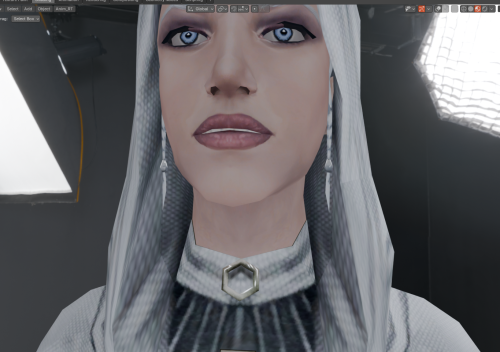
Hello everyone! This mod makes Handmaiden’s braids visible beneath the hood of her default outfit; the braids are present on the model, but by default, the "render" flag is not enabled for them. Credit for the improved base model of Handmaiden, which I used for my mod, goes to RedRob41 for the mod: "2x Upscale+ Character Textures & Model Fixes for TSL."0 points -
Version 1.0.0
15 downloads
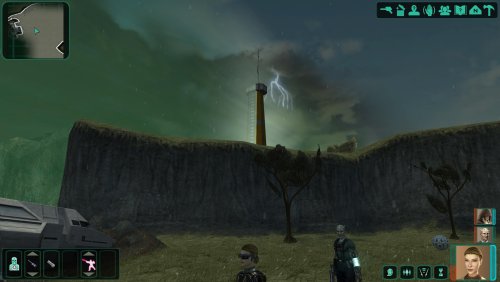
Hello everyone! This mod replaces the fair weather in the Telos Restoration Zone with a thunderstorm—complete with lightning, thunder sounds, and rain—and darkens the sky, much like what was seen in the early demo of KOTOR 2. The files are loose files intended for the 'Override' folder; therefore, conflicts may arise if the files '231TEL.are' and '233TEL.are' are already present or have been modified/added to the module by another mod.0 points