

Leaderboard


Popular Content
Showing content with the highest reputation on 08/22/2026 in Files
-
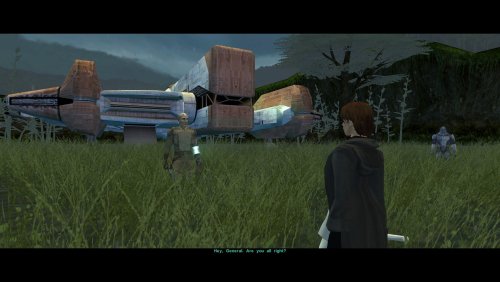
Version 1.0
16 downloads
As you know, there's a story segment on Dxun where your party splits up. While you're off to Onderon, the other group goes to explore the jungle. After everything's done, there's a little reunion scene with the party leader of your choosing, just a few lines between the Exile and their companion before Kreia interrupts. Turns out, despite being one of the possible party leaders, Bao-Dur was the only one who didn't have any lines at all. The game simply skipped straight to Kreia rather abruptly. This little fix adds that missing reunion scene with Bao-Dur, provided he's been chosen to lead the party on Dxun, putting him on par with all other companions. Requirements: TSLRCM — for being able to send Bao-Dur at all. Notes: The mod can be installed and uninstalled at any time; the changes are minimal and safe. Since these lines weren't even cut originally (they were just missed), I've reused some of Bao-Dur's existing voice lines that I deemed fit the occasion perfectly. Installation: Copy following file from archive's "Override" folder to yours: reunion.dlg. Credits: Fred Tetra, for KOTOR Tool TK102, for DLGEditor Torlack, stoffe & TK102, for NWNSSCOMP JdNoa & Dashus, for DeNCS Cortisol, for Holocron Toolset1 point -
![More information about "[TSL] Ebon Hawk skybox for M4-78 EP"](https://deadlystream.com/downloads/screens/monthly_2026_08/EHSkyboxforM4-78EPThumbnail.thumb.png.785575fb7fac539a0adcc772f373b0cc.png)
Version 1.0.0
7 downloads
[TSL] Ebon Hawk skybox for M4-78 EP AUTHOR: Sith Holocron ORIGINAL RELEASE: 21 AUG 2026 GAMES: Star Wars Knights of the Old Republic II (using M4-78 Enhancement Project) Description: I like Kexikus’ skyboxes for the various worlds in K1 and TSL. I like tjsase’s Ebon Hawk skyboxes for TSL. However, it seems I've always had to make a choice between keeping one or the other when considering either tjsase's Ebon Hawk skybox (which utilizes the standard skybox included in the EP) or Kexikus' world skybox which is its own thing. That is until I made a Frankenstein's monster of the EH skybox and the EP world skybox together, which I think merges them suitably. (See attached picture.) I reached out in early 2025 to both modders to see if I could make this combined skybox available to the public. The first modder responded almost immediately. The second modder – who doesn’t visit the site often – finally granted permission today. Installation: Copy the TGA file to the Knights of the Old Republic II's Override folder. (Example location - C:\Program Files (x86)\Steam\steamapps\common\swkotor2\Override) When/if prompted to overwrite files, press okay. If you like the mod; please leave a comment or endorse! It would be much appreciated. Uninstall: Remove the TGA file you’ve added in Installation instructions. Thanks (in alphabetical order): Kexikus: For their kind permission to publicly release their work in this skybox to the public. tjsase: For their kind permission to publicly release their work in this skybox to the public. You can find Kexikus’ mods on Deadly Stream here: https://deadlystream.com/profile/12766-kexikus/content/?type=downloads_file You can find tjsase’s mods on Deadly Stream here: https://deadlystream.com/profile/12310-tjsase/content/?type=downloads_file1 point -
Version 1.1.0
82 downloads
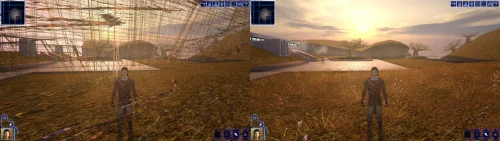
Turn off grass. For years that has been the first answer to almost any KOTOR problem, and it was good advice, because on a modern PC the grass really does tear itself across the sky. This patch fixes that, and quite a lot else. KOTOR decides how to light the world once, when it starts, choosing between two methods built for graphics cards of 2003. On most machines today neither is on offer, so the game quietly falls back to a path that was never finished: no proper lighting on walls and floors, no reflections on metal or armour, no fog, no soft shadows, and none of the screen effects. It still runs. It just looks wrong, and a lot of people have never seen it look right. This rebuilds that lighting using something every modern card does support, and puts the game back on the paths the developers actually finished. The grass is one of them. If you play on an NVIDIA card, the lighting has been working for you all along. Those drivers still carry register combiners, one of the two original methods, and it does the job properly. It is also an extension from 2001 that no other vendor implements, surviving on one company's willingness to keep shipping it. This moves every card onto a method that is still current, so there is one path everyone is exercising rather than one propped up by goodwill. What you get back Grass that stays on the ground Lighting on walls and floors, the baked lighting that makes interiors look lit rather than flat Reflections on metal, armour and polished surfaces Fog, in the places the game meant to have it Soft shadows, and the screen effects: bloom, blur, film grain, the distortion around force powers, and the colour wash on some cutscenes Bump lighting on creatures, which the game only ever drew on an NVIDIA card. The wet highlight in a Hutt's eyes is the easiest place to notice it. Requirements KOTOR 1, version 1.0.3. GOG, Steam and the CD release all work. Install it with the KotOR Patch Manager. Your game files are not modified; the manager applies the patch while the game runs. It replaces the separate cube map fix and soft shadows fix. Both are folded in, so disable those if you have them enabled in the patch manager. Source, releases and issues: https://codeberg.org/Synchro/kotor-modern-driver-compatibility Settings, if you ever need them You do not need any of this to play. The first time you run it, a file called `K1DriverCompat.ini` appears next to `swkotor.exe` with every option listed, explained, and switched off. Open it and delete the `#` in front of anything you want to change. The one worth knowing about is `look`, which chooses between the two ways cards of 2003 drew bright light. `look = nvidia` is the default and the calmer of the two. `look = ati` lets strong lights bleach out what they land on, the way a Radeon did. Neither is a bug, and neither is more correct than the other. Replacement shaders You can drop your own shader files into override/shaders/, you can create it if it isn't there. The patch will use shaders in there instead of the ones it generates, with no rebuilding and no tools. They are plain text in ARB fragment program assembly, which is what the patch compiles its own into. It sits under override so a replacement can ship as an ordinary TSLPatcher mod rather than needing its own packaging, and in a subdirectory because these are not game resources. The game ignores them completely: it only looks in override for the file extensions it knows, and has no idea what an .arb file is. Reading them is this patch's job. For more information on naming, shader inputs, and all of the mode types, take a look at this section of the README: https://codeberg.org/Synchro/kotor-modern-driver-compatibility#replacement-shaders Tested on AMD, Intel and NVIDIA hardware, on Windows and on Linux through Proton, across the GOG, Steam and CD releases. If something looks wrong `logs/K1DriverCompat.log` in your game folder holds one session and is overwritten each run, so there is only ever one file to send. Setting `log = debug` in the ini before reproducing the problem makes it far more useful. Thanks @Lane and @J tested this on cards and I don't own. Nearly everything here is based on how some particular drivers behave, and that is worth nothing until somebody with that hardware runs it and reports back. The faults that turned up that way are ones I had no way of finding on my own. @Lane also wrote the KotOR Patch Manager, which is what this ships for. LLM Disclosure This project made use of an LLM during development, in the following capacities: Brainstorming: exploring possible approaches and design directions Decompilation assistance: help interpreting and structuring reverse-engineered code Code comments: refining and clarifying existing comments Skeletons and fixes: generating initial code scaffolding and minor fixes All LLM-assisted output was modified and reviewed by a human before being committed.1 point -
![More information about "[TSL] HD Rodians"](https://deadlystream.com/downloads/screens/monthly_2026_08/20260821112801_1.thumb.jpg.ce1b722df7b5c30541478f89b6d4b4c9.jpg)
Version 1.0.0
22 downloads
===================================================== [TSL] HD Rodians ===================================================== Mod for Knights of the Old Republic II - The Sith Lords Author: Lily File Name: HD_Rodians_TSL.zip Latest Version: 1.0 --- 1. DESCRIPTION: This mod ports Stormie97's High Quality Aliens: Rodians from KotOR 1 to KotOR 2, with Dark Hope's HD retextures included and tweaked. - Replaces the original low-poly Rodian model with Stormie97's custom high-poly version. - Five HD texture variants for Rodian NPCs. - Adds an environment map for specular sheen. - All four Rodian appearance entries updated in appearance.2da. - Sitting Rodian placeable updated in placeables.2da. --- 2. INSTALLATION: Run Install.exe and select your KotOR 2 game directory. A "backup" folder is created by the installer in the same directory. Don't delete it if you plan to uninstall later. --- 3. UNINSTALLATION: Run Install.exe, select your KotOR 2 directory, and use the "Tools > uninstall/restore backup" option to revert all changes made by this mod. --- 4. KNOWN ISSUES: None. If you find any bugs or problems, please report them. --- 5. MOD COMPATIBILITY: This mod only touches the Rodian model, Rodian textures, and the relevant rows in appearance.2da and placeables.2da - no dialogue, scripting, or other module changes. Should be compatible with all other mods, including TSLRCM. If you have any other mods that change Rodian appearances, this mod will obviously stop the old appearances from showing. All files should have unique names, so this should not overwrite other mods, and it would just take Appearance.2da changes (or an uninstallation) to revert. Do not use the Steam Workshop for KotOR. It will almost certainly end with compatibility issues. --- 6. SUPPORT: My mods are free to use. You do not need to pay for them, but if you would like to say thanks, you can buy me a coffee! --- 7. PERMISSIONS: Do not directly reupload this mod anywhere else. Ask before using any assets. --- 8. THANKS: - Stormie97 - High Quality Aliens: Rodians - Dark Hope - Rodian HD Retexture - bead-v - MDLEdit - Cortisol - Holocron Toolset & HoloPatcher - Fair Strides - TSLPatcher THIS MODIFICATION IS NOT SUPPORTED BY BIOWARE/OBSIDIAN ENTERTAINMENT OR LUCASARTS OR ANY LICENSORS/SPONSORS OF THE MENTIONED COMPANIES. USE THIS FILE AT YOUR OWN RISK.1 point -
![More information about "[TSL] No Duplicate Bao-Dur Fix"](https://deadlystream.com/downloads/screens/monthly_2026_08/20260821003014_1.thumb.jpg.84b7b9fd8d64f83483b967dc7ccad85e.jpg)
Version 1.0.0
12 downloads
===================================================== [TSL] No Duplicate Bao-Dur Fix ===================================================== Mod for Knights of the Old Republic II - The Sith Lords Author: Lily File Name: No_Duplicate_Bao-Dur.zip Latest Version: 1.0 --- 1. DESCRIPTION: During Bao-Dur's Jedi training cutscene, the game creates duplicate stand-ins of Bao-Dur and the player character to act out the training montage. Afterward, these duplicates are supposed to be removed - but the duplicate Bao-Dur is never actually destroyed, leaving a phantom Bao-Dur wandering the Ebon Hawk for the rest of the game. This mod fixes the two scripts responsible for cleaning up after the training sequence, so the duplicate is properly removed when the cutscene ends. --- 2. INSTALLATION: Run Install.exe and select your KotOR 2 game directory. A "backup" folder is created by the installer in the same directory. Don't delete it if you plan to uninstall later. --- 3. UNINSTALLATION: Run Install.exe, select your KotOR 2 directory, and use the "Tools > uninstall/restore backup" option to revert all changes made by this mod. --- 4. KNOWN ISSUES: None. If you find any bugs or problems, please report them. --- 5. MOD COMPATIBILITY: This mod installs two files to your Override folder: - a_noremotefix.ncs - a_remotetrain.ncs No 2DA or other game files are modified. Any mod that also modifies these two script files will conflict with this one. I believe this is only TSLRCM, which this needs to be installed after. Requires TSLRCM. Do not use the Steam Workshop for KotOR. It will almost certainly end with compatibility issues. --- 6. SUPPORT: My mods are free to use. You do not need to pay for them, but if you would like to say thanks, you can buy me a coffee! --- 7. PERMISSIONS: Please let me know if you plan on using any of the files in my mod for your own mod. The answer is "yes you may", but I would like to know what you are doing with it! Do not directly reupload this mod anywhere else. --- 8. THANKS: - Fred Tetra - KotOR Tool - Cortisol - Holocron Toolset & HoloPatcher - Fair Strides - TSLPatcher THIS MODIFICATION IS NOT SUPPORTED BY BIOWARE/OBSIDIAN ENTERTAINMENT OR LUCASARTS OR ANY LICENSORS/SPONSORS OF THE MENTIONED COMPANIES. USE THIS FILE AT YOUR OWN RISK.1 point -
Version 1.0.0
10 downloads
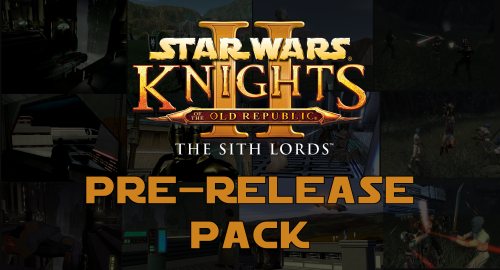
A Mod for Star Wars Knights of The Old Republic II: The Sith Lords Author: N-DReW25 1.0.0 Release Date: 22.08.2026 Installation: This mod currently only has "Override Mods" to offer. Simply copy the files within the "Beta Cockpit Skyboxes" folder and paste them into your Override folder. Description: December 6th 2004 was the day Kotor II was released for the first time on Xbox. If you aren't living under a rock, you'll know that both the Xbox and PC versions of the game were released in an unfinished state and how a mod called "The Sith Lord's Restored Content Modification" was developed years later to restore the cut content, thus 'completing' the game. Some of us might be aware of other cut content which didn't make it into TSLRCM such as M4-78... but what if I told you there's other things Obsidian cut from the game which you may not know about. Like Bioware before Kotor I's release, Obsidian released concept art & promotional screenshots of Kotor II in the months leading up to its release during the game's development. Whilst these promotional screenshots might appear worse than the vanilla game (as these are pre-release/in-development screenshots), a few eagle eyed observers might notice some features in said screenshots which the vanilla game lacks. What this mod will do is add these features back into the game. Override Mods: * Beta Cockpit Skyboxes- These are the beta skyboxes of the Ebon Hawk's cockpit. These files were left unused in the game files and were from a period of development before the current skyboxes were finalized. * Beta Battle Armors- Like how Light Battle Armor was reskinned green in the final game, multiple screenshots depict the normal Battle Armor as being blue. This not only reskins the Battle Armor to match the beta screenshots, but the Light and Heavy Battle Armors have also been changed as in the background of those screenshots you can vaguely see that they were both also blue at some point. () Known Bugs: This mod shouldn't have bugs but if you find any please report them to me on Deadlystream. Incompatibilities: Would be incompatible with any mods which modifies the Ebon Hawk's cockpit skyboxes or the Light, Heavy, and normal Battle Armor textures. Permissions: Do NOT claim credit for this mod and do not use assets from this mod without my permission. Thanks to: Obsidian: For such an amazing game! Fred Tetra: For Kotor Tool JackInTheBox: For making the KOTOR 2 Alpha Textures mod of which the thumbnail of that mod was used in the thumbnail of this mod! Everyone who downloads the mod! Legal: THIS MODIFICATION IS NOT SUPPORTED BY BIOWARE/OBSIDIAN ENTERTAINMENT, LUCASARTS, DISNEY OR ANY LICENSERS/SPONSORS OF THE MENTIONED COMPANIES. USE OF THIS FILE IS AT YOUR OWN RISK AND THE ABOVE-MENTIONED COMPANIES OR THE AUTHOR IS NOT RESPONSIBLE FOR ANY DAMAGE CAUSED TO YOUR COMPUTER FOR THE USAGE OF THIS FILE.1 point -
Version 1.0.0
20 downloads
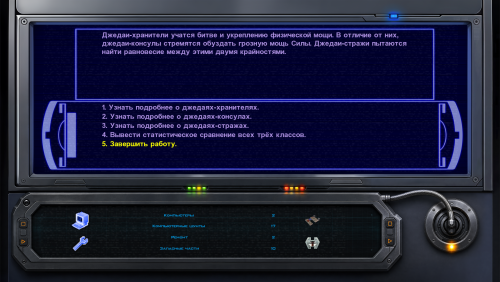
Just another interface for computer terminals. Animated (4 frames) texture, for 16x9 monitors. How to install: Unpack and copy all files to the Knights of the Old Republic's Override folder.1 point -
Version 4.1
134,571 downloads
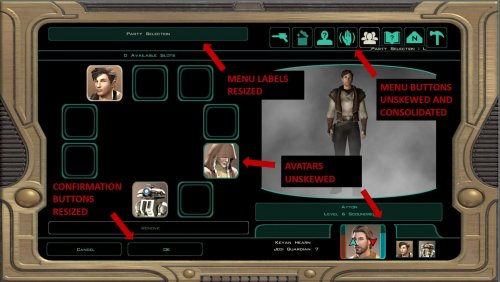
THE UPDATE IS FOR STEAM USERS, PLAYING THE ASPYR VERSION IN 2K. -------------------------------------------------- Title: Widescreen UI Fix for Knights of the Old Republic 2: The Sith Lords -------------------------------------------------- Special Thanks to the following individuals: Alien - For the original version of the 16x9 mod, without which none of this would have happened. tk102 - Since GFFEditor broke stuff and KGFF saved the day, teekay deserves some recognition for his awesome (TSL-friendly) tool. -------------------------------------------------- Original mod info (including link to download and screenshots) can be found here: http://steamcommunity.com/app/208580/discussions/0/864975632546978851/ As you can see, Alien's work is remarkable. Unfortunately, v.1 has some issues with the Actions UI in the lower left (mines and force form are borked, and the action description hovers over the menus rather than displaying above, making the arrows a pain to use). After some digging around, I was able to fix these issues and am releasing the fix with Alien's permission. *CD/DVD/GOG/Steam (Non-Aspyr) Installation Instructions* Download the GOG version Extract the download Select either the 16x9 or 16x10 version (not both) Copy the folder to Override To uninstall, remove the installed files. *Steam (Aspyr version) Installation Instructions* [Optional, but recommended] Find equip_p.gui in the game's install directory and make a backup Delete equip_p.gui from the install directory Extract the contents of the download to Override. To uninstall, remove the installed files.1 point -

Version 1.0.0
9,652 downloads
This mod aims to fix all* the stretching that occurs in widescreen (16:9) resolutions. There have already been other mods to fix the main HUD, but there are a lot of other elements in the game that are in need of correction, such as the pause menu, galaxy map, loading screens, etc. *For now, I recommend that you download "Widescreen UI Fix for Knights of the Old Republic 2: The Sith Lords" by Achilles to fix the HUD, and combine it with this mod to un-stretch everything else. I have included my own experimental version of a 16:9 HUD, but right now I think most people would prefer Achilles' version.1 point



