

Leaderboard


Popular Content
Showing content with the highest reputation on 03/19/2023 in Files
-
Version 1.5.5
2,820 downloads
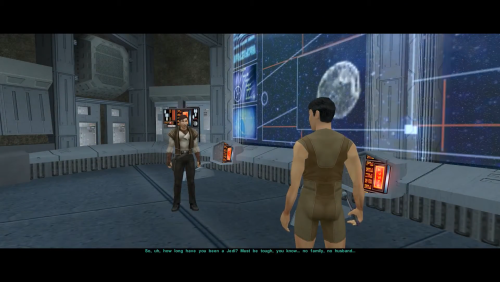
=Atton Rand and Male Exile Romance= A KNIGHTS OF THE OLD REPUBLIC II: THE SITH LORDS MODIFICATION AUTHOR: Leilukin FILE NAME: Atton Rand and Male Exile Romance.7z LATEST VERSION: 1.5.5 CONTACT: E-mail to contact@leilukin.com, or message to Leilukin on Deadly Stream PLEASE READ THROUGH THE MOD INFO ON THIS PAGE AND THE FAQ ARTICLE FOR MY KOTOR SAME-GENDER ROMANCE MODS BEFORE ASKING QUESTIONS! 1. DESCRIPTION: In KotOR II: TSL, certain party members can develop romantic feelings for the Exile, even though none of the romances in TSL were given much development, especially if compared to the first KotOR game. Atton Rand is among the potential romance options of TSL, however, in the vanilla game, he flirts with and expresses romantic interests for female Exiles only. What this mod does is to change the gender check of Atton's flirting and romantic dialogue, so he will express interest in male Exiles as well. Please note that this mod is ONLY COMPATIBLE WITH THE ENGLISH LOCALIZATION OF TSL AND TSLRCM. I do not provide support for non-English localizations of TSL and TSLRCM. 2. INSTALLATION: First and foremost, make sure you have The Sith Lords Restored Content Mod (TSLRCM) installed since TSLRCM is REQUIRED for this mod to work. !! ATTENTION!! STEAM USERS: If you play KotOR 2 on Steam, DO NOT USE THE STEAM WORKSHOP VERSION OF TSLRCM if you want to use this mod! Instead, use the installer (.exe) version of TSLRCM, which can be downloaded from Deadly Stream here. I recommend reading this Deadly Stream post on why Steam Workshop is NOT recommended for modding KotOR 2. Extract the Atton Rand and Male Exile Romance.7z archive you downloaded to anywhere you like, as long as it is not within the KoOR 2 directory. Run Install.exe. You will notice that this mod provides four installation options. You may only choose ONE of these options: Version A: This option will make Atton express interest in both male and female Exiles. Version B: This option will make Atton express interest in male Exiles only, and Atton will not flirt with a female Exile Once you have chosen the installation option you want, and select your KotOR 2 game folder as your KotOR 2 directory path, click the “Install” button and let the installer do its job. This mod also provides compatibility patches for the following mods: My Handmaiden and Female Exile - Disciple and Male Exile Romance mod danil-ch's Kreia's Fall Cutscene (In-Game) If you want to use any of the above mod alongside this mod, go to the "Compatibility Patches" folder, and follow the instructions written on the READ ME file. When you install this mod, two new folders named "backup" and “uninstall” will be created by the installer in the same folder as the installer. Do not delete the folders or any of the files within the folder if you are planning on uninstalling this mod. The "Source" folder includes the source of the scripts used by this mod for modders' reference. Ignore the "Source" folder if you only want to install and play this mod. 3. UNINSTALLATION: Run Install.exe and select your KotOR 2 directory where you installed this mod. From the “Tools” drop-down menu, select “Uninstall Mod / Restore Backup”, then confirm to uninstall the mod. You can also choose to delete the backup after uninstalling the mod. 4. KNOWN ISSUES: None currently known. If you find any bugs or problems, please let me know. 5. MOD COMPATIBILITY: Apart from TSLRCM, which is required for this mod to work, any other mods that modify any of the following content may conflict with this mod: Atton's main dialogue (atton.dlg) Atton's dialogue on Peragus (101atton.dlg, 102atton.dlg) Dialogue of the Atton & Bao-Dur cutscene on the Ebon Hawk (baoatt_p.dlg) Atton's endgame dialogue (904atton.dlg) Kreia's endgame dialogue (904kreia.dlg) Script for the party member cutscenes on the Ebon Hawk (k_003ebo_enter.ncs and a_next_scene.ncs from the 003EBO module) I have set up the installer to install this mod by patching the relevant dialogue files to improve compatibility with other content mods as much as possible, but it is still not guaranteed to be compatible with every other mods that modify the same files. If you use any of the below mods, I have provided compatibility patches, as noted in the "INSTALLATION" section above: My Handmaiden and Female Exile - Disciple and Male Exile Romance mod danil-ch's Kreia's Fall Cutscene (In-Game) This mod is compatible with my Alternate Revan Romances REDUX. If you want to use DarthTyren's PartySwap mod alongside this mod, you must install this mod AFTER PartySwap, otherwise you'll miss out certain Atton romance content when you're playing as a male Exile. This mod is compatible with JCarter426‘s Thematic Obscured Mausoleum Burial. This mod is compatible with the Atton’s ending dialogue component of Pavijan357's Unofficial TSLRCM Tweak Pack. If you want to use Kaidon Jorn’s Schematic Lightsaber Mod (SLM), you must install my mod after SLM. 6. PERMISSION: You may modify this mod for personal use or show this mod in screenshots. However, do not release your mods containing assets from my mod without my permission. You may use the k_003ebo_enter and a_next_scene scripts from this mod to make compatibility patches with your mod, but do not claim these modifications as your own. I do not use nor support Steam Workshop, so I do not want any of my mods to be uploaded to Steam Workshop. 7. CREDITS: danil-ch for giving me permission to make a compatibility patch for Kreia's Fall Cutscene (In-Game) Fred Tetra for the KotOR Tool and nwnnsscomp OpenKotOR for Holocron Toolset and HoloPatcher KobaltBlu for Kotor Scripting Tool tk102 for DLG Editor JCarter426 for SithCodec Stoffe for TSLPatcher; Fair Strides for the updated version THIS MODIFICATION IS NOT SUPPORTED BY BIOWARE/OBSIDIAN ENTERTAINMENT OR LUCASARTS OR ANY LICENSERS/SPONSORS OF THE MENTIONED COMPANIES. USE THIS FILE AT YOUR OWN RISK AND NEITHER THE ABOVE MENTIONED COMPANIES NOR THE AUTHOR IS RESPONSIBLE FOR ANY DAMAGE CAUSED TO YOUR COMPUTER FOR THE USAGE OF THIS FILE.1 point -

Version 2.0.5
8,658 downloads
This mod is focused on the so-called Quest Crystal, a powerful lightsaber crystal only the player character can utilize. There are three parts to this mod, which may be installed together or individually. Class-Based Properties The Quest Crystal in the original game has differing properties depending on your character's level and alignment only. This option gives the Quest Crystal differing properties based on your character's class in addition to their level and alignment. Each combination of class and alignment has access to a unique set of item properties. Note: A crystal with Class-Based Properties is saved differently from the original crystal. Save game files containing the original crystal will not function correctly with Class-Based Properties installed. Likewise, save game files containing a Class-Based Properties crystal will no longer function correctly if that part of the mod is uninstalled. Workbench Attunement In the original game, only Kreia is able to attune your Quest Crystal to keep it up to date with your character's stats. This option allows you to attune the crystal without Kreia's help. The player will be able to attune the crystal in the final act of the game, or earlier by passing a Wisdom check after crafting a lightsaber and observing Kreia attune the crystal. This option also removes the "[Learn about using the workbench.]" dialogue from any workbenches you can access after the game's prologue. Bug Fixes In the original game, you are not always given a Quest Crystal that properly reflects your player character. This mod includes bug fixes to correct that problem. While all of the installation options include these bug fixes, they can also be installed alone without the rest of the mod. Installation Extract files from the downloaded archive. Run INSTALL.exe. Select which option you want to install: a) Class-Based Properties + Workbench Attunement b) Class-Based Properties c) Workbench Attunement d) Bug Fixes Only Click "Install Mod" and select your game directory. This Workbench Attunement part of this mod only supports the English language version of the game at this time. Uninstallation During installation, TSLPatcher generates a backup folder and a log recording which files were affected. Restore or delete all module files affected by this mod. For each module, copy the corresponding .mod file from the backup folder to replace the one in your game's Modules folder if a backup was created, otherwise delete the .mod file from your game's Modules folder. Restore or delete all .2da files affected by this mod. For each, copy the corresponding .2da file from the backup folder to replace the one in your game's Override folder if a backup was created, otherwise delete the .2da file from your game's Override folder. Delete workbnch.dlg from your Override folder only if you have not installed other mods which edit this file. Otherwise, leave it; you will still have the tutorial removed but all other changes to the workbench dialogue will be inaccessible without the rest of the mod installed. Delete all other files installed by this mod from your game's Override folder. Note that depending on which option you installed, some of the above might not be necessary. Compatibility This mod is compatible with my Saber Workshop mod. The order of installation does not matter. This mod makes minimal changes to the global workbench dialogue (workbnch.dlg) but it is installed by overwriting the file. This is an unfortunate necessity because TSLPatcher is not so good at patching dialogue files, especially when different mods do very similar things. I thought long and hard, and this seemed the most compatible option to me despite its inherent problems, because it simplifies the installation for mods which are designed to be compatible with this mod while minimizing amount of changes needed to make a compatibility patch. In any case, other mods which edit the global workbench dialogue will only be compatible with this mod if one of the following is true: The other mod is installed after this mod and patches (i.e. does not overwrite) the workbench dialogue The other mod is installed after this mod, overwrites the workbench dialogue, and includes this mod's changes to the workbench dialogue The other mod has a compatibility patch which is installed after this mod, overwrites the workbench dialogue, and includes this mod's changes to the workbench dialogue Credits KOTOR Tool – Fred Tetra 2DA Editor – VarsityPuppet TSLPatcher – stoffe & Fair Strides DeNCS – JdNoa & Dashus DLGEditor – tk102 ERFEdit – stoffe & Fair Strides K-GFF – tk102 NWNSSCOMP – Torlack, stoffe, & tk102 xoreos tools – xoreos team https://xoreos.org/ with thanks to @Snigaroo for help deciding the class-based item properties License This work is licensed under a Creative Commons Attribution-NonCommercial 4.0 International License. Donations If you enjoy my mods and would like to show your support in a monetary manner, you may do so via PayPal at https://www.paypal.me/carterunited.1 point