


Jump to content

8 Screenshots

About This File

 =====================================================
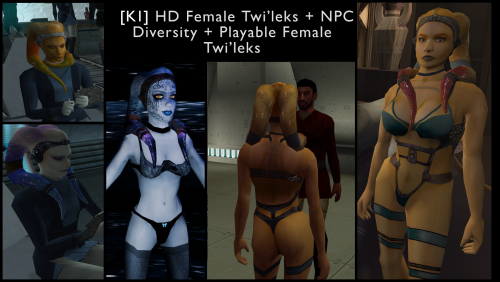
[K1] HD Female Twi'leks + NPC Diversity + Playable Female Twi'leks
=====================================================

Mod for Knights of the Old Republic 1

Author: Lily
File Name: K1_HD_Female_Twilek_Diversity_and_PCs_v1.zip
Latest Version: 1.2.0

---

1. DESCRIPTION:

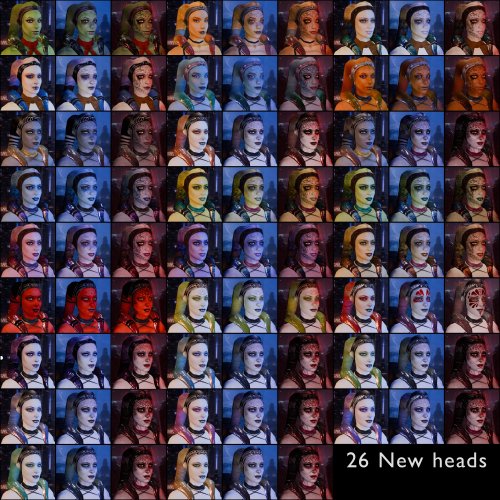
This mod overhauls the female Twi'lek NPCs in KotOR 1 and adds 26 new playable female Twi'lek heads.

NPC Overhaul:
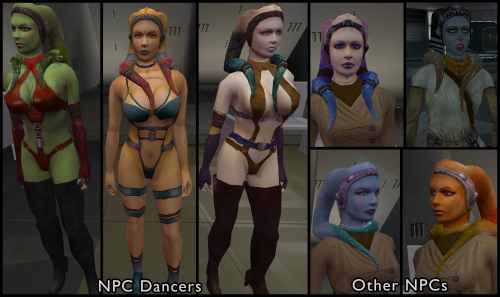
- Upscaled and updated dancer outfits.
- Body skin tones all match head skin tones.
- Added specular highlights to body textures.
- Added specular highlights with a bump map to the heads, giving female lekku the same light-reactive shine male Twi'leks have. Eyes and lips also get a subtle shine.
- NPCs now use different lekku positioning per head, so they no longer all look like pure reskins.
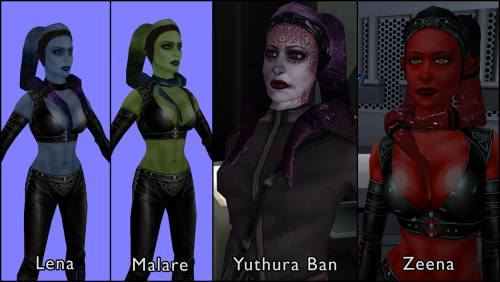
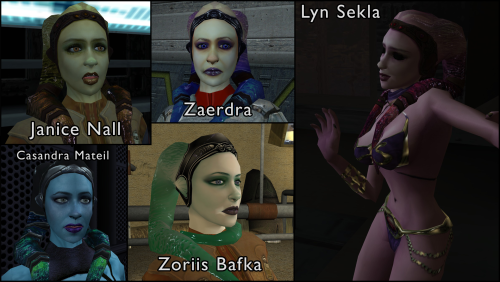
- Gives a unique appearance to:
   - Yuthura Ban when encountered on Dantooine
   - Zaerdra - Hidden Beks bodyguard, Taris
   - Lyn Sekla - dancer, Taris
   - Janice Nall - droid shop owner, Taris
   - Kandon's Bodyguard - Black Vulkar Base
   - Malare - Bastila's quest 
   - Lena - Mission's quest
   - Zoriis Bafka - swoop racer, Tatooine
   - Casandra Mateil - swoop racer, Manaan
   - Zeena - swoop racer, Manaan

Playable Heads:
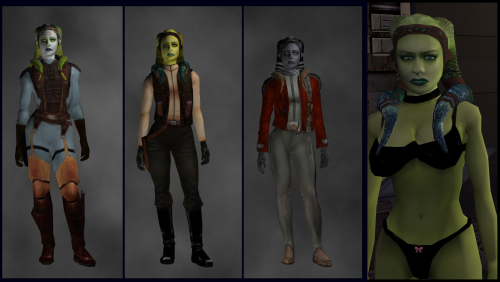
- 26 playable female Twi'lek models, including every female Twi'lek NPC.
- A number of completely new heads.
- Dark side transitions. 
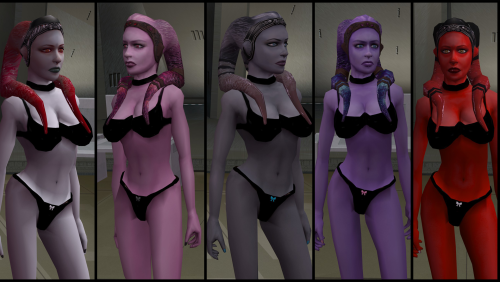
- Every playable head comes with a Handmaiden-style underwear model with matching skin tones.

Find the KotOR II version here!

---

2. INSTALLATION:

Run Install.exe and select your KotOR 1 game directory.

There are 3 installation options.

- Default Installation: Includes playable Twi'lek models and replacements for NPC Twi'leks. You probably want this one.
- Playable Twi'leks ONLY: Includes only models for the player character, NPC Twi'leks will remain unchanged
- NPC replacement ONLY: Replaces models for NPC Twi'leks, does not add any playable characters

If you use the default installation, you DO NOT need to install NPC replacement ONLY or Playable Twi'leks ONLY.

You should be safe to reinstall this mod on top of itself without any problems.

You will probably want to use a widescreen mod such as this
Without a high resolution, the bump mapping looks pretty bad.
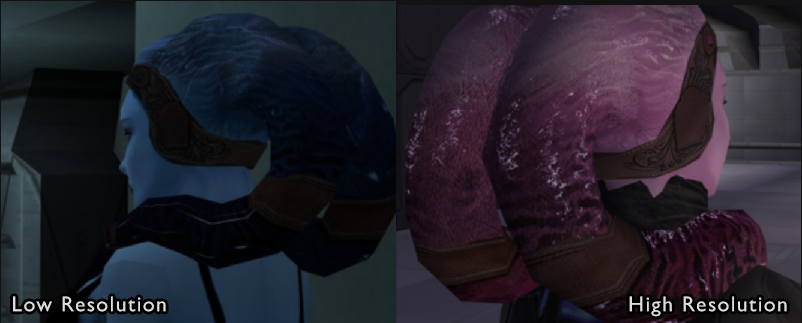
image.png.123b379e96e8545784717b0222ba61fc.png


A "backup" folder is created by the installer in the same directory. Don't delete it if you plan to uninstall later.

---

3. UNINSTALLATION:

Run Install.exe, select your KotOR 1 directory, and use the "Tools > uninstall/restore backup" option to revert all changes made by this mod.

---

4. KNOWN ISSUES:

If you have met any of the NPCs, they will not have their unique appearance.  You should use a save from beforehand.

If you find any bugs or problems, please report them.

---

5. MOD COMPATIBILITY:

Installing this should not break any other mods or have any conflicts, including K1R.
This mod only touches female Twi'lek head/body models, textures, and appearance-related files - no dialogue, scripting, or module changes. Should be compatible with all other mods other than any other mods that have changed the female Twi'lek appearances, this mod will obviously stop the old appearances from showing.  All files should have unique names, so this should not overwrite other mods, and it would just take Appearance.2da changes (or an uninstallation) to revert. 

Notably, this mod conflicts with KotOR 1 Twi'lek Female NPC Diversity
That mod directly installs to the override folder instead of into modules, so you will need to uninstall that mod if you want to see the NPC appearances from this mod.  However, if you wish to keep any appearances from that mod or any other female Twi'lek NPC mods, you can install those after this one to overwrite specific NPCs without an issue.

Do not use the Steam Workshop for KotOR.  It will almost certainly end with compatibility issues.

--- 

6. SUPPORT:

My mods are free to use. You do not need to pay for them, but if you would like to say thanks, you can buy me a coffee!
 

---

7. PERMISSIONS:

Please let me know if you plan on using any of the files in my mod for your own mod. The answer is "yes you may", but I would like to know what you are doing with it!

Do not directly reupload this mod anywhere else.

---

8. THANKS:
- Dark Hope - HD Twilek base textures
- Leilukin & SpaceAlex - Dahnis Unique Look
- Effixian - Red Twi'lek head
- DarthParametric - Twi'lek high boots model
- redrob41 - Original Twi'lek head/body model fixes, original underwear, dancer, assassin models
- bead-v - MDLEdit
- Fred Tetra - KotOR Tool
- Cortisol - Holocron Toolset & HoloPatcher
- Fair Strides - TSLPatcher
- seedhartha - KotOR Blender
- ndix UR - tga2tpc
- ??? - A couple playable heads are originally from a decade-old modpack with no credits. If you are or know the author, let me know and I can credit the author/remove them.

THIS MODIFICATION IS NOT SUPPORTED BY BIOWARE/OBSIDIAN ENTERTAINMENT OR LUCASARTS OR ANY LICENSORS/SPONSORS OF THE MENTIONED COMPANIES. USE THIS FILE AT YOUR OWN RISK.

Edited by Lily


What's New in Version 1.2.0   See changelog

Released

Update underwear texture to support lower resolutions & graphics quality.

  • Like 2
  • Light Side Points 1

User Feedback

Recommended Comments

Narzoul

Posted

Neat mod there friend, but I notice some problems like dark stains around the mouth, also on the left lips of Playable Female Twi'leks there's white spot. Hope you can fix it somehow.

swkotor 2026-09-12 15-01-51-60(1).jpg

swkotor 2026-09-12 15-02-03-24(1).jpg

swkotor 2026-09-12 15-02-14-34(1).jpg

Untitled-7.png.5476c8ce698e0be8919819ddf4da25d0(1).jpg

Lily

Posted

6 hours ago, Narzoul said:

Neat mod there friend, but I notice some problems like dark stains around the mouth, also on the left lips of Playable Female Twi'leks there's white spot. Hope you can fix it somehow.

Thanks for reporting.  The normals from KotOR II were still on the models and making it look strange.  Fixed.
You can redownload the mod and reinstall it - no need to uninstall the old version, the new one will overwrite it just fine.

Let me know if it is fixed for you!

Narzoul

Posted

Yep, it fixed for me thanks, but I noticed the back side, more specific buttom checks has some wierd black lines all around when I don't use anti aliasing, or maybe it's due to old Windows 7 64bit system, but do you think that Kotor 1 models are bit diffrent than ones in Kotor 2, anyway do you think models from Kotor 2 get broken when imported to Kotor 1?

Lily

Posted

On 9/13/2026 at 6:27 AM, Narzoul said:

Yep, it fixed for me thanks, but I noticed the back side, more specific buttom checks has some wierd black lines all around when I don't use anti aliasing, or maybe it's due to old Windows 7 64bit system, but do you think that Kotor 1 models are bit diffrent than ones in Kotor 2, anyway do you think models from Kotor 2 get broken when imported to Kotor 1?

The baked in normals should have been stripped out of the underwear model already with the Kotor 2 version, so it's likely just that the polygons aren't super smooth, if that's the model you're talking about.  You can try downloading these 2 files and replacing the ones in your override folder, but I suspect that it will not help.
N_TwiUnd.mdxN_TwiUnd.mdl

1. Let me know if that helps.
2. If you can post a picture, that might help me figure out what you're seeing.
3. If anyone reading this has thoughts on smoothing out KotOR model geometry to make the normals look better, I would love to hear it.

Narzoul

Posted (edited)

Sadly, these two files didn't help to levitate the problem , but I got screenshots, here take look. It hard to see, but you can see, not only black lines on the bottom checks, but also strange round white lines on the second yellow character here. doesn't happen with default female character. Also is it me or back of 1 blue character, and 3 dark yellow a bit broken in someway?

swkotor 2026-09-16 10-16-16-64.png

swkotor 2026-09-16 10-17-28-09.png

swkotor 2026-09-16 10-21-55-19.png

swkotor 2026-09-16 10-24-00-71.png

Edited by Narzoul
Lily

Posted (edited)

7 hours ago, Narzoul said:

Sadly, these two files didn't help to levitate the problem , but I got screenshots, here take look. It hard to see, but you can see, not only black lines on the bottom checks, but also strange round white lines on the second yellow character here. doesn't happen with default female character. Also is it me or back of 1 blue character, and 3 dark yellow a bit broken in someway?

swkotor 2026-09-16 10-16-16-64.png

swkotor 2026-09-16 10-17-28-09.png

swkotor 2026-09-16 10-21-55-19.png

swkotor 2026-09-16 10-24-00-71.png

What resolution are you using? 

I don't see that when running high quality textures with a widescreen mod. I think even a computer from the Windows 7 era would be fine to run this old game in high quality.

1 hour ago, Lily said:

What resolution are you using? 

I don't see that when running high quality textures with a widescreen mod. I think even a computer from the Windows 7 era would be fine to run this old game in high quality.

It actually wasn't too hard to tweak to support lower graphics.  Redownload and reinstall the mod - should be better now for the new underwear.

I'm not seeing the issue on the second image. Are you just talking about the shading?

Edited by Lily
Narzoul

Posted

Hmm, the issue is still there, and I do have all set to high texture quality by default, maybe it's Windows 7 64bit issue along with AMD driver thing, since I can't turn on anti-aliasing in the game, I don't know to be sure, about second picture, yeah shading is the right word, the yellow is a bit bright than the rest of body, I think, yeah it's kind of hard to see, but the more I think about it, the more I think it's my old Windows 7 64bit along with AMD driver, if it doesn't show for on your PC specs, then it's issue on my side, anyhow it's not critical for me, I mean the mod itself is magnificent, I have seen Twi'leks mods for kotor, but this one takes the cake. Regardless thanks for your help.

  • Light Side Points 1
Lily

Posted (edited)

21 minutes ago, Narzoul said:

Hmm, the issue is still there, and I do have all set to high texture quality by default, maybe it's Windows 7 64bit issue along with AMD driver thing, since I can't turn on anti-aliasing in the game, I don't know to be sure, about second picture, yeah shading is the right word, the yellow is a bit bright than the rest of body, I think, yeah it's kind of hard to see, but the more I think about it, the more I think it's my old Windows 7 64bit along with AMD driver, if it doesn't show for on your PC specs, then it's issue on my side, anyhow it's not critical for me, I mean the mod itself is magnificent, I have seen Twi'leks mods for kotor, but this one takes the cake. Regardless thanks for your help.

Just to be sure, you downloaded the v2 version of the mod and installed it?

In your override folder what's the last edit date/time on N_TwiUndBlue01.tpc?

And what resolution are you using?

The update I just made extended the body color. On the texture, it was close to a black spot and without anti aliasing the black was blurry and bleeding onto the model. I turned off the anti aliasing in my own game and saw it before this fix , but don't see it anymore, so I would be surprised if it wasn't fixed on your end...

The shading for the yellow one does look a bit different on your screenshot. You can see what it looks like in my game in the first screenshot for the file. The body matches the head much better - I'm guessing that's a product of no anti aliasing and the older hardware, and I'm not sure I can do anything about it - apologies :(

Also on your PC you cannot even touch the anti aliasing in game? I've never heard of that before... Can you turn it on for the game in your graphics card settings?

Edited by Lily
Narzoul

Posted

I'm using 1920x1080 resolution, and I've have download the mod, replaced the files, but the issue is still there. The date on N_TwiUndBlue01.tpc file is 16.09.2026. and no driver anti aliasing doesn't work either.

Lily

Posted

2 hours ago, Narzoul said:

I'm using 1920x1080 resolution, and I've have download the mod, replaced the files, but the issue is still there. The date on N_TwiUndBlue01.tpc file is 16.09.2026. and no driver anti aliasing doesn't work either.

I have a fix for you.  I'll post it in a few hours when I'm free. :)

Join the conversation

You can post now and register later. If you have an account, sign in now to post with your account.

Guest
Add a comment...

×   Pasted as rich text.   Paste as plain text instead

  Only 75 emoji are allowed.

×   Your link has been automatically embedded.   Display as a link instead

×   Your previous content has been restored.   Clear editor

×   You cannot paste images directly. Upload or insert images from URL.

×
×
  • Create New...

Important Information

By using this site, you agree to our Guidelines.
