About This File
K1 AREA MAP FIXES
High Resolution Area Map & Map Marker Fix
TL;DR
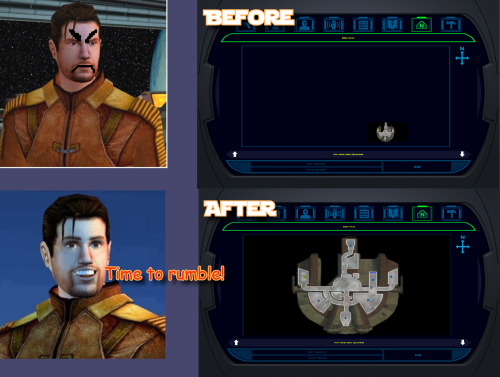
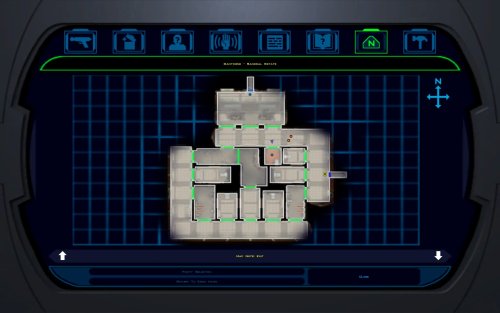
When playing KOTOR 1 at widescreen or high resolution, the area map screen becomes broken: the map sits shrunken in a corner instead of filling its frame. This mod resolves that issue. It also corrects 250 map note positions that BioWare positioned incorrectly in 2003.
The mod does not change your resolution. It fixes the map after another tool has configured the game for your resolution, requiring UniWS and KotOR High Resolution Menus to be installed first, in that order. Steam users need the KOTOR Editable Executable before either of those; GOG users do not.
Installation is straightforward: unzip the folder and double-click Install.bat. The installer finds the game and reads resolution from the exe automatically, requiring no configuration. Uninstall.bat restores your original exe.
Detailed installation instructions are provided below.
What This Fixes
At widescreen and high resolutions, the area map renders at its original size in a corner of the frame. This mod:
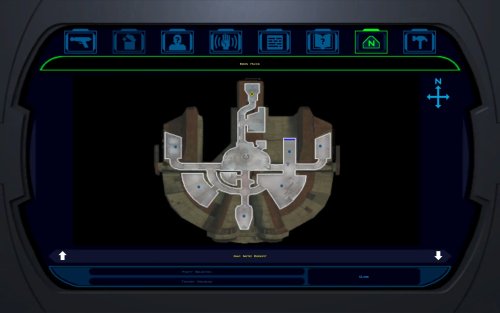
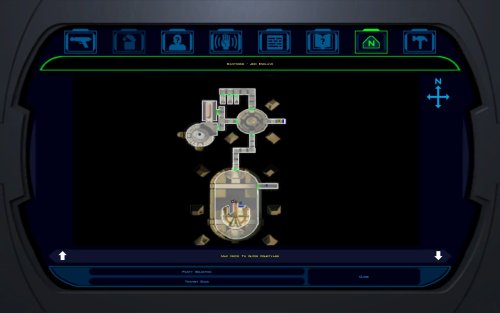
- Rescales the map to fill the frame
- Positions all three marker types correctly, scaling icons up at very high resolutions for visibility
- Corrects 250 map notes BioWare left in incorrect positions
One additional fix: KotOR High Resolution Menus patcher (the .exe version) leaves the area map offset to one side. This patcher detects and fixes that issue, with Uninstall.bat undoing all changes.
Requirements
Required, in this order
-
KOTOR Editable Executable (Steam only)
https://deadlystream.com/files/file/1320-kotor-editable-executable/
Steam ships a locked swkotor.exe that no mod can edit. This provides an unlocked copy for your game folder.
On GOG, skip this step. GOG's v1.03 swkotor.exe is already an unlocked file, byte-for-byte identical apart from 16 bytes of unused header padding. Begin at step 2. -
UniWS
https://www.wsgf.org/article/universal-widescreen-uniws-patcher
Enables the game to run at your screen resolution. Select "Star Wars: KOTOR" from the list, choose 1024x768 interface, specify your game folder, enter your screen resolution, and patch. -
KotOR High Resolution Menus (k1hrm) by ndix UR
https://deadlystream.com/files/file/1159-kotor-high-resolution-menus/
Redraws all menus for your resolution. Run its patcher, then copy the menu files for your resolution into your game's Override folder.
Then install this mod last.
If those links become unavailable, search DeadlyStream for the mod names.
Resolutions Supported
The mathematics is automatically checked against all 49 resolutions k1hrm supports, from 800x600 up to 15360x8640. Four of them have been actually played:
| Resolution | Aspect |
|---|---|
| 2560x1600 | 16:10 |
| 1920x1080 | 16:9 |
| 3840x2400 | 16:10 |
| 1600x1200 | 4:3 |
Everything else is checked but not visually verified, including ultrawide (21:9 and 32:9). If you run ultrawide, feedback is genuinely welcomed, either positive or negative. Should be working.
Installation
- Install the requirements above first, in that order. Steam needs all three; GOG needs UniWS and k1hrm only.
- Unzip this mod's folder somewhere. Do not run from inside the zip; it will stop and instruct you to unzip first.
- Double-click Install.bat.
- Wait until completion. It may take a moment to process.
That's the entire process. It finds your game folder independently and reads resolution from the exe, so it never requests user input.
If it cannot find your game: drag your KOTOR folder onto Install.bat and release. Use the whole main game folder containing swkotor.exe, not the exe itself.
If Windows shows a blue "Windows protected your PC" box: click "More info", then "Run anyway". Any small unsigned mod tool gets this warning.
If you prefer not to run an exe: the whole thing is a Python script included in the download.python "More info\source\install.py"This does exactly what Install.bat does. This route requires Python installed; Install.bat does not. More info\SHA256SUMS.txt lists a checksum for every file if you want to verify nothing changed in transit.
Compatibility
Tested and Working
- KOTOR 1 Community Patch (K1CP) 1.10.0. Checked by measurement: K1CP moves 35 waypoints and none is a map note, so all 250 note corrections still match. The complete stack was played at 2560x1600 with K1CP, k1hrm and this mod together, everything working correctly.
- K1 Ultrawide Letterbox Fix. Both install orders were tested; it must go before this mod. The reverse order causes its patcher to refuse running and blame your game build, which is misleading — your build is fine. Uninstall in reverse: this mod first, theirs second.
- 4 GB (Large Address Aware) patch. Confirmed with the real NTCore tool; it leaves everything this mod uses untouched. Apply it before this mod: nothing breaks if done afterwards, but Uninstall.bat restores the exe from the backup taken at install time, so uninstalling this mod later would quietly remove the 4 GB patch.
- GOG retail v1.03. Played at 3840x2400; area map and HUD minimap both correct.
Compatible
- 3440x1440 Enhanced HUD/UI and Menus. Note it is a replacement for k1hrm's own 3440x1440 set, not an addition. Its map frame is identical to k1hrm's, so this mod's checks pass on either. Its bundled exe carries the k1hrm centering defect described above, which this patcher detects and fixes.
- Override art and texture mods, including HD UI Menu Pack, Pretty Good! Icons, HD portraits, Main Menu Widescreen Fix and KOTOR Widescreen Fade Fix. No shared ground with anything this mod writes. Anything not modifying the game exe will probably work.
- Larger Text Fonts. Works alongside this mod. Note it is separately known to break item stack counts independently; that is not caused by this mod.
Works, With One Setting Turned Off
- Kotor Patch Manager (KPM). Fine alongside this mod as long as you switch off its KotorUniResPatch. Everything else KPM does is unaffected. That one patch is an alternative to this mod rather than an addition: it rescales the same area map at runtime using the same shared constants, so with both active the map gets scaled twice and comes out wrong, and no install order fixes that. This patcher warns you if it spots KPM's files in your game folder rather than refusing to run, because having KPM installed doesn't mean that particular patch is switched on.
Expected to Work, Not Tested
- True Controller Support. It is a dinput8.dll ASI that works at the process level and touches none of the same bytes, so no reason for conflict, but it has not been tested.
Not Tested
- No-CD executables. If yours still measures 4,042,752 bytes the patcher will accept it, but nothing here has been checked against one.
Incompatible
- Flawless Widescreen. It injects into the running process and leaves nothing on disk, so this mod cannot detect it and cannot warn you. Do not use together with this stack. WSGF themselves recommend UniWS and k1hrm for KOTOR 1 and reserve Flawless Widescreen for KOTOR 2.
Maybe support will be added in the future.
Not Supported
- 4-CD retail build. Probably patchable in principle, but there is no such binary here to test against and its spare code space is not guaranteed to match. The patcher refuses anything that is not 4,042,752 bytes.
One thing not about mod conflicts but will bite you anyway: Steam's "verify integrity of game files" replaces any exe it doesn't recognize, which undoes this mod and every other exe mod. Keep a copy of your patched swkotor.exe somewhere outside the game folder.
Uninstallation
Double-click Uninstall.bat. It restores your original swkotor.exe, exactly as it was. UniWS and k1hrm stay installed, so your game still runs at your resolution, just without the map fixes.
You can drag your game folder onto Uninstall.bat the same way as with install, which helps if you have two separate KOTOR installations.
Your original exe is copied somewhere safe before anything is changed:
%LOCALAPPDATA%\K1AreaMapFixes\backup
Paste that into File Explorer's address bar to access it. It is kept out of the download folder and out of the game folder deliberately, so deleting the download cannot cost you your original game file.
If you have already deleted the mod folder and want to uninstall, download the mod again and run Uninstall.bat from the new copy. It will find the backup.
If you installed the K1 Ultrawide Letterbox Fix, uninstall this mod first and theirs second.
What the Patcher Does
It is built to refuse rather than guess.
- Copies your swkotor.exe to %LOCALAPPDATA%\K1AreaMapFixes\backup before changing anything.
- Reads your resolution out of the exe instead of asking, then cross-checks it against Override\map.gui, so it will tell you if UniWS and k1hrm disagree with each other. That mismatch is the most common failure in this category of mod.
- Refuses an executable that is not the expected build, an install where UniWS or k1hrm has not been run, and a second install on top of itself.
- Refuses to run from inside the zip, so your backup cannot end up in a temp folder Windows later deletes.
- Warns you if it finds Kotor Patch Manager in your game folder.
- After writing, re-reads the file from disk and runs 25 checks against it, including one that no byte outside the intended ranges changed. If any check fails it says so and points you at the backup. It does not report success on a write it has not verified.
- Writes an install record next to the backup listing every step, its offsets, and hashes of the exe before and after.
Every run also writes last-run-log.txt next to Install.bat, so if something goes wrong there is a file to attach to a report rather than a command to re-run.
Technical Details
Every offset this mod writes is documented in More info\TECHNICAL.txt in the download, and the full source is in More info\source\. It is published so that a collision with another executable patcher can be diagnosed by someone other than the author, which is the precedent k1hrm set by publishing its own offsets.
A few things worth knowing without reading all of it:
- The patcher only accepts the 4,042,752-byte executable, which is what you have after the Editable Executable (or GOG's own exe) plus UniWS and k1hrm. Anything else is refused rather than written into on the assumption that the spare space matches.
- The exe grows by 8 KB. That is a reserved region added at the end of the resource section, holding the 250-entry note correction table, and it is the only change to the file's size.
- The two float constants the area map divides by are shared with the HUD minimap, so they are not rewritten in place. Editing them directly turns the minimap black. Scaled private copies are written elsewhere instead, and only the area map's own operands are pointed at them.
The note corrections are keyed on each note's position in the game world rather than on module or index numbers, which is why they survive mods that edit module files.
Credits
ndix UR
KotOR High Resolution Menus, and hires_patcher.pl, which the map scaling here is derived from. Required, and not included here.
wsgf.org
UniWS. Required, and not included here.
LaneDibello
Kotor Patch Manager, whose published address database was a useful cross-check against findings worked out here independently.
PyKotor
For reading the game's file formats.
Everyone at DeadlyStream who documented this engine over the last decade.
License
GPL version 3 or later. The full text is in More info\LICENSE.
The resolution work this builds on is ndix UR's hires_patcher.pl, also GPLv3. None of it is included in this download; you install it yourself, as step 3 of the requirements.
Edited by Derslok
Styling
What's New in Version 1.0.3 See changelog
Released
21.09.2026 - v.1.0.3 Adjusted map size to remove uneven edges. Edges should look clean now.