
Jump to content

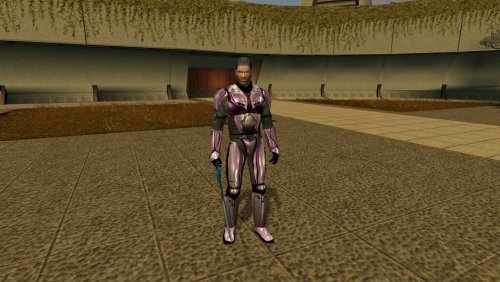
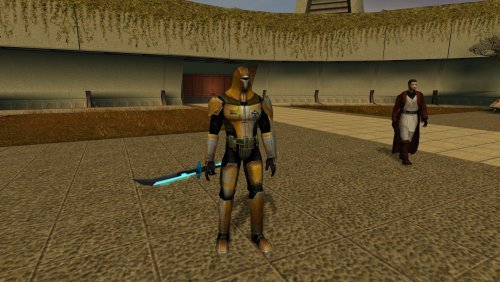
3 Screenshots

About This File

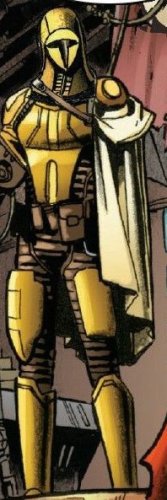
I always hated vanilla armor look, especially if you look at Cassus' arts. And since I always give it to Canderous I decided to make small modifications. All stats are the same, the only thing I have changed is the model itself.

Edited by Wagner235

  • Like 1

User Feedback

Recommended Comments

Shay Ordo

Posted

Nice. Only thing missing is a small cape. 

N-DReW25

Posted

Might I suggest using the modded Cassus Fett Armor over the vanilla armor for the mod's thumbnail?


If you update the mod it's possible for modders to select which image is the thumbnail by clicking the small circular checkbox on the bottom corner of the uploaded image.

Wagner235

Posted

16 hours ago, N-DReW25 said:

Might I suggest using the modded Cassus Fett Armor over the vanilla armor for the mod's thumbnail?


If you update the mod it's possible for modders to select which image is the thumbnail by clicking the small circular checkbox on the bottom corner of the uploaded image.

Sorry, I have no idea what you mean. I am (kind off) new here.

N-DReW25

Posted

4 hours ago, Wagner235 said:

Sorry, I have no idea what you mean. I am (kind off) new here.

I'll explain it to you.


A "thumbnail" is the image that appears on the download page.


Right now, your mod's thumbnail looks like this:

Screenshot2026-03-28200728.png.cf9cc5e63518e6603ed7bc39ea6979cb.png


Think of your mod like a product you are trying to sell, or like a YouTube video, the "thumbnail" is what attracts clicks and attention to your mod. As your thumbnail is the "before" image not many people will click on this mod as they would had this been the thumbnail.


Screenshot2026-03-28200728.png.86cf3ac933a269f28af309c9d216bfca.png


This image above is a Photoshop, but what I'm trying to tell you is that you can change your mod thumbnail to look like this Photoshop here.


On the bottom of the mod, click "File Action" and "Edit Details".

Screenshot2026-03-28201355.png.e5a8cc3b8d9d1c240363c87445451a75.png


Below is my K1 Alien Pack as an example, you see how most of the images have a circle that is blank and how the "Alien Pack" image has a circle that is white. If I were to click on the blank circle underneath "Pink Devaronian" then the "Pink Devaronian" image would become the mod thumbnail and the blank circle, once clicked, would become white and the "Alien Pack" image would go blank. 

Screenshot2026-03-28201515.png.d3a7307b647577ddde375fa22ddb8ab6.png


You can try this with your mod to change the thumbnail from the "Before" image to the "After" image with the Yellow Cassus Fett Armor.

Wagner235

Posted

N-DReW25

I understand now.

Yes, I think this is much better now. Thanks!

Join the conversation

You can post now and register later. If you have an account, sign in now to post with your account.

Guest
Add a comment...

×   Pasted as rich text.   Paste as plain text instead

  Only 75 emoji are allowed.

×   Your link has been automatically embedded.   Display as a link instead

×   Your previous content has been restored.   Clear editor

×   You cannot paste images directly. Upload or insert images from URL.

×
×
  • Create New...

Important Information

By using this site, you agree to our Guidelines.