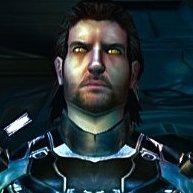
Juggernut Posted August 15 Posted August 15 This is an Ahsoka mod I found on nexus originally but changed the skin a bit and added full ds transition based more on how it might look in the game. Wip. Oh and theres my tailored juhani. Bc i like the way she turned out. shes a hodge podge 1 Quote
Juggernut Posted August 17 Author Posted August 17 project is built on Stormie97 and Effix’s Ahsoka/Togruta mod, and full credit for the original work belongs to them. I took that foundation and added a bit. Ahsoka has been reshaded and given additional visual progression tied to alignment, along with a number of additions intended to make the character feel like a character that belongs into KOTOR. ITEMS: Two sets of Wayfarer Robes have been added as in-game items. I havent reshaded the blue knight robe because i havent figured out a good color scheme yet but the advanced wayfarer robe is reshaded as a lived in white intended for a later stage of the playthrough. They are meant to be found, used, and grown into naturally as the game progresses and not as overpowered equipment. Two white lightsaber crystals have also been integrated into the game, one is found in the Krayt Dragon hoard. Another is available through Yavin. They carry no special bonuses. purpose is simply to produce white blades. Nothing here is meant to bypass KOTOR’s progression or turn the character into something mechanically excessive. intent is to integrate an Ahsoka-style experience into the existing game as cleanly as possible: visual progression, equipment progression, and items placed within the world rather than simply handed to the player. Some placement and progression details may still change. The project will be released when I consider it finished.Again, credit to Stormie97 and Effix for the original Ahsoka/Togruta mod that provided the foundation. Spoiler 2 Quote
Juggernut Posted August 18 Author Posted August 18 her LS progression brightens here eyes a bit and skin. so theres a visual element to ls alignment. implementing found special red crystals that can change with her to mirror characters story for white crystals. working it out now. mod should be available soon. We made it through the game without any major issues. This has her custom "wayfarer" robe with balanced stats. this is a found item in korriban. Her blue attire is also a found wayfarer robe but i havent decided on a reshade that looks better than the games standard blue knight so for now, thats it. also found item in krayt dragon horde. (see previous post which shows her dark side progression shading) She'll be ready soon. Spoiler Quote
Fair Strides Posted August 18 Posted August 18 @Juggernut First, I'd like to say welcome to DeadlyStream. I realize you are new, so I wanted to lend a hand and help ya a bit. I saw that you posted several threads that seemed to be continuations, so I've merged them. Within a thread, there's a way to add a new reply or post from the "Reply to this topic" button at the top and the comment box at the bottom of the page. That will allow you to contain things to one thread if they're the same topic like this WIP is. In addition, I've altered the images so that they take up less visual space. When you add an image to a post, you can double-click it to alter the height and width, and it can be clicked by someone in the saved post to view the full size. I've reduced the image sizes by 50% for the thread itself to take up less space. I've also put some of the images inside Spoilers, which can be clicked on to hide or show as-needed. This is done by selecting all of the content from the start point to the end point and using the eye icon in the post editor: 1 Quote
Juggernut Posted August 18 Author Posted August 18 Thank you, and my apologies I'm new and fumbling around here. And no worries at all, thank you for setting everything appropriately. Quote


Recommended Posts
Join the conversation
You can post now and register later. If you have an account, sign in now to post with your account.