Search the Community
Showing results for tags 'vibrocutter'.
Found 4 results
-
Version 1.0.0
189 downloads
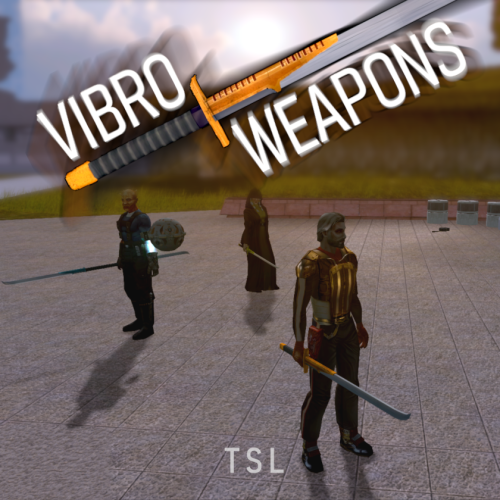
Vibro Weapons with vibration effects. All vanilla vibroswords, vibroblades, and vibro double-blades updated. Toasty Fresh vibro models were used as a base and each texture was color matched to the vanilla style. Vibrocutter and Ludo Kressh's War Sword now have their own unique textures and icons. Vibration and motion blur effects were added to the blades. 4 Vibroblades Vibrocutter - vibrocutter Vibroblade - w_melee_05 Zabrak Vibroblade - w_melee_10 Tehk'la Blade - w_melee_27 3 Vibroswords Vibrosword - w_melee_06 Echani Vibrosword - w_melee_21 Sith Tremor Sword - w_melee_22 5 Vibro Double- Blades Sith War Sword - w_melee_12 Vibro Double-Blade - w_melee_15 Trandoshan Double-Blade - w_melee_20 Zhaboka - w_melee_28 Ludo Kressh's War Sword - w_melee_x12 Credit: KoTOR Weapon Model Overhaul by Toasty Fresh - 3 models/textures were used as base KOTOR Blender- 3 comments
- 1 review
-
- 5
-

-
- vibrocutter
- vibroblade
- (and 1 more)
-
View File HQ Vibro Weapons + Effects - TSL Vibro Weapons with vibration effects. All vanilla vibroswords, vibroblades, and vibro double-blades updated. Toasty Fresh vibro models were used as a base and each texture was color matched to the vanilla style. Vibrocutter and Ludo Kressh's War Sword now have their own unique textures and icons. Vibration and motion blur effects were added to the blades. 4 Vibroblades Vibrocutter - vibrocutter Vibroblade - w_melee_05 Zabrak Vibroblade - w_melee_10 Tehk'la Blade - w_melee_27 3 Vibroswords Vibrosword - w_melee_06 Echani Vibrosword - w_melee_21 Sith Tremor Sword - w_melee_22 5 Vibro Double- Blades Sith War Sword - w_melee_12 Vibro Double-Blade - w_melee_15 Trandoshan Double-Blade - w_melee_20 Zhaboka - w_melee_28 Ludo Kressh's War Sword - w_melee_x12 Credit: KoTOR Weapon Model Overhaul by Toasty Fresh - 3 models/textures were used as base KOTOR Blender Submitter J Submitted 01/09/2026 Category Mods TSLRCM Compatible Yes
-
.thumb.png.70ebd2108bd66556db64bb7fdd193718.png)
Version 1.1.0
1,199 downloads
Description: This mod can make different changes to the vibroblade in TSL, such as moving it, removing it, or replacing it. Installation: Note: There are different methods with installing this mod! First Method. (Quick Install, Mod Build Recommended Method.) - Open up Holopatcher.exe - Open up the first scroll down menu and select "Location and Medpac" - Select your kotor directory where swkotor2.exe is located. (i.e. folder named swkotor2 or Knights of the Old Republic II) - Click Install and wait for the mod to finish installing, then close the window when it is complete. If you would like to have no medpac on the corpse with the above method: - Open Holopatcher.exe - Select "Corpse has nothing" - select the kotor directory where swkotor2.exe is - Click install and wait for the mod to install, then close the window when it is complete. ^^^ Note: This may inflict more difficulty for your playthrough. Second Method(s) (More seperate installs, Mod Build compatible although not recommended.) Note: Can be used over top the first method but NOT recommended for balancing reasons. (Advisories included in square brackets) - Launch Holopatcher.exe and select ONE of these 3 installs in the first drop down menu: "Medpac Replacement" (Replaces the vibrocutter with a Medpac) - [Usless with First Method Install, already included] "Vibroblade Replacement" (Replaces the vibrocutter with a vibroblade, pre tslrcm.) - [You would have a Vibroblade on the regular corpse over top First Method Install] "Corpse has nothing" (The corpse will not contain any items.) - [Already told in First Method install] - Select the kotor directory where swkotor2.exe is. NOTE: Choosing another one of those 3 after installing another WILL overwrite the changes made by the previous one installed. - After installing ONE of those options, install "Location Change" IF you want the vibrocutter to appear in the locker in the security room. - [You would get a second vibrocutter over top the First Method Install] Instructions are DONE INCOMPATIBILITES: - Incompatible with NDrew's Peragus Miner Overhaul, Use the vibrocutter changes install included with his mod if you're using his mod. DO NOT install my mod over NDrew's mod. Tools used: Holopatcher - Cortisol Holocron Toolset - Cortisol and th3w1zard1 I ask that my mod is not uploaded anywhere else by other users. I will upload it somewhere if I think it should belong there. -
View File Vibrocutter changes Description: This mod can make different changes to the vibroblade in TSL, such as moving it, removing it, or replacing it. Installation: Note: There are different methods with installing this mod! First Method. (Quick Install, Mod Build Recommended Method.) - Open up Holopatcher.exe - Open up the first scroll down menu and select "Location and Medpac" - Select your kotor directory where swkotor2.exe is located. (i.e. folder named swkotor2 or Knights of the Old Republic II) - Click Install and wait for the mod to finish installing, then close the window when it is complete. If you would like to have no medpac on the corpse with the above method: - Open Holopatcher.exe - Select "Corpse has nothing" - select the kotor directory where swkotor2.exe is - Click install and wait for the mod to install, then close the window when it is complete. ^^^ Note: This may inflict more difficulty for your playthrough. Second Method(s) (More seperate installs, Mod Build compatible although not recommended.) Note: Can be used over top the first method but NOT recommended for balancing reasons. (Advisories included in square brackets) - Launch Holopatcher.exe and select ONE of these 3 installs in the first drop down menu: "Medpac Replacement" (Replaces the vibrocutter with a Medpac) - [Usless with First Method Install, already included] "Vibroblade Replacement" (Replaces the vibrocutter with a vibroblade, pre tslrcm.) - [You would have a Vibroblade on the regular corpse over top First Method Install] "Corpse has nothing" (The corpse will not contain any items.) - [Already told in First Method install] - Select the kotor directory where swkotor2.exe is. NOTE: Choosing another one of those 3 after installing another WILL overwrite the changes made by the previous one installed. - After installing ONE of those options, install "Location Change" IF you want the vibrocutter to appear in the locker in the security room. - [You would get a second vibrocutter over top the First Method Install] Instructions are DONE INCOMPATIBILITES: - Incompatible with NDrew's Peragus Miner Overhaul, Use the vibrocutter changes install included with his mod if you're using his mod. DO NOT install my mod over NDrew's mod. Tools used: Holopatcher - Cortisol Holocron Toolset - Cortisol and th3w1zard1 I ask that my mod is not uploaded anywhere else by other users. I will upload it somewhere if I think it should belong there. Submitter Lewok2007 Submitted 03/01/2025 Category Mods TSLRCM Compatible Yes