
BottomlessThought23
-
Posts
27 -
Joined
-
Last visited
Content Type
Profiles
Forums
Blogs
Forum & Tracker Requests
Downloads
Gallery
Store
Events
Everything posted by BottomlessThought23
-
Version 0.3.6
144 downloads
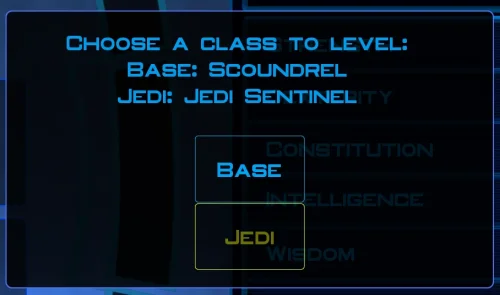
This is the mod you've all been waiting for. Designed using KPM patcher. The problem is simple; you can't level your character on Taris, because if you did, you would lose out on Jedi levels later. You can reach Dantooine at level 8 if you do everything on Taris... meaning you'll only ever get 12 levels of Jedi, because the level cap is a hard 20. This fixes that. Finally. Basically, instead of looking at your Character Level to determine if you can level up, this mod makes it so that the game looks at the Class Level. So you can be a level 8 Soldier... and still level to Jedi Guardian Class Level 20, for a total level of 28. This uses KPM's mapping system for levels past 20, which just continues curves already defined by vanilla behavior. It raises the level cap to 40, meaning you could theoretically reach level 20 in your original class and still level to 20 in your Jedi class as well. This also includes a fix for the old problem of not being able to back out of the level screen once you've pressed level up. And that's all in V1, Jedi Extended Progression. V2, Selectable Class Progression, takes it a step beyond that. After you gain your Jedi Class, you will from then on be asked which Class you want to level, up to level 20 for each of the two classes. It does this as minimally as possible, with a simple dialogue box that comes up after you press Level Up. I have included both options, in case people want to preserve a more vanilla feel. With V1 you can literally just play the game like normal, nothing at all changes until you eventually surpass Character Level 20. And nothing really changes then, except that you can keep levelling to Class Level 20. With V2 you could ignore being a Jedi entirely. The single level of Jedi you get on Dantooine is mandatory, but if you want to just keep levelling as a Soldier, Scout, or Scoundrel, you can. Up to level 20 in that Class. Note that you only need ONE of these files. (Coded with the assistance of AI; presented under the open source MIT license ) Requirements and Compatibilities: This installer requires the KOTOR Patch Manager (KMP) runtime. KOTOR Modern Restoration Project (KMRP) is supported and includes the required runtime, but KMRP itself is not technically required.... But seriously, you should be using it, it's incredible. Note that this should not be used alongside KMP's LevelUpLimit patch, as this modifies it for my purposes. Besides that, this should be pretty broadly compatible, as it only modifies Level Up initiation behavior. Safe to use in previous saves, should insert its functionality with no issue no matter where you are in the story. Recommended Installation: 1. Download and install KMRP. 2. Download this mod. 3. Run install.cmd. 4. Enjoy! (To uninstall, simply run uninstall.cmd) Advanced Installation: 1. Download the latest version of KPM. 2. Extract the folder, and in the resulting bin folder, run KPatchLauncher.exe 3. Use the options at the top to navigate to your swkotor folder, and the KPM folder called patches. 4. Download and install KMRP (You do not need to close KPM). 5. In KPM, select KMRP (and it's controller support, and any other patches you want except for the 4GB patch, save game memory leak, and Movie Patch, as they are included in or not compatible with KMRP; and LevelUpLimit as it is not compatible with this mod). 6. Click "Apply." 7. Download this mod. 8. Run install.cmd 9. ENJOY! -
Version 1.0.0
21 downloads
Vanilla auto-levelling and recommendations... aren't great. The game doesn't make good choices, and late-game characters that have used them extensively are just simply worse than characters levelled by hand. This doesn't aim to perfectly min-max every character. What it does aim to do is take into account their strengths and focus on those. But the heuristic is a little bit smarter than "has good STR so increase STR and get Melee Weapons stuff." In fact, if you auto-level Canderous, you'll find that he moves towards Heavy Ranged weapons over time, increasing his Dex and getting the proper ranged specializations. This is because of the character's feats that point in that direction (you won't find any "Character = Canderous thus Heavy Ranged" code in here, it builds this all from the character as they exist). Trying it out on my player character, I actually ended up with something pretty close to the build I usually use. (Made with the assistance of AI; presented under the open source MIT license) Requirements and Compatibilities: This installer requires the KOTOR Patch Manager (KMP) runtime. KOTOR Modern Restoration Project (KMRP) is supported and includes the required runtime, but KMRP itself is not technically required.... But seriously, you should be using it, it's incredible. This completely bypasses the vanilla recommendation system, and does not modify any .2da files. It is compatible with mods that modify the starting state of characters, or modify the amount of skills, feats, or powers that Classes get (I'm using it with Companion Fix). It is compatible with mods that reuse vanilla feats in other classes, and mods that change level requirements for feats. It has basic detection for feats and powers that are added to to the game, but they aren't weighted intelligently in the system and just fall towards the bottom of the list, unless I design specific compatibility for them. So far I've only built in compatibility for the mods below (just the one so far, but I welcome requests): - K2 Powers for K1 Recommended Installation: 1. Download and install KMRP. 2. Download this mod. 3. Run install.cmd. 4. Enjoy! (To uninstall, simply run uninstall.cmd) Advanced Installation (with KMRP): 1. Download the latest version of KPM. Extract the files. 2. Download the .kpatch version of this mod, and place it in the patches folder. 2. In the bin folder, run KPatchLauncher.exe 3. Use the options at the top to navigate to your swkotor folder, and the KPM folder called patches. 4. Download and install KMRP (You do not need to close KPM). 5. In KPM, select this mod and KMRP (and it's controller support, and any other patches you want except for the 4GB patch, save game memory leak, and Movie Patch, as they are included in or not compatible with KMRP). 6. Click "Apply." 9. ENJOY!