

Leaderboard



Popular Content
Showing content with the highest reputation on 11/03/2026 in Files
-

Version 1.0.0
264 downloads
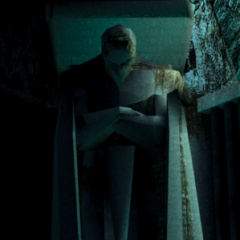
Author: Kain Prime Mod Name: Legacy of Kain Soundset for TSL 1.0 ************************* Under NO circumstances is this, or any of my other, mod(s) to be posted on ANY site other than by myself. ************************* 1. Info =========== This mod adds a playable soundset to TSL, based on the titular protagonist of the Legacy of Kain series. 2. Installation: ========= Run the TSLPatcher. Use the Kotor Save Editor to open the savegame of your choice, and add the "Player_Kain" soundset to your character under the "Soundset" header. 3. Credits: =========== Special thanks to: Deadly Stream - For all the great resources. 4. DISCLAIMER: =============== This Mod is not supported by LucasArts, Bioware or Obsidian. Please do not contact them for support of this mod. Copyright: Star Wars: Knights of the Old Republic, characters, items, etc. are trademarks and copyrights owned by their respective trademark and copyright holders. Star Wars: Knights of the Old Republic: The Sith Lords, characters, items, etc. are trademarks and copyrights owned by their respective trademark and copyright holders. Bioware and the Odyssey Engine are trademarks of Bioware Corp. Obsidian are trademarks of Obsidian Entertainment. All trademarks and copyrights contained in this document are owned by their respective trademark and copyright holders.1 point -
Version 1.0.0
36 downloads
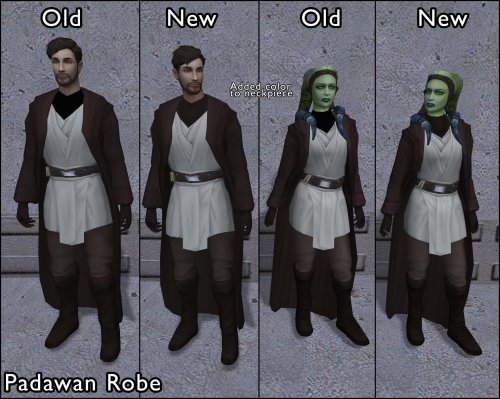
===================================================== [TSL] Lily's Jedi Robe Fixes ===================================================== Mod for Knights of the Old Republic II - The Sith Lords Author: Lily File Name: Lilys_Jedi_Robe_Fixes.zip Latest Version: 1.0 --- 1. DESCRIPTION: This mod fixes several visual issues with the Jedi robe body models. Padawan Robes: - Added color to the neckpiece, which was solid black by default - Fixed incorrect UV mapping on fingers - Fixed a gap/hole in the back of the female robe - Fixed robe clipping through the legs during run animations - Fixed a black spot appearing on the back of the torso The Padawan Robes are based on PapaZinos's "Robes With Shadows For TSL" and includes all of the fixes from that mod. Master Robes: - Adjusted boot and leg proportions The Master Robes option uses models based on DeadMan's "Movie-style Jedi Master robes" mod. You need the textures from that mod (or another mod that provides textures for it) installed before using this option - the textures will be mapped incorrectly with default textures. --- 2. INSTALLATION: Run Install.exe and select your KotOR 2 game directory. There are two installation options: - Padawan Robes: Fixes models for the Padawan robe. These are based on PapaZinos's "Robes With Shadows For TSL" and include all of the fixes from that mod. Any texture files will work. - Master Robes: Fixes models for the Master robe. These are based on DeadMan's "Movie-style Jedi Master robes" models, so you must have the textures from that mod (or another mod that provides textures for it) installed first. You can install one or both options. Run the installer once per option. A "backup" folder is created by the installer in the same directory. Don't delete it if you plan to uninstall later. --- 3. UNINSTALLATION: Run Install.exe, select your KotOR 2 directory, and use the "Tools > uninstall/restore backup" option to revert all changes made by this mod. --- 4. KNOWN ISSUES: None. If you find any bugs or problems, please report them. --- 5. MOD COMPATIBILITY: This mod installs model files to your Override folder: Padawan option: PFBIM.mdl, PFBIM.mdx, PMBIM.mdl, PMBIM.mdx Master option: PFBNM.mdl, PFBNM.mdx, PMBNM.mdl, PMBNM.mdx No 2DA files, scripts, or other game files are modified. Any mod that also replaces these model files will conflict with this one. If you use the Master Robes option, install DeadMan's "Movie-style Jedi Master robes" (or a compatible texture mod) first. Do not use the Steam Workshop for KotOR. It will almost certainly end with compatibility issues. --- 6. SUPPORT: My mods are free to use. You do not need to pay for them, but if you would like to say thanks, you can buy me a coffee! --- 7. PERMISSIONS: Please let me know if you plan on using any of the files in my mod for your own mod. The answer is "yes you may", but I would like to know what you are doing with it! Do not directly reupload this mod anywhere else. --- 8. THANKS: - PapaZinos - Robes With Shadows For TSL - DeadMan - Movie-style Jedi Master robes - bead-v - MDLEdit - Cortisol - Holocron Toolset & HoloPatcher - Fair Strides - TSLPatcher - seedhartha - KotOR Blender THIS MODIFICATION IS NOT SUPPORTED BY BIOWARE/OBSIDIAN ENTERTAINMENT OR LUCASARTS OR ANY LICENSORS/SPONSORS OF THE MENTIONED COMPANIES. USE THIS FILE AT YOUR OWN RISK.1 point -
Version 1.0.0
154 downloads
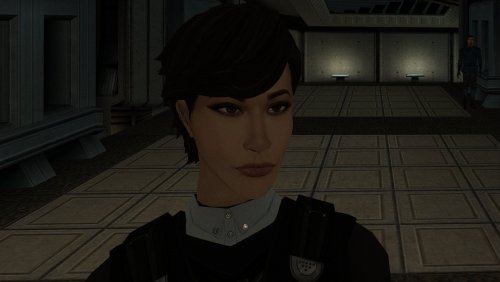
The mod replaces the PFHA01 model and textures. To Install 1. Download: PFHA01 2. Copy all files to the Knights of the Old republic's Override folder. (Example location - C:\Program Files (x86)\Steam\steamapps\common\swkotor\Override) 3. When/if prompted to overwrite files, press okay. 4. If you like the mod; leave a comment or endorse! (It would be much appreciated) Made with love.1 point -
Version 1.0.0
13 downloads
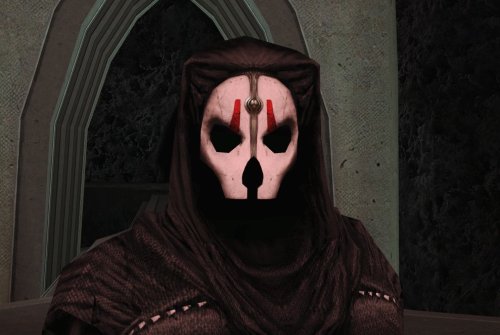
As Chris Avellone intended... This mod removes the facial features beneath Darth Nihilus’ mask, leaving just blackness. INSTALLATION Move the files from “to override” to your Override folder. UNINSTALLATION Remove N_DarthNihilus.mdl and N_DarthNihilus.mdx from Override. COMPATIBILITY Should be compatible with Darth Nihilus texture mods. Will conflict with mods that edit the Darth Nihilus model. Install this mod after others to ensure its changes take effect. PERMISSIONS Feel free to do whatever you want with this mod, just give credit. CREDITS offthegridmorty KOTOR Tool - Fred Tetra KOTORBlender - seedhartha Screenshots use HD Darth Nihilus by Darth_Sapiens0 points