

Leaderboard




Popular Content
Showing content with the highest reputation on 10/04/2026 in Files
-
Version 1.0.0
23 downloads
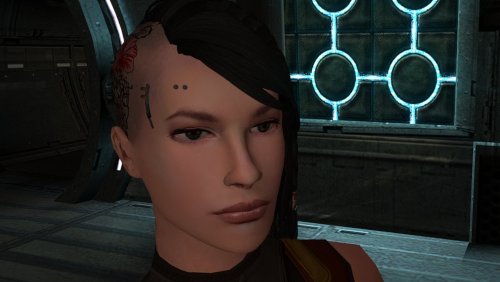
The mod replaces the PFHC05 model and textures. To Install 1. Download: PFHC05 2. Copy all files to the Knights of the Old republic's Override folder. (Example location - C:\Program Files (x86)\Steam\steamapps\common\swkotor\Override) 3. When/if prompted to overwrite files, press okay. 4. If you like the mod; leave a comment or endorse! (It would be much appreciated) Made with love.2 points -
Version 1.0
36 downloads
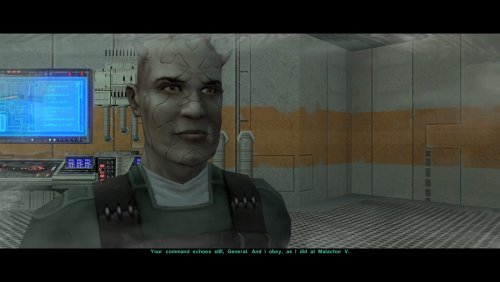
One of the many threads left hanging by KOTOR 2's incomplete ending is that Bao-Dur mysteriously disappears just before the Battle of Telos with very little indication of what might have happened to him. This mod attempts to fill the narrative gap with a pair of cutscenes showing Bao-Dur accompanying HK-47 to the Telos underground base and retrieving data from the Republic's database while HK-47 continues alone to the HK factory. It also adds a brief cutscene after the battle showing him staying behind on Citadel Station as the player departs. If the player does not rebuild HK-47 or if the HK factory is not located, essentially the same scenes occur but without HK-47. I have taken some general inspiration from KOTOR 2 writer Chris Avellone's comments on Bao-Dur's intended fate, but I have chosen to go in a different direction with much of it. Thank you for downloading, and I hope you enjoy this mod! ------------------------------------------------------------------- INSTALLATION If you are using any of the mods noted in the "Compatibility" section below, install them first. Afterwards, run "INSTALL.exe", and select the Main Installation option. After the installation is complete, if you are using my mod "Equip Party for Malachor, rerun "INSTALL.exe", and select the option for the compatibility patch. If you are using The Sith Lords Restored Content Mod (TSLRCM) from the Steam Workshop, see this guide for how to combine installer-based mods with the Workshop: https://steamcommunity.com/sharedfiles/filedetails/?id=488641307. ------------------------------------------------------------------- COMPATIBILITY This mod requires The Sith Lords Restored Content Mod (TSLRCM) (https://deadlystream.com/files/file/578-tsl-restored-content-mod/). It is also compatible with the KotOR 2 Community Patch (K2CP) (https://deadlystream.com/files/file/1280-kotor-2-community-patch/). If you are using any of the following mods, they must be installed prior to this mod: - TSLRCM - PartySwap by DarthTyren and Leilukin (https://deadlystream.com/files/file/544-partyswap/) - Equip Party for Malachor by me (https://deadlystream.com/files/file/3128-equip-party-for-malachor/) - Any other mods which overwrite pcdead2.dlg in the module 003ebo.mod.(*) This mod is incompatible with mods other than those mentioned above which edit the following files: - a_221load.ncs - a_901jump.ncs - a_escape_851.ncs - a_hand_pc_end.ncs (*)This mod may be incompatible with mods which alter pcdead2.dlg significantly compared to the TSLRCM version. ------------------------------------------------------------------- CREDITS KotorBlender by seedhartha tpcview and tga2tpc by ndix UR NWNSSCOMP by Torlack and tk102 K-GFF by tk102 DLGEditor by tk102 TSL Patcher by stoffe and Fair Strides ERFEdit by stoffe and Fair Strides Kotor Tool by Fred Tetra Holocron Toolset by Cortisol and th3w1zard1 2DA Editor by VarsityPuppet SithCodec by JCarter426 Reone Toolkit by seedhartha Edited vanilla and TSLRCM scripts are based on the K2CP team's repository of unaltered, decompiled vanilla scripts, which may be found at https://github.com/KOTORCommunityPatches/Vanilla_KOTOR_Script_Source. Thanks to N-DReW25 for suggesting that I might try addressing Bao-Dur's fate in some fashion. Thanks to Leilukin for granting permission to include modified versions of scripts from PartySwap for compatibility. ------------------------------------------------------------------- VERSION HISTORY 1.0 - Initial Release ------------------------------------------------------------------- DISCLAIMER AND PERMISSIONS This modification is provided as-is and is not supported by Disney, Lucasarts, or Obsidian. Use at your own risk. The author shall not be held responsible for damage to your game installation, computer, or saved games resulting from the use of this mod. This mod shall not be reposted, in whole or in part, on any sites other than Deadly Stream without the author's permission. Scripts from this mod may be modified and redistributed for the purpose of compatibility with this mod as long as credit is given to this mod's author. Otherwise, assets from this mod shall not be redistributed in other modifications without the author's permission. Assets containing work by other authors also require the permission of those authors.1 point -
Version 1.0
18 downloads
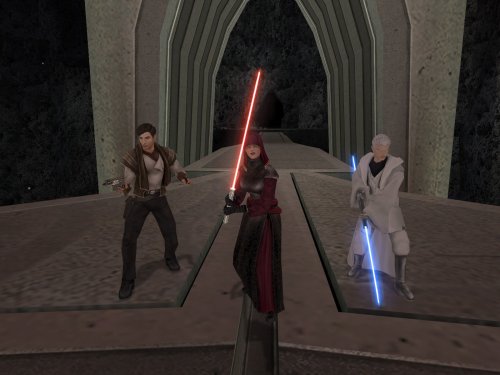
After the Dantooine Enclave sequence, there are very few opportunities to change your party's equipment before arriving on Malachor V. If you are like me and regularly unequip your party's gear to keep it available, you may then find that your companions unwisely attempt to fight Darth Traya armed with nothing but their fists. This mod makes it so that you return to the Ebon Hawk after finishing the Ravager sequence, giving you the opportunity to select your party's gear for the Malachor cutscenes. It also modifies the "traveling to Malachor" cutscene so that Atton does not appear if he has left with Kreia because of jealousy over the Disciple. This mod comes in two versions which affect how the galaxy map behaves when you travel to Malachor: - OPTION A (Limited Galaxy Map): Displays the full galaxy map, including Malachor. All planets are visible, but you will only be allowed to select Malachor as a valid destination. - OPTION B (No Galaxy Map): Does not display the full map and instead offers a dialog option confirming whether you are ready to go to Malachor. Malachor's appearance is therefore not revealed until the Ebon Hawk arrives there, as in the vanilla game. Thank you for downloading, and I hope you enjoy this mod! ------------------------------------------------------------------- INSTALLATION If you are using any of the mods noted in the "Compatibility" section below, install them first. Afterwards, navigate to the folder for either Option A or B, run "INSTALL.exe", and select the Typical Installation option. After the installation is complete, if you are using "Coruscant Jedi Temple" by deathdisco and/or M4-78 Enhancement Project, rerun "INSTALL.exe", and select the appropriate compatibility patch. If you are using The Sith Lords Restored Content Mod (TSLRCM) from the Steam Workshop, see this guide for how to combine installer-based mods with the Workshop: https://steamcommunity.com/sharedfiles/filedetails/?id=488641307. ------------------------------------------------------------------- COMPATIBILITY This mod requires The Sith Lords Restored Content Mod (TSLRCM) (https://deadlystream.com/files/file/578-tsl-restored-content-mod/). It is also compatible with the KotOR 2 Community Patch (K2CP) (https://deadlystream.com/files/file/1280-kotor-2-community-patch/). If you are using any of the following mods, they must be installed prior to this mod: - TSLRCM - PartySwap by DarthTyren and Leilukin (https://deadlystream.com/files/file/544-partyswap/) - M4-78 Enhancement Project by zbyl2, DarthStoney, and Hassat Hunter (https://deadlystream.com/files/file/277-m4-78-enhancement-project/) - Coruscant Jedi Temple by deathdisco (https://deadlystream.com/files/file/585-coruscant-jedi-temple-by-deathdisco/) - Jedi Temple Expansion by HK42 (https://www.gamefront.com/games/knights-of-the-old-republic-ii/file/jedi-temple-expansion) - Coruscant - Jedi Temple Compatibility by Hassat Hunter (https://deadlystream.com/files/file/394-coruscant-jedi-temple-compatibility/) This mod is not compatible with any mods which add new planets to the galaxy map other than those listed above. It is compatible with mods which only edit the locations of the planets on the map. This mod is incompatible with mods other than those mentioned above which edit the following files: - a_901jump.ncs - a_escape_851.ncs - tr_leave_ehawk.ncs - a_galaxymap.ncs - k_sup_galaxymap.ncs It is incompatible with mods which overwrite pcdead2.dlg in 003ebo.mod. It may be compatible with mods which edit pcdead2.dlg in place if this mod is installed first. It is compatible with Extended Enclave (https://deadlystream.com/files/file/428-extended-enclave-tslrcm-add-on/), which edits a file called pcdead2.dlg in a different module which does not conflict. ------------------------------------------------------------------- CREDITS KotorBlender by seedhartha tpcview and tga2tpc by ndix UR NWNSSCOMP by Torlack and tk102 K-GFF by tk102 DLGEditor by tk102 TSL Patcher by stoffe and Fair Strides ERFEdit by stoffe and Fair Strides Kotor Tool by Fred Tetra Holocron Toolset by Cortisol and th3w1zard1 2DA Editor by VarsityPuppet TalkEd by stoffe Edited vanilla and TSLRCM scripts are based on the K2CP team's repository of unaltered, decompiled vanilla scripts, which may be found at https://github.com/KOTORCommunityPatches/Vanilla_KOTOR_Script_Source. Thanks to Snigaroo for inspiring this by requesting a mod to allow the player to equip the party before the endgame Thanks to deathdisco and Leilukin for granting permission to include modified versions of scripts from their mods for compatibility. ------------------------------------------------------------------- VERSION HISTORY 1.0 - Initial Release ------------------------------------------------------------------- DISCLAIMER AND PERMISSIONS This modification is provided as-is and is not supported by Disney, Lucasarts, or Obsidian. Use at your own risk. The author shall not be held responsible for damage to your game installation, computer, or saved games resulting from the use of this mod. This mod shall not be reposted, in whole or in part, on any sites other than Deadly Stream without the author's permission. Scripts from this mod may be modified and redistributed for the purpose of compatibility with this mod as long as credit is given to this mod's author. Otherwise, assets from this mod shall not be redistributed in other modifications without the author's permission. Assets containing work by other authors also require the permission of those authors.1 point -
Version 1.0.0
24 downloads
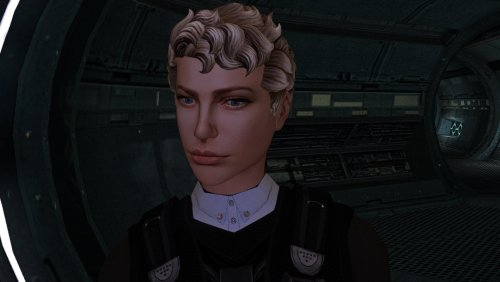
The mod replaces the PFHC04 model and textures. To Install 1. Download: PFHC04 2. Copy all files to the Knights of the Old republic's Override folder. (Example location - C:\Program Files (x86)\Steam\steamapps\common\swkotor\Override) 3. When/if prompted to overwrite files, press okay. 4. If you like the mod; leave a comment or endorse! (It would be much appreciated) Made with love.1 point -
Version 1.0.0
4 downloads
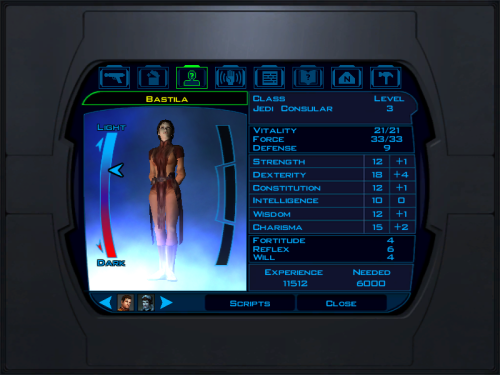
Swap Jolee and Bastila Classes Game: KOTOR 1 Author: Dodrari Kaan Version: 1.0.0 GitHub: https://github.com/danielstegink/Kotor.SwapJoleeAndBastilaClasses It occurred to me that Bastila's and Jolee's classes don't make a lot of sense for them. Jolee is an ex-Padawan who has tried just about every career path in the galaxy. Meanwhile, Bastila is a (relatively) sheltered Jedi prodigy with unique Force powers. This mod swaps their classes, and it slightly modifies their stats and abilities. I didn't change their starting lightsabers to ensure compatibility with any mods that modify those lightsabers. Instructions If you have any mods that modify Bastila's and Jolee's character files, such as offthegridmorty's "Bastila Has TSL Battle Meditation", install those first Use the TSLPatcher Permissions Use this mod however you want. Just make sure to credit me. Compatibility This mod uses GFF to modify Bastila's and Jolee's classes and abilities. It may overwrite any changes made to these files by other mods, but it should be compatible with any mods that don't have any overlapping changes on these files. Special Thanks Fred Tetra - Kotor Tool Stoffe - TSLPatcher Disclaimer THIS MODIFICATION IS NOT MADE, DISTRIBUTED, OR SUPPORTED BY BIOWARE, OR LUCASARTS ENTERTAINMENT COMPANY LLC. ELEMENTS TM & © LUCASARTS ENTERTAINMENT COMPANY LLC AND/OR ITS LICENSORS.1 point -
Version 1.0.0
41 downloads
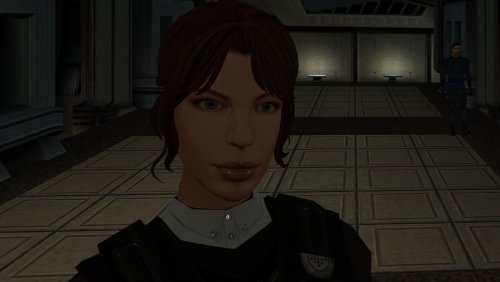
The mod replaces the PFHC03 model and textures. To Install 1. Download: PFHC03 2. Copy all files to the Knights of the Old republic's Override folder. (Example location - C:\Program Files (x86)\Steam\steamapps\common\swkotor\Override) 3. When/if prompted to overwrite files, press okay. 4. If you like the mod; leave a comment or endorse! (It would be much appreciated) Made with love.1 point -
Version 1.0.0
40 downloads
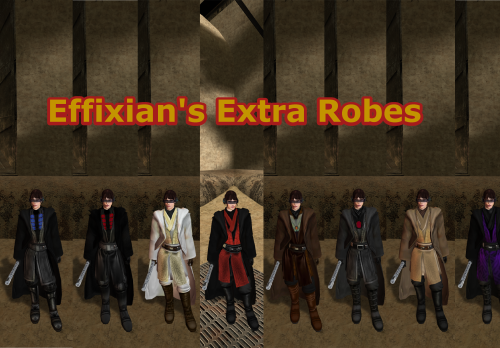
Upon finding Effixian's Extra JC's Jedi Robes mod, I instantly fell in love as I loved all the designs and it added new robes to Kotor, as this game was very much lacking in terms of unique robes unlike TSL, However I also loved the K1 Movie style Jedi Robes by N-DReW25, and wanted to use both mods ,but no patches existed to make the two mods compatible, so I pulled a Thanos and decided to do it myself which led me to making this mod. All these textures were made by me, with the help of other textures for the K2 movie style robes mod by Deadman. I hope you enjoy this mod. INSTALLATION: 1. you must install JC's Jedi robes mod by JCarter426 for this to work properly: 2. you have to install the K1 Movie style Master robes by N-DReW25: 3. then install Effixian's Extra Robes mod by Effix: 4. then finally drop the files for this mod into the Override folder, Replace any files if prompted. CREDITS: Thanks to: DeadMan for making the OG TSL mod JCarter426 for his Cloaked Jedi robes mod N-DReW25 for his master robes mod for K1 Effix for his Extra Robes mod Dark Hope for allowing me to use her Electromesh texture for this mod Hope you enjoy this mod -SebastianTheBlueBird1 point -
Version 1.0.0
11 downloads
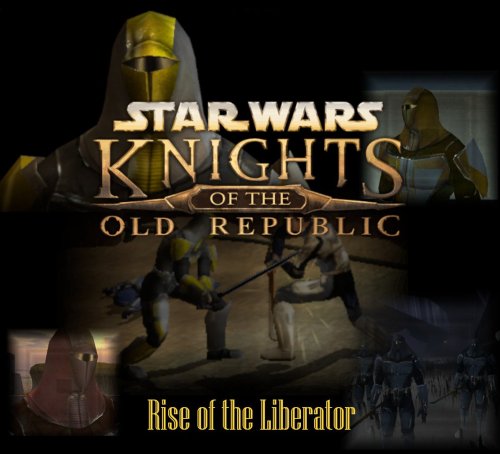
Rise of the Liberator Game: KOTOR 1 Author: Dodrari Kaan Version: 1.0.0 GitHub: https://github.com/danielstegink/Kotor.RiseOfTheLiberator Within the world of Kotor, there are hints that the Mandalorians are stirring, that a new Mandalore is rising to claim the mantle after the fall of Mandalore the Ultimate. Now, with Rise of the Liberator, that mystery has a name and a face. Face the Mandalorians of Kotor as you haven't faced them before, with new types, new equipment, new maps, and a mighty foe waiting for you at the end of the galaxy! This mod adds 2 new maps to the Rakata homeworld, where a new Mandalore and a small army of Mandalorians wait for you. Additionally, Mandalorian encounters throughout the game hint at the rise of this new Mandalore, transforming the Mandalorian experience into a proper sub-plot. Encounter new Mandalorian types, each with a unique armor that comes in both heltmetless and helmeted versions, and face the final boss to claim a very special weapon. Instructions Install BoS:SR (https://deadlystream.com/files/file/761-brotherhood-of-shadow-solomons-revenge) Use the TSLPatcher Permissions Use this mod however you want. Just make sure to credit me. Compatibility This mod should be compatible with the Jagi Mandalorian and Sherruk with Lightsabers mods. This mod uses GFF and overrides to modify the following characters and items. Any mods that modify the same may not be compatible: Bendak's Blaster dan14ac_mand04 in danm14ac (one of Sherruk's cronies) tat18_ in tat_m18aa (one of Jagi's minions) tat_thug3 in tat_m18aa (the GenoHaradan Mandalorian) kas25_mandcomm in kas_m25aa (the Mandalorian Commander in the Shadowlands) kas25_mandalor03 in kas_m25aa (one of the Mandalorians in the Shadowlands) kas25_mandalor04 in kas_m25aa (one of the Mandalorians in the Shadowlands) kas25_mandalor06 in kas_m25aa (one of the Mandalorians in the Shadowlands) kas25_mandalor07 in kas_m25aa (one of the Mandalorians in the Shadowlands) mikastore in korr_m33aa (Mika Dorin's merchant inventory in Dreshdae) g_mandalor004 in unk_m41ad (the Mandalorian Captain on the Rakata homeworld) m41ad.git in unk_m41ad (the map for the area around the Ancient Temple on the Rakata Homeworld) mand_armor_red (the Mandalorian Scout Armor in BoS:SR) g_a_class9004 (the unused Mandalorian Heavy Armor item) g_a_class9010 (the Mandalorian Assault Armor item) This mod adds item texture variations which may overlap with texture variations added by other mods D9 Heavy Armor - Texture Variations 21, 22, 23, 24, 25, 26 Lightsaber, Shortsaber and Doublesaber - Texture Variation 21 Lightsaber Crystal - Texture Variation 22 Special Thanks Fred Tetra - Kotor Tool tk102 - DLG Editor, K-GFF Stoffe and Fair Strides - ERFEdit Fair Strides - MdlOps Stoffe - TSLPatcher ndix UR - TPCView SilverEdge9 - Brotherhood of Shadow: Solomon's Revenge Vriff and Synchro - Kotorblender Disclaimer THIS MODIFICATION IS NOT MADE, DISTRIBUTED, OR SUPPORTED BY BIOWARE, OR LUCASARTS ENTERTAINMENT COMPANY LLC. ELEMENTS TM & © LUCASARTS ENTERTAINMENT COMPANY LLC AND/OR ITS LICENSORS.0 points