

Leaderboard



Popular Content
Showing content with the highest reputation on 09/18/2026 in Files
-
![More information about "[K1] HD Female Twi'leks + NPC Diversity + Playable Female Twi'leks"](https://deadlystream.com/downloads/screens/monthly_2026_09/Untitled-5.thumb.png.825cd65aa1f41bb1266ad35609de16ba.png)
Version 1.3.0
83 downloads
===================================================== [K1] HD Female Twi'leks + NPC Diversity + Playable Female Twi'leks ===================================================== Mod for Knights of the Old Republic 1 Author: Lily File Name: K1_HD_Female_Twilek_Diversity_and_PCs_v3.zip Latest Version: 1.3.0 --- 1. DESCRIPTION: This mod overhauls the female Twi'lek NPCs in KotOR 1 and adds 26 new playable female Twi'lek heads. NPC Overhaul: - Upscaled and updated dancer outfits. - Body skin tones all match head skin tones. - Added specular highlights to body textures. - Added specular highlights with a bump map to the heads, giving female lekku the same light-reactive shine male Twi'leks have. Eyes and lips also get a subtle shine. - NPCs now use different lekku positioning per head, so they no longer all look like pure reskins. - Gives a unique appearance to: - Yuthura Ban when encountered on Dantooine - Zaerdra - Hidden Beks bodyguard, Taris - Lyn Sekla - dancer, Taris - Janice Nall - droid shop owner, Taris - Kandon's Bodyguard - Black Vulkar Base - Malare - Bastila's quest - Lena - Mission's quest - Zoriis Bafka - swoop racer, Tatooine - Casandra Mateil - swoop racer, Manaan - Zeena - swoop racer, Manaan Playable Heads: - 26 playable female Twi'lek models, including every female Twi'lek NPC. - A number of completely new heads. - Dark side transitions. - Every playable head comes with a Handmaiden-style underwear model with matching skin tones. Find the KotOR II version here! --- 2. INSTALLATION: Run Install.exe and select your KotOR 1 game directory. There are 3 installation options. - Default Installation: Includes playable Twi'lek models and replacements for NPC Twi'leks. You probably want this one. - Playable Twi'leks ONLY: Includes only models for the player character, NPC Twi'leks will remain unchanged - NPC replacement ONLY: Replaces models for NPC Twi'leks, does not add any playable characters If you use the default installation, you DO NOT need to install NPC replacement ONLY or Playable Twi'leks ONLY. You should be safe to reinstall this mod on top of itself without any problems. You will probably want to use a widescreen mod such as this Without a high resolution, the bump mapping looks pretty bad. A "backup" folder is created by the installer in the same directory. Don't delete it if you plan to uninstall later. --- 3. UNINSTALLATION: Run Install.exe, select your KotOR 1 directory, and use the "Tools > uninstall/restore backup" option to revert all changes made by this mod. --- 4. KNOWN ISSUES: If you have met any of the NPCs, they will not have their unique appearance. You should use a save from beforehand. If you find any bugs or problems, please report them. --- 5. MOD COMPATIBILITY: Installing this should not break any other mods or have any conflicts, including K1R. This mod only touches female Twi'lek head/body models, textures, and appearance-related files - no dialogue, scripting, or module changes. Should be compatible with all other mods other than any other mods that have changed the female Twi'lek appearances, this mod will obviously stop the old appearances from showing. All files should have unique names, so this should not overwrite other mods, and it would just take Appearance.2da changes (or an uninstallation) to revert. Notably, this mod conflicts with KotOR 1 Twi'lek Female NPC Diversity That mod directly installs to the override folder instead of into modules, so you will need to uninstall that mod if you want to see the NPC appearances from this mod. However, if you wish to keep any appearances from that mod or any other female Twi'lek NPC mods, you can install those after this one to overwrite specific NPCs without an issue. Do not use the Steam Workshop for KotOR. It will almost certainly end with compatibility issues. --- 6. SUPPORT: My mods are free to use. You do not need to pay for them, but if you would like to say thanks, you can buy me a coffee! --- 7. PERMISSIONS: Please let me know if you plan on using any of the files in my mod for your own mod. The answer is "yes you may", but I would like to know what you are doing with it! Do not directly reupload this mod anywhere else. --- 8. THANKS: - Dark Hope - HD Twilek base textures - Leilukin & SpaceAlex - Dahnis Unique Look - Effixian - Red Twi'lek head - DarthParametric - Twi'lek high boots model - redrob41 - Original Twi'lek head/body model fixes, original underwear, dancer, assassin models - bead-v - MDLEdit - Fred Tetra - KotOR Tool - Cortisol - Holocron Toolset & HoloPatcher - Fair Strides - TSLPatcher - seedhartha - KotOR Blender - ndix UR - tga2tpc - ??? - A couple playable heads are originally from a decade-old modpack with no credits. If you are or know the author, let me know and I can credit the author/remove them. THIS MODIFICATION IS NOT SUPPORTED BY BIOWARE/OBSIDIAN ENTERTAINMENT OR LUCASARTS OR ANY LICENSORS/SPONSORS OF THE MENTIONED COMPANIES. USE THIS FILE AT YOUR OWN RISK.1 point -
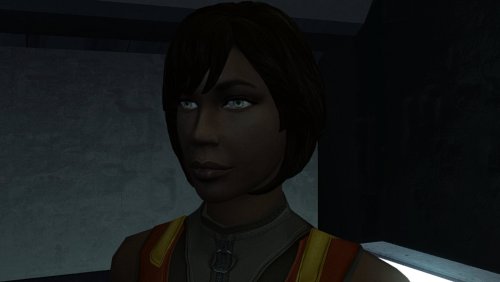
Version 1.0.0
21 downloads
The mod replaces the PFHB02 model and textures. To Install 1. Download: PFHB02 2. Copy all files to the Knights of the Old republic's Override folder. (Example location - C:\Program Files (x86)\Steam\steamapps\common\swkotor\Override) 3. When/if prompted to overwrite files, press okay. 4. If you like the mod; leave a comment or endorse! (It would be much appreciated) Made with love.1 point -
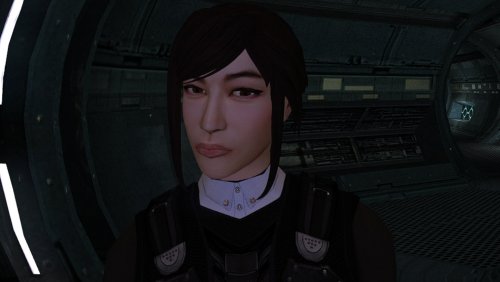
Version 1.0.0
43 downloads
The mod replaces the PFHA05 model and textures. To Install 1. Download: PFHA05 2. Copy all files to the Knights of the Old republic's Override folder. (Example location - C:\Program Files (x86)\Steam\steamapps\common\swkotor\Override) 3. When/if prompted to overwrite files, press okay. 4. If you like the mod; leave a comment or endorse! (It would be much appreciated) Made with love.1 point -

Version 1.61
47,040 downloads
This mod attempts to address some of the issues with holograms in TSL. In the vanilla game, the majority of holograms have things like eyeballs and teeth being visible through the head. This is caused by the way the game handles transparency, in conjunction with the order in which it renders the individual meshes that a model is comprised of. By changing the hierarchy of the meshes within these models, certain elements can be occluded, resulting in less cases of “bug-eyed” holograms. This is not a perfect solution however. Because meshes do not self-occlude, visual glitches still remain during certain animations and camera angles, but this is likely the best that can be done without being able to make alterations the game engine itself. Additionally, because their interactions are primarily via hologram, this mod includes a revised version of Jinger/Kreia’s Admiralty Mod, which changes the appearance of Admirals Cede and Onasi to give them outfits more fitting of their rank. And while I was at it, I also revised certain appearances with head swaps and custom model merges (hair, etc.) to try and reduce overuse of the same heads and make NPCs a little more distinct. N.B.: TSLRCM is a requirement for this mod. It is not compatible with the vanilla version of the game. Specific Changes: Ebon Hawk: Bastila hologram (Light Side male Revan) Ebon Hawk: Bastila hologram (Dark Side male Revan) Ebon Hawk: Carth hologram (Dark Side female Revan) Ebon Hawk: Carth (Admiral Onasi) hologram (Light Side female Revan) Ebon Hawk: Canderous hologram Ebon Hawk: Jedi Master Atris hologram Ebon Hawk: Jedi Master Kavar hologram Ebon Hawk: Jedi Master Vash hologram Ebon Hawk: Jedi Master Vrook hologram Ebon Hawk: Jedi Master Zez-Kai Ell hologram Peragus: Administration Officer hologram Peragus: Dock Officer hologram Peragus: Maintenance Officer hologram Peragus: Medical Officer hologram Peragus: Security Officer hologram Peragus: Coorta hologram Peragus: Coorta thug #1 hologram Peragus: Coorta thug #2 hologram Harbinger: Republic Captain hologram Harbinger: Republic Navigation Officer hologram Harbinger: Republic Doctor/Med Officer hologram Harbinger: Republic Soldier hologram (partial) Harbinger: Admiral Cede hologram Harbinger: Admiral Onasi hologram Telos: Admiral Cede hologram Telos: Admiral Onasi hologram Telos: Admiral Onasi physical appearance Dantooine: Jedi Master Vandar hologram Dantooine: Jedi Master Vrook hologram Dantooine: Admiral Cede hologram Dantooine: Admiral Onasi hologram Nar Shaddaa (Goto's Yacht): Goto hologram/projector VFX Korriban: Bastila hologram (Dark Side male Revan) Korriban: Jedi Master Vash hologram (M4-78) Korriban: Jedi Kaah hologram (M4-78) Malachor V: Bao-Dur hologram Known Issues: There are still visual artefacts from overlapping sections of individual meshes, particularly noticeable in the case of the neck being visible through the jaw which occurs with certain animations and/or camera angles. This is not addressable by model edits. The problem is the way in which the engine renders overlapping transparency within a single mesh. The Republic soldier on the Harbinger has been replaced as of v1.3, however the helmet is still somewhat problematic. I'm not sure that is addressable without completely remodelling it, and perhaps not even then given its shape. Hair planes with alpha transparency don't function as intended as holograms, so typically look pretty terrible (e.g. Peragus Maintenance Officer). There's not much that can be done about those, other than completely remodelling the hair to rely on geometry rather than texture transparency. Dangly meshes used for hair bangs tend to look conspicuous due the requirement of placing them under the head mesh in the hierarchy. Particularly egregious examples may warrant having these elements being turned into skinned meshes in a future update. No doubt there are still a few holograms that need attention that I have missed. If anyone can provide a list of such cases, I may address it in a future update. Note that some holograms look fine in their vanilla state. I am only interested in hearing about ones with issues like those already addressed in this mod ("bug eyes", etc.). Compatibility: I've edited UTCs to point to custom appearance.2da entries, so the mod should be compatible with any other mod that only edits the vanilla 2DA entries. However, it will not be compatible with any mod that forcibly overwrites the module files this mod edits, that outright replaces the UTCs in question, or that also edits the UTC appearance values. Install any such mods first, then this mod afterwards. To make it clear, do not use this in conjunction with Jinger/Kreia’s Admiralty Mod or Darth Hayze's TSLRCM Compatibility Patch for said mod. They are superseded by this mod. A separate patch is provided for M4-78 to handle its version of the Korriban academy module. After installing the main content of the mod, run the installer a second time and select the "Additional Patch" option from the drop down menu. An optional patch has been added to give the robe-wearing holograms unique named textures for use with robe mods that use the same filenames as vanilla robe textures. This will prevent texture issues (but note that they will still be wearing the vanilla-style robes). Acknowledgements: Thanks to Fair Strides for creating a customised version of TSLPatcher to handle filename clashes, which made this mod practical. Thanks to Jinger/Kreia for permission to release a revised version of the Admiralty mod's content, the textures from which (with modification) are used in this mod. Thanks to zbyl2 for permission to redistribute TSLRCM's module files to ensure compatibility for Steam Workshop users Thanks to JCarter426 for permission to use the female Republic soldier body model from "JC's Republic Soldier Fix for K2" and his adjusted N_CommM04 texture from "JC's Minor Fixes for K2". Thanks to bead-v for KOTORMax and MDLEdit, and ndix UR for MDLOps 2K18 Edition, all of which were required at various points to get this to work. Thanks to ndix UR for TGA2TPC Thanks to Malkior for providing the impetus for the mod via this thread. Thanks to L0ki194 for offering input on the case of the Harbinger's "Doctor" vs "Medical Officer".1 point