

Leaderboard



Popular Content
Showing content with the highest reputation on 01/09/2026 in Files
-
Version 1.0.0
395 downloads
Peragus Miner Overhaul A Mod for Star Wars Knights of The Old Republic 2 Author: N-DReW25 1.0.0 Release Date: 02.09.2025 Installation: Simply click on the HoloPatcher.exe, select your option, click install and sit back and watch the HoloPatcher do its magic. This mod has four install options, you do NOT need to install four but you must install them in this order. Proper Peragus Corpses comes first. Peragus NPC Overhaul comes second. Tiered Peragus Miners comes third. The Peragus Mining Gear mod is required for this install. Vibrocutter changes can be installed at any point AFTER Proper Peragus Corpses. The "Description" section of the readme will tell you what each install does. Make sure to read them to ensure that you've made an informed decision on what exactly you want to install. Description: Peragus is a strange place. It's a mine wherein all of the miners are dead, except those dead miners all look like burnt monkeys wearing beige jumpsuits in-game. Despite the holograms of the Miners all wearing the same Miner's Uniform the aforementioned corpses are all wearing beige, whilst the Maintenance Officer Corpse and the bodies in the Kolto tanks wear a Czerka inspired uniform not seen anywhere else. This mod serves as a collection of mods, allowing you to fully customize Peragus to your exact liking. This mod offers the following features: 1) Proper Peragus Corpses: Proper Peragus Corpses removes the low-poly corpse placeables from the Peragus Modules and replaces them with NPC Corpses. These NPCs use the four generic Peragus NPC appearances, meaning there will be clones though this is on-par with Obsidian's NPC Czerka Corpses in the Telos Underground ruins. 2) Peragus NPC Overhaul: An addon for Proper Peragus Corpses, Peragus NPC Overhaul will give all 60+ Peragus NPC Corpses an overhauled appearance. Whilst this new appearance will be a generic appearance, if you see a generic old white man with orange hair that specific appearance will be unique to just that specific corpse meaning only Twi'leks and Devaronians would have duplicate appearances. 3) Tiered Peragus Miners: This option requires Kainzorus Prime's Peragus Mining Gear mod and the Proper Peragus Corpses, and Peragus NPC Overhaul from this mod installed. Tiered Peragus Miners is designed around Kainzorus Prime's Peragus Mining Gear mod, it adds a second Miner's Uniform item based on the vanilla Miner's Uniform. This means you can have BOTH Kainzorus Prime's Peragus Mining Gear for the Defense Bonuses and the vanilla Peragus Miner's Uniform for the ability to use Force Powers at the same time. The loot for these uniforms has been changed so the vanilla Peragus Miner's Uniform is found in the Plasteel Cylinder at the start of the Mining Tunnels whilst the Peragus Mining Gear is found inside a Plasteel Cylinder at the Central Platform which can only be opened via the nearby terminal. The Peragus Mining Gear, Peragus Miner's Uniform, and the Beta Peragus Miner outfit will be worn by various Peragus Miner Corpses and Holograms where appropriate. The end result should be a fully diversified Peragus Mining Facility. 4) Vibrocutter Changes: Since this mod is NOT compatible with Lewok2007's Vibrocutter changes mod, the Vibrocutter Changes install serves as an alternative to his mod. This option will move the Vibrocutter from the Corpse near the start of Peragus to a locked Locker in the nearby Security Office, this will force you to use the Plasma Torch and Mining Blaster to fight the Mining Droids for a little bit. This option will NOT work without "Proper Peragus Corpses" option mentioned above. Known Bugs: This mod shouldn't have bugs but if you find any report it to me on Deadlystream.com. Incompatibilities: * This mod is compatible with Kainzorus Prime's Peragus Mining Gear mod. * This mod is compatible with WildKarrde's Peragus Medical Bay Enhancement. * This mod is NOT compatible with VarsityPuppet's Peragus Tweak. * The Tiered Peragus Miners component is NOT compatible with DarthParametric's Fixed Hologram Models and Admiralty Redux for TSLRCM. Report any incompatibilities to me on Deadlystream.com. Permissions: Do NOT claim credit for this mod and do not use assets from this mod without my permission. Thanks: DarthParametric: For making the Female Czerka Officer's Uniform - A Modder's Resource, which the Medical Officer's Beta Uniform is based upon! ebmar: For providing help with the TSLPatcher! Kainzorus Prime: For making the Peragus Mining Gear mod! VarsityPuppet: For making the Peragus Tweak mod which inspired me to make this mod! Lewok2007: For making the original Vibrocutter Changes mod! WildKarrde: For making the Peragus Medical Bay Enhancement mod! Bioware: For such an amazing game! Obsidian: For such an amazing sequel! Fred Tetra: For Kotor Tool! Everyone who downloads the mod!! Legal: THIS MODIFICATION IS NOT SUPPORTED BY BIOWARE/OBSIDIAN ENTERTAINMENT, LUCASARTS, DISNEY OR ANY LICENSERS/SPONSORS OF THE MENTIONED COMPANIES. USE OF THIS FILE IS AT YOUR OWN RISK AND THE ABOVE-MENTIONED COMPANIES OR THE AUTHOR IS NOT RESPONSIBLE FOR ANY DAMAGE CAUSED TO YOUR COMPUTER FOR THE USAGE OF THIS FILE.1 point -
Version 1.0.2
228 downloads
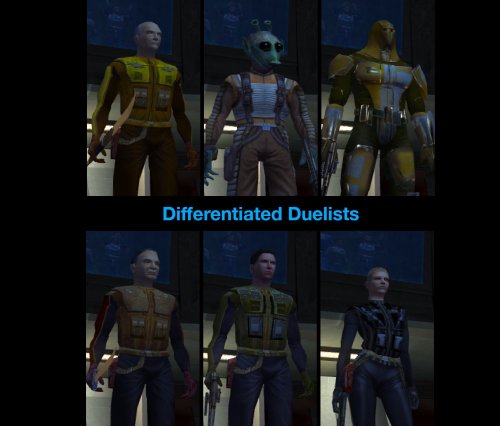
Rebalance of the Taris duelists. SUMMARY This mod re-equips and rebalances the Taris duelists, aiming to give them more variety, smooth out their difficulty curve, and make the fights a bit more challenging and engaging overall. Almost all duelists have had their stats or equipment tweaked to some degree to make them more distinct in both appearance and combat while ensuring a natural progression in difficulty throughout the fights. Twitch has undergone the most extensive changes and should now be significantly more challenging. Each of the human duelists gets a different set of level-appropriate light armor, instead of all wearing the same armor as they do in vanilla. Certain duelists have had their AI tweaked for improved behavior. Detailed changes to each duelist are listed below. This mod is not intended to dramatically alter the difficulty of the dueling arena but will make it harder overall. Note this mod will only work on saves from before entering the Taris cantina for the first time. DETAILS INSTALLATION Run HoloPatcher.exe and select an install option. The default option installs the mod to the Override folder. An alternative option is included which installs to the Modules folder. If you don’t have any mods which edit these NPCs in Override but do have mods which edit them in Modules, you can use the alternative install option to prevent overwriting them. See compatibility notes for more details. Direct the installer to your game folder then press install. Unaltered copies of any modified files will be placed inside the backup folder in the location of HoloPatcher.exe. If you receive the following warning while running the alternative install option: “A resource located at ‘…\Override\…’ is shadowing this mod’s changes in Modules\tar_m02ae.mod!” then you should install the default option instead. If you have Effixian’s Taris Arena Changes installed, run the compatibility patch after running the default install option. UNINSTALLATION To uninstall from the default install option: Remove the following files from Override: tar02_bendak021.utc, tar02_gerlon021.utc, tar02_ice021.utc, tar02_marl021.utc, tar02_twitch021.utc, tar02_deadeye022.utc, m_ai_dueler.ncs, m_att_dueler.ncs, m_dmg_dueler.ncs, m_htb_dueler.ncs, m_per_dueler.ncs, m_rnd_dueler.ncs, m_spn_dueler.ncs, and m_udf_dueler.ncs. If any files were created inside the backup folder, move them to Override. To uninstall from the alternative install option: Remove tar_m02ae.mod from the Modules folder and, if present, replace with the tar_m02ae.mod in the backup folder. COMPATIBILITY Two install options are included to allow compatibility with different sets of mods that edit the same NPCs. If you are using any other mods which edit the duelist NPCs in the Override folder, you should use the default install option. However if the only other mods you have which edit these NPCs do so in the Modules folder, you can use the alternative install option to prevent overwriting them. See list of which mods are compatible with which options below. Installs to Override (use the default option if using any of these mods): Effixian’s Taris Arena Changes by Effix NOTE: Install order critical! Taris Arena Changes > Differentiated Duelists > Patch Bendak Starkiller Emblem Armour by redrob14 Installs to Modules (use the alternative option if using any of these mods and none of the previously listed mods): K1 NPC Diversity Pack - N-DReW25 NOTE: If you prefer the armors from this mod, install it after Differentiated Duelists. Galaxy of Faces - N-DReW25 If unsure, install using the default option after any other mods that edit these NPCs to ensure its full changes take effect. Twitch, Ice, and Bendak will not be affected by combat AI changes from other mods. PERMISSIONS Feel free to do whatever you want with this mod as long as credit is provided. CREDITS offthegridmorty HoloPatcher - Cortisol, th3w1zard1 TSLPatcher - stoffe, Fair Strides KOTOR Tool - Fred Tetra DeNCS - JdNoa, Dashus Mods in screenshots: High Quality Blasters by Sithspecter HD Fire and Ice by Cinder Skye JC’s Blaster Visual Effects by JCarter426 Taris Dueling Arena Adjustment by DarthParametric Taris Reskin Pack by Quanon Ultimate Character Overhaul by ShiningRedHD Ultimate Taris High Resolution by ShiningRedHD1 point -
Version 1.0.0
401 downloads
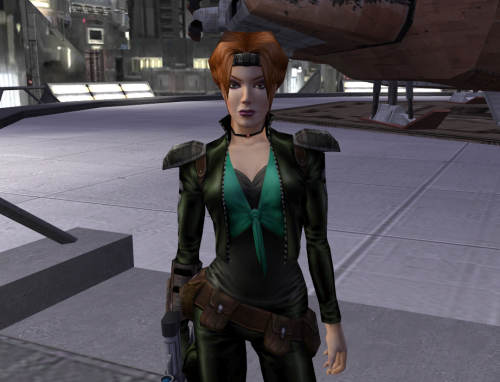
Gives Mira a new top to layer with. Stylish Concerned it might ruin immersion? Don't worry, the dialogue lines referencing Mira's outfit still work: Mira's "Men are easy" -> neckline still low enough that men can still be easy Atton's "Maybe without the plunging neckline" -> Atton thinks the vanilla female underwear is hot so anything over an inch below the collarbone may as well be a plunging neckline to him Installation: Drop P_MiraA.tga and P_MiraAD01.tga into your override folder Uninstallation: Delete P_MiraA.tga and P_MiraAD01.tga from your override folder1 point -

Version 3.1.0
3,720 downloads
This modding toolset is a work in progress and I carry no responsibility to any damage done to your game files or lost work that may occur. Some antiviruses will flag a false positive and prevent you from opening the application. If this happens you will need to configure your antivirus to allow the program to run. Holocron Toolset is a collection of modding tools packaged in a single application aimed at streamlining modding development for KotOR/TSL, drawing inspiration from Kotor Tool and the NWN Aurora Toolset. There are editors available for nearly every file type used by the game. Also included with it is a 3D module editor and a "Map Builder" which the user can use to create new maps by rearranging existing models already used in the game. Discord for suggestions + bug reports: https://discord.com/invite/3ME278a9tQ If you are running Windows 7 or 8 and get a missing DLL error when opening the program you will need to download the Visual C++ Redist from Microsoft. Toolset source0 points