

About This File
Hides tags on skill & attribute checks in dialogue. Customizable.
SUMMARY
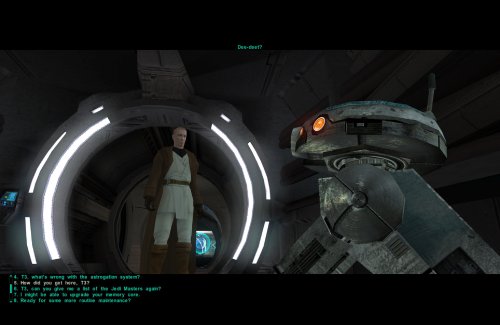
This mod removes the written indicators at the beginning of skill & attribute checks in dialogue, as well as optionally success and failure tags. For example, you will no longer see “[Wisdom]” at the beginning of a line you get from having enough Wisdom, it will just be there as an option.
I got this idea while playing IStewieAI’s Tweaks and Engine Fixes for FNV which has this feature, and I thought it would be interesting to see in KOTOR. I liked how it made me think a little harder about my dialogue choices, since normally I just automatically pick an option if it has a skill indicator, since it’s almost always advantageous to pick. Those options are still usually obvious and often go to the top of the list anyway, but it adds a nice bit of immersion and a little extra challenge.
There are multiple versions to choose from:
LITE - removes attribute tags only
MEDIUM - removes both attribute & skill tags
HIGH - removes attribute, skill, & persuade/intimidate tags
FULL - removes attribute, skill, persuade/intimidate, success/failure, & influence tags
This mod does not affect tags for using Force powers (e.g. Choke, Force Persuade, etc.) or Lie tags.
If you’re new to the game, please be aware of the implications of installing any of these versions. Many conversation mechanics may become non-obvious.
IMPORTANT NOTES:
- For Medium version and up, this will remove all instances of text like “[Computer]” or “[Repair]” even when they are intended to indicate an option to actually use that skill, rather than just speaking from your knowledge on it. You’ll still see [X Spikes] or [X Parts] at the end of Computer or Repair options where applicable, however it’s possible some options can become ambiguous for this reason.
- On rare occasions, different attributes can unlock the same line, therefore this mod can result in occasionally seeing duplicate dialogue options.
- Some lines may not be affected, for example if they are added by another mod or not found in dialog.tlk.
INSTALLATION
To install, run HoloPatcher.exe. Select the option corresponding to the version you want and whether you have TSLRCM installed. Unaltered copies of dialog.tlk will be placed inside the "backup" folder in the location of HoloPatcher.exe.
UNINSTALLATION
Replace dialog.tlk in the main game folder (outside override) with the version found in the backup folder.
COMPATIBILITY
Compatible with TSLRCM using the TSLRCM compatible option.
This mod must be installed after any other mods which hard overwrite dialog.tlk. If any other mod makes changes to lines with a dialogue check indicator, those specific lines will be overwritten by this mod.
Mods which append dialog.tlk using a patcher are compatible.
PERMISSIONS
Do whatever you want with this mod, just give credit.
CREDITS
offthegridmorty
HoloPatcher - Cortisol, th3w1zard1
TSLPatcher - stoffe, Fair Strides
tlk2xml, xml2tlk - DrMcCoy
Edited by offthegridmorty
Recommended Comments
There are no comments to display.
Join the conversation
You can post now and register later. If you have an account, sign in now to post with your account.