



janglesworthy
-
Posts
5 -
Joined
-
Last visited
janglesworthy's Achievements





-
Autodesk Maya Kotor Level Editor and Importer released
janglesworthy replied to janglesworthy's topic in Modding Tools
The first beta version of the Kotor Importer and Level editor has been released for both Maya 2024.2 and 2027.2 It reads your own installed copy of the game, and it never modifies your installation. Download: https://github.com/janglesworthy/KotorMayaImporter/releases/latest (pick the package for your Maya version — 2024 or 2027) What it imports Complete levels in a couple of clicks — rooms with their baked lightmaps, doors, placeables, creatures, grass, water, particle effects, lights, cameras, sounds and more. Characters — any body with a head, weapons in either hand, masks or goggles, correct game textures, skin weights and skeleton intact. NPCs, creatures and droids — browse every creature by name and import it with its full equipment, exactly as the game defines it. Props — static geometry, no invented rig. If the game itself has no authored texture for something, you still get exact geometry plus a warning naming the missing resrefs (nothing is faked). Animations — list every clip a model can play, then bake one to Maya keyframes at 30 fps and play it back. The odd corners too — the swoop/minigame maps keep their track hooks and obstacle placements, and all 20 STUNT/cinematic modules import with their no-model rooms, reference nodes and source emitters preserved. Z-up toggle — flip Maya between its own Y-up and KotOR's Z-up without rewriting your scene. Formats read directly: KEY/BIF/RIM/ERF, MDL/MDX, TPC/TGA/TXI, 2DA/TLK, LYT/VIS/WOK, IFO/ARE/GIT and the UT* template families, plus WAV and KotOR's packaged compressed audio. What it edits Placement — move waypoints, sounds, stores and ground items. Place anything from the asset library with a click-to-drop preview that snaps to the floor you clicked. Container loot — open any footlocker's loot list, add and remove items, and browse the game's entire item library by real name ("Blaster Rifle", not g_w_blstrrfl001) with descriptions pulled from the game's string table. NPC inventory and drops — give a creature items that can be looted from its remains. It works even for creatures that normally carry nothing at all. Item stats — retune Cost, StackSize and Charges on any item in a container. Template fields — a filterable form of every editable field on a template: locks, lock DCs, HP, hardness, tags, faction, creature stats. That's 53 fields on a typical container and 60 on a creature. Save as New Template — save your edited version under a new name without touching anything placed in the world. It then shows up in the asset browser as a placeable library entry, so you can build your own kit of custom chests, droids or NPCs. The tools Window What it's for Level Editor Import a module, see every placed marker as a colour-coded cube, edit placements, drop new objects, export Asset Browser The whole game's template library — 5,000+ entries with 2,400+ rendered thumbnails, search, duplicate grouping and a variant picker Level Outliner Flat searchable list of everything placed in the level, with folders for your own organisation Template Editor Tabbed editor for any asset: properties, editable fields, loot/inventory Item Browser Every item the game can resolve (566 in a stock install) with names, descriptions and editable stats KotOR entries also live inside Maya's own right-click menu, so you can right-click a chest in the viewport and jump straight to editing it. How it stays safe This was the part I cared most about, because a level editor that quietly corrupts a module is worse than no level editor. Your game install is never written to. Exports go to a folder you choose. Putting a change in the game is always a file copy you make, and undo is restoring your backup. Edits never touch shared originals. Change a footlocker's loot and the tool saves a copy of that template under a new name and points only the chest you picked at it. The other footlockers using that template in other modules are untouched — and the editor tells you up front how many placements share what you're editing. Check Changes does a dry-run export and shows you the exact bytes that would differ before you write anything. Everything is verified byte-for-byte. Every write is re-parsed and checked before it's saved, and each editing feature is gated by an independent checker that re-derives the expected bytes from the original game data: 37 checks for container loot, 42 for item stats, 19 for field edits and save-as-new-template, 39 for creature inventories. The Maya 2024 and 2027 builds are also proven to produce byte-identical output from the same inputs. Getting started Unzip anywhere. Drag install.py into the Maya viewport — you get a KotOR menu and a shelf button. KotOR > Level Editor…, point it at your game folder, type a module name (danm13 is the Dantooine enclave) and hit Import Level. There's a TUTORIAL.md in the package that walks a full first session in about 20 minutes and ends with you looting a chest you stocked yourself, inside the game. HELP.md has an FAQ and troubleshooting. uninstall.py removes everything cleanly. Known limitations (it's a beta) Being straight about these: NPCs you add to a level render in game but aren't interactive yet — no dialogue or combat. Retail NPCs, and edits you make to them, work normally. I've traced this to something engine-side at spawn registration and it's still open. Placement editing covers waypoints, sounds, stores and ground items. NPC and door placements are shown read-only for now. Item and creature names, item damage properties, scripts and dialogue aren't editable yet. Triggers, doors, encounters and cameras import and display, but have no editor page yet. KotOR 1 only, Windows only, and it needs Maya (2024 or 2027). Requirements Windows 10/11 64-bit, Autodesk Maya 2024 or 2027, and a legally installed copy of KotOR 1 (GOG, Steam or disc). No game assets are included or redistributed. Feedback very welcome — especially crashes, confusing UI, or modules that import badly. The most useful reports say what you clicked, what you expected, what happened, which module, and your Maya version. This is a fan project, not affiliated with or endorsed by Lucasfilm, Disney, BioWare, Aspyr or Autodesk.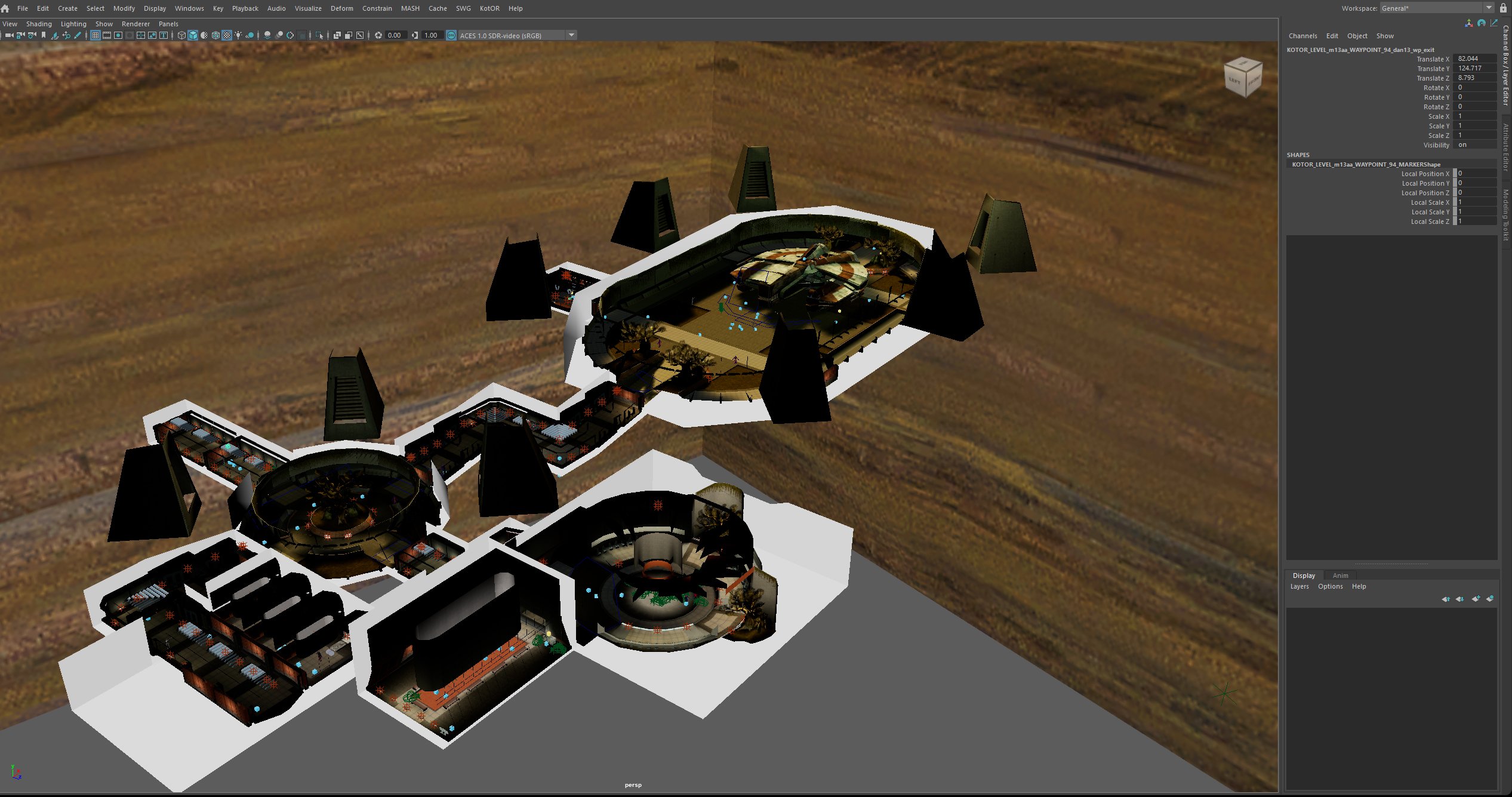
-
Autodesk Maya Kotor Level Editor and Importer released
janglesworthy replied to janglesworthy's topic in Modding Tools
Another small update. Drag and drop into map, right click edit properties for chest, add loot, remove loot, export and play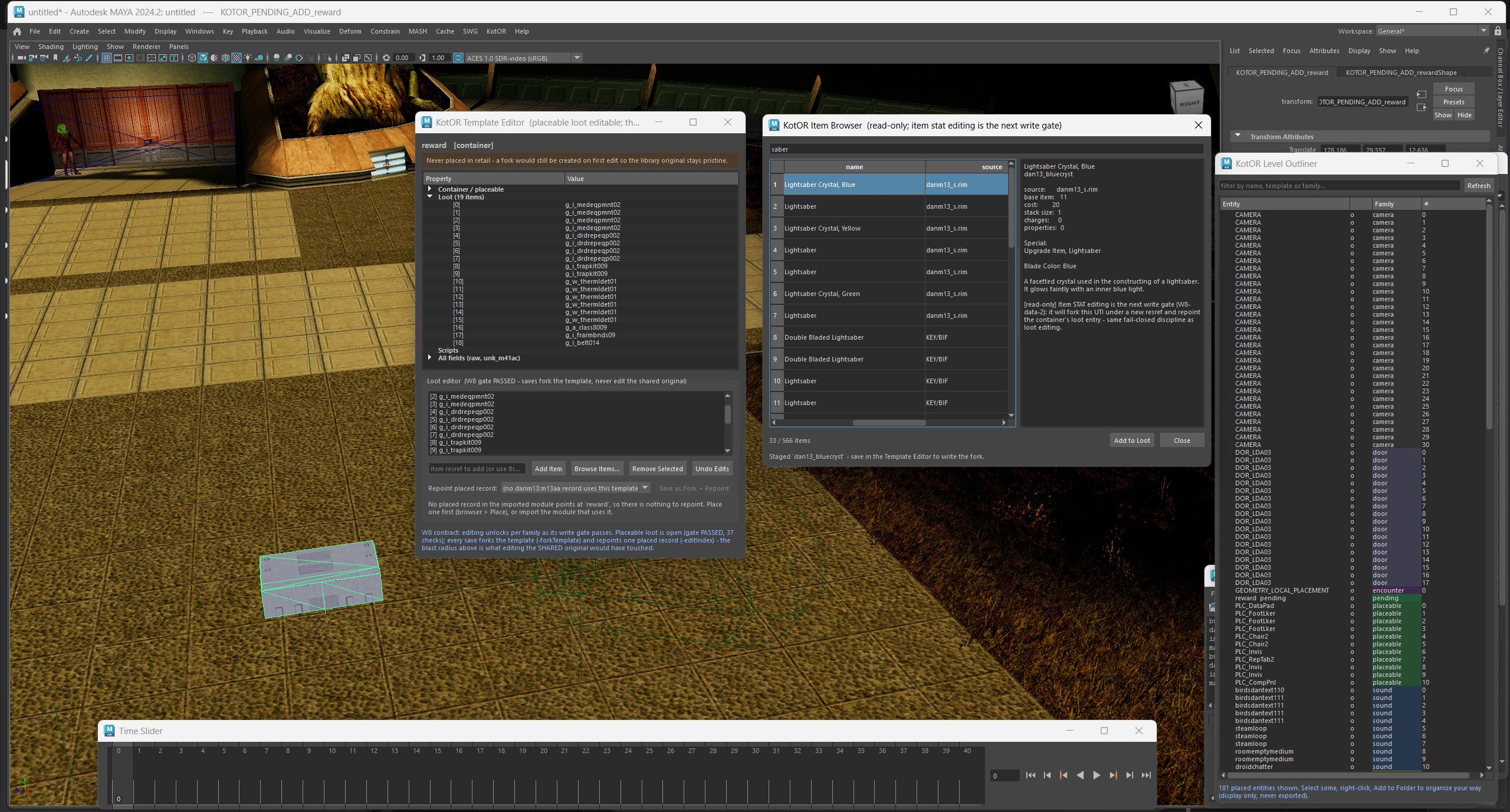
-
Autodesk Maya Kotor Level Editor and Importer released
janglesworthy replied to janglesworthy's topic in Modding Tools
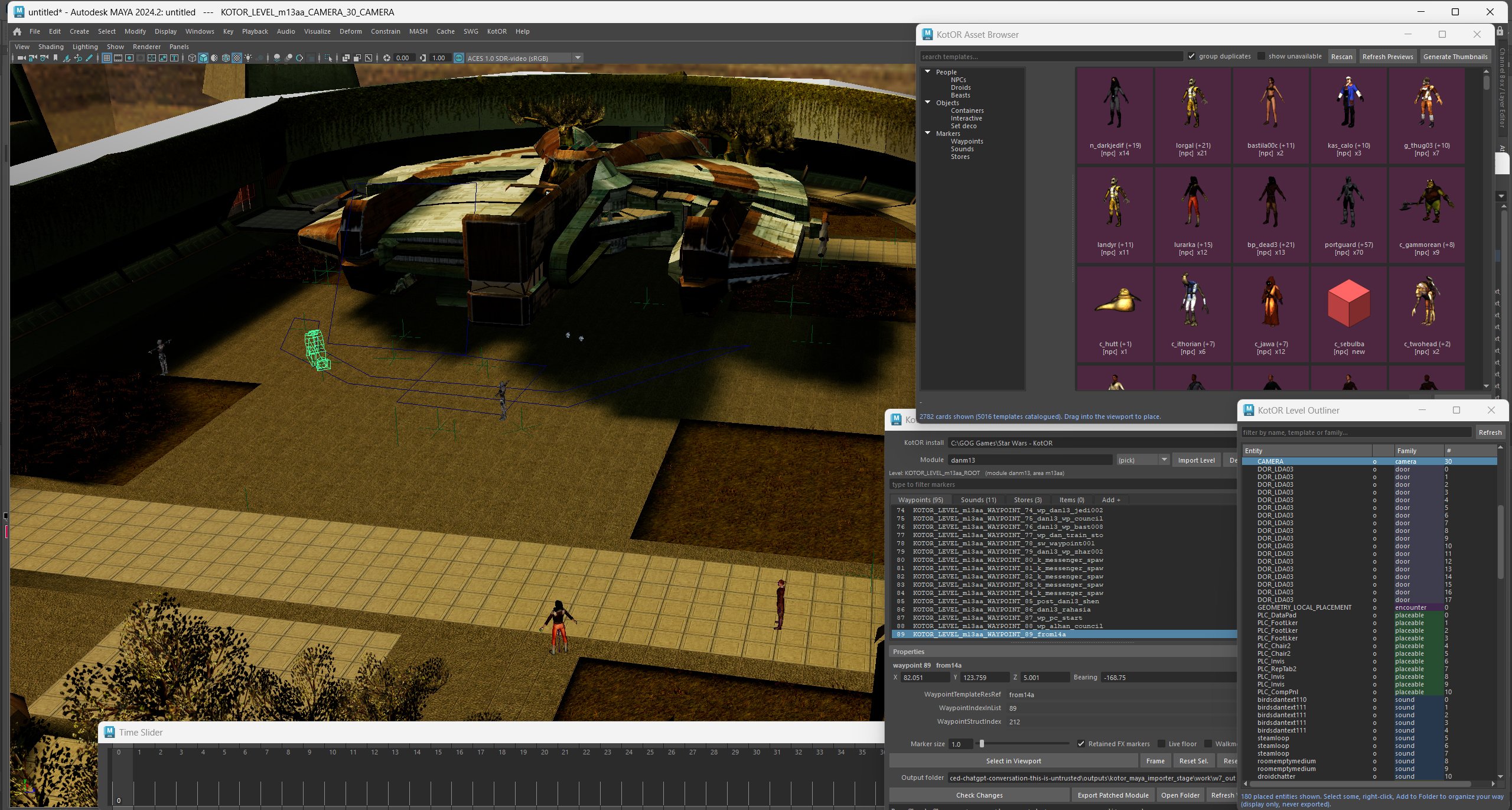
Here are some pics showing the current level editor running in Maya. Asset browser is now working and supports drag and drop placement. The outliner works similar to UE for selecting/editing and organizing all in game assets.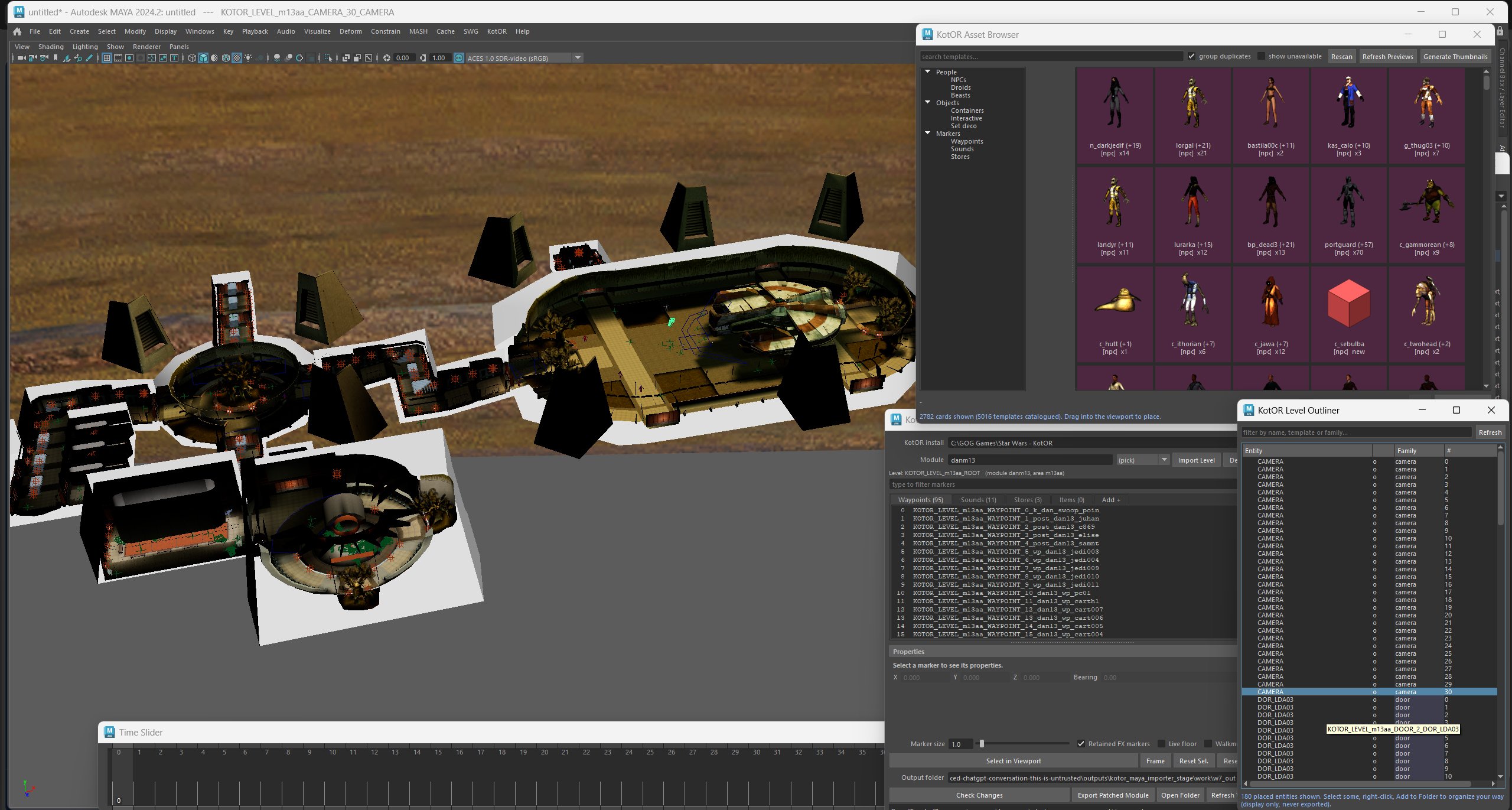
-
Autodesk Maya Kotor Level Editor and Importer released
janglesworthy replied to janglesworthy's topic in Modding Tools
It will mean creating brand new levels or editing existing levels. Next release of the editor can open levels, edit them any way you want, save them back out and play them. It is an importer and writer. -
Autodesk Maya Kotor Level Editor and Importer released
janglesworthy posted a topic in Modding Tools
Hello, my first post here. I wanted to share my Maya Kotor tools. Right now they only import, but the next release will have full level editing all done inside of Maya. That means you can load a level, edit whatever you want, save it back out and load it in game. You can find the tool set here. No extra tools needed, point it at your game install and import whatever you want. janglesworthy/KotorMayaImporter: Compiled Autodesk Maya 2024 importer for Star Wars: Knights of the Old Republic (KotOR) MDL/MDX characters, animations, props, and complete levels.