

Leaderboard
.thumb.png.d8b108d1620cfd7d697f7271e60714db.png)


Popular Content
Showing content with the highest reputation on 09/07/2026 in Files
-
Version 1.0.0
434 downloads
KMRP - KOTOR MODERN RESTORATION PATCH Modern resolutions, properly scaled UI, engine fixes and restored interface behaviour for KOTOR 1 48 resolutions | 800x600 to 15360x8640 | 4:3 | 16:10 | 16:9 | 21:9 | 32:9 WHAT IS KMRP? Vanilla KOTOR was built around fixed pixel sizes and interface layouts originally designed for resolutions such as 640x480. On modern displays this causes tiny text, overlapping list entries, undersized icons, broken map scaling and other interface problems. KMRP fixes these problems in the game engine itself. It supports 48 resolutions from 800x600 up to 15360x8640 across 4:3, 16:10, 16:9, 21:9 and 32:9. Several of these fixes require changes to swkotor.exe because the affected values are hardcoded inside the engine and cannot be reached through GUI or 2DA files alone. WHAT IT FIXES Readable text with properly scaled list rows Inventory, Abilities and Store icons and rows scale correctly Item stack counts remain visible with larger fonts Long item description crash fixed Description text no longer runs under the scrollbar Area map fills its frame Fog of war covers the complete map Map marker clicks line up correctly 250 misplaced map notes can be corrected using Derslok's fixes HUD minimap is zoomed correctly again Dialogue letterboxing, tutorial popups and interface artwork follow the selected resolution INSTALLATION Install other content mods first, such as K1CP or K1R, then install KMRP. Download the standard KOTOR Editable Executable Run KMRP - KOTOR Modern Restoration Patch.exe. Select your resolution. Open Advanced Settings if you want to change optional components. Click Start Patching. Launch KOTOR. To change resolution later, use Restore Original first, then patch again. KMRP backs up the executable, INI and every Override file it modifies before patching. EXE PATCHING KMRP modifies swkotor.exe because several interface values and bugs are hardcoded inside the game engine. Before writing anything, KMRP verifies the executable by SHA-256 and file size. Unknown executables are rejected. KMRP modifies 893 bytes of the 4,042,752-byte executable, around 0.022%, and adds ten 4KB code sections where additional space is required. Every executable patch is documented in the GitHub repository. KMRP is not a launcher and nothing stays running in the background. The only exception is the optional Modern Driver Compatibility component, which places two files beside the executable. If you do not want your executable modified, do not install KMRP. INCLUDED COMPONENTS K1 Modern Driver Compatibility 1.2.0 by Synchro Optional. Restores lighting, reflections, fog, soft shadows and correct grass rendering on modern hardware. K1 Area Map Fixes by Derslok Optional. Corrects 250 misplaced map-note positions. Party Portraits by MadDerp Bundled with permission. KOTOR 1 HD Icon Pack 1.0 by JackInTheBox Bundled with permission. COMPATIBILITY Tested with: KOTOR 1 Community Patch 1.10.0 KOTOR 1 Restoration 1.2 K1CP replaces two icons also included in the HD Icon Pack. KMRP keeps the K1CP versions where applicable. DOWNLOADS GitHub Releases https://github.com/RayesDiyab/KMRP-KOTOR-Modern-Restoration-Patch/releases Nexus Mods https://www.nexusmods.com/kotor/mods/1879 Deadly Stream Available on this page SOURCE AND DOCUMENTATION Full source code, executable patch documentation and reverse-engineering notes: https://github.com/RayesDiyab/KMRP-KOTOR-Modern-Restoration-Patch CREDITS ndix UR KOTOR High Resolution Menus 1.5 Synchro K1 Modern Driver Compatibility and published area-map research Derslok K1 Area Map Fixes MadDerp Party Portraits JackInTheBox KOTOR 1 HD Icon Pack RaymanGT HD menu and UI asset set LICENSE KMRP is licensed under GPL-3.0. Star Wars: Knights of the Old Republic © 2003 BioWare Corp. / LucasArts. KMRP is an unofficial community patch and is not affiliated with or endorsed by BioWare, LucasArts, Lucasfilm or Disney. You must own the game.1 point -
Version 1.0.0
8 downloads
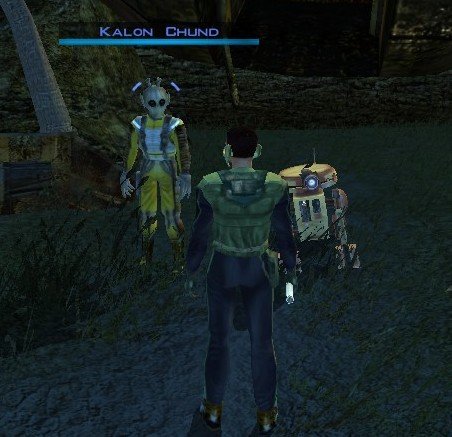
Stranded Merchant Game: KOTOR 1 Author: Dodrari Kaan Version: 1.0.0 GitHub: https://github.com/danielstegink/Kotor.StrandedMerchant We get a lot of stuff on the Rakata homeworld, most of which we don't need. It's kind of annoying since it bogs down our inventory and we don't get to buy any more cool stuff. Enter a new NPC on the Nameless World: Kalon Chund, a stranded merchant hiding in the safety of the crashed starship outside the Elder's settlement. He has a huge inventory for you to choose from, and his assistant Scrapper is more than happy to buy any junk you've accumulated over the course of the game. Instructions Use the TSLPatcher Permissions Use this mod however you want. Just make sure to credit me. Compatibility This mod uses GFF to modify the area outside the Elder's settlement (unk_m41ab), removing the ship parts and one of the plasma vents. Any mods that affect the same area may not be compatible. Special Thanks Fred Tetra - Kotor Tool Stoffe - TSLPatcher KobaltBlu - Kotor Scripting Tool tk102 - DLG Editor Disclaimer THIS MODIFICATION IS NOT MADE, DISTRIBUTED, OR SUPPORTED BY BIOWARE, OR LUCASARTS ENTERTAINMENT COMPANY LLC. ELEMENTS TM & © LUCASARTS ENTERTAINMENT COMPANY LLC AND/OR ITS LICENSORS.1 point -
Version 1.0.0
118 downloads
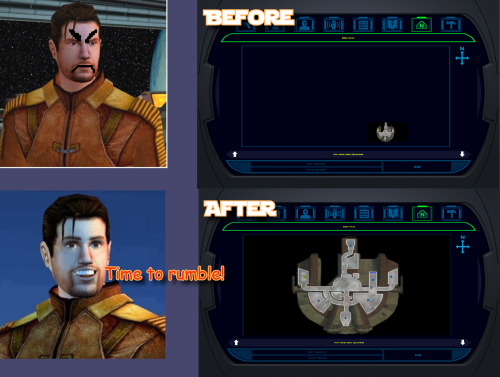
K1 Area Map Fixes High Resolution Area Map & Map Marker Fix TL;DR When you play KOTOR 1 at widescreen or high resolution the area map screen is broken: the map sits shrunken in a corner instead of filling its frame. This mod fixes that. It also corrects 250 map note positions that BioWare put in a strange spot in 2003. It does not change your resolution. It fixes the map after something else has already got the game running at your resolution, so UniWS and KotOR High Resolution Menus have to be installed first, in that order. Steam users need the KOTOR Editable Executable before either of those; GOG users do not. Unzip the folder somewhere and double-click Install.bat. It finds the game and reads your resolution out of the exe, so there is nothing to configure. Uninstall.bat puts your original exe back. Detailed installation instructions are bellow. (next page) What this fixes At widescreen and high resolutions the area map is drawn at its old size in a corner of the frame. This mod rescales the map to fill the frame, puts all three kinds of marker where they belong (scaling the icons up at very high resolutions so they stay big enough to see), and corrects 250 map notes that BioWare left in the slightly (sometimes majorly) wrong spot. One thing it fixes that is not its own bug KotOR High Resolution Menus patcher, the .exe one, leaves the area map shoved off to one side. This patcher checks for it and fixes it, and Uninstall.bat undoes that along with everything else. Requirements Required, in this order 1. KOTOR Editable Executable (for Steam only) https://deadlystream.com/files/file/1320-kotor-editable-executable/ Steam ships a locked swkotor.exe that no mod can edit, including the two below. This is an unlocked copy you drop into your game folder. On GOG, skip this step. GOG's own v1.03 swkotor.exe is already the same unlocked file, byte for byte, apart from 16 bytes of unused header padding. Start at step 2. 2. UniWS https://www.wsgf.org/article/universal-widescreen-uniws-patcher Makes the game run at your screen resolution. Pick "Star Wars: KOTOR" from the list, choose 1024x768 interface. Choose your game folder, type in resolution of your screen and patch it. 3. KotOR High Resolution Menus (k1hrm) by ndix UR https://deadlystream.com/files/file/1159-kotor-high-resolution-menus/ Redraws all the menus for your resolution. Run its patcher, then copy the menu files for your resolution into your game's Override folder. Then this mod, last. If those links are dead by the time you read this, search DeadlyStream for the mod names. They have all been up for years. Resolutions support The maths is checked automatically against all 49 resolutions k1hrm supports, from 800x600 up to 15360x8640. Four of them have actually been played: Resolution Aspect 2560x1600 16:10 1920x1080 16:9 3840x2400 16:10 1600x1200 4:3 Everything else is checked but has not been looked at on a real screen. That includes ultrawide (21:9 and 32:9), because there was no ultrawide monitor here to test on. If you run one, we would genuinely like to hear how it goes, either way. Should be working. Installation Install the requirements above first, in that order. Steam needs all three, GOG needs UniWS and k1hrm only. Unzip this mod's folder somewhere. Do not run it from inside the zip; if you try, it stops and tells you to unzip first. Double-click Install.bat. Wait until it says it has finished. It can take a moment to think. That is the whole thing. It finds your game folder on its own and reads the resolution out of the exe, so it never asks you questions. If it cannot find your game: drag your KOTOR folder onto Install.bat and let go. That means the whole main game folder, the one with swkotor.exe inside it, not the exe itself. If Windows shows a blue "Windows protected your PC" box: click "More info", then "Run anyway". Any small unsigned mod tool gets this warning. If you would rather not run an exe at all: the whole thing is a Python script and it is in the download. python "More info\source\install.py" That does exactly what Install.bat does. This route needs Python installed; Install.bat does not. More info\SHA256SUMS.txt lists a checksum for every file in the download if you want to check nothing changed in transit. Compatibility Tested and working KOTOR 1 Community Patch (K1CP) 1.10.0. Checked by measurement: K1CP moves 35 waypoints and none of them is a map note, so all 250 note corrections still match. The whole stack was then played at 2560x1600 with K1CP, k1hrm and this mod together, and everything was working. K1 Ultrawide Letterbox Fix. Both install orders were tested, and it has to go before this mod. The other way round its patcher refuses to run and blames your game build, which is misleading, because your build is fine. Uninstall in reverse: this mod first, theirs second. 4 GB (Large Address Aware) patch. Confirmed with the real NTCore tool, and it leaves everything this mod uses untouched. Apply it before this mod: nothing breaks if you do it afterwards, but Uninstall.bat restores the exe from the backup taken at install time, so uninstalling this mod later would quietly take the 4 GB patch with it. GOG retail v1.03. Played at 3840x2400, area map and HUD minimap both correct. Compatible 3440x1440 Enhanced HUD/UI and Menus. Be aware it is a replacement for k1hrm's own 3440x1440 set, not an addition to it. Its map frame is identical to k1hrm's, so this mod's checks pass on either. Its bundled exe carries the k1hrm centring defect described above, which this patcher detects and fixes. Override art and texture mods, including HD UI Menu Pack, Pretty Good! Icons, HD portraits, Main Menu Widescreen Fix and KOTOR Widescreen Fade Fix. No shared ground with anything this mod writes. Anything that does not modify the game exe will probably work. Larger Text Fonts. Works alongside this mod. Be aware it is separately known to break item stack counts on its own; that is not caused by this mod. Works, with one setting turned off Kotor Patch Manager (KPM). Fine alongside this mod as long as you switch off its KotorUniResPatch. Everything else KPM does is unaffected. That one patch is an alternative to this mod rather than an addition to it: it rescales the same area map at runtime using the same shared constants, so with both live the map gets scaled twice and comes out wrong, and no install order fixes that. This patcher warns you if it spots KPM's files in your game folder rather than refusing to run, because having KPM installed does not mean that particular patch is switched on. Expected to work, not tested True Controller Support. It is a dinput8.dll ASI that works at the process level and touches none of the same bytes, so there is no reason for it to conflict, but it has not been tested. The other 45 resolutions. Checked automatically, never seen on a screen. Not tested No-CD executables. If yours still measures 4,042,752 bytes the patcher will accept it, but nothing here has been checked against one. Incompatible Flawless Widescreen. It injects into the running process and leaves nothing on disk, so this mod cannot detect it and cannot warn you. Do not use it together with this stack. WSGF themselves recommend UniWS and k1hrm for KOTOR 1 and reserve Flawless Widescreen for KOTOR 2. Maybe we will add support for it in the future. Not supported 4-CD retail build. Probably patchable in principle, but there is no such binary here to test against and its spare code space is not guaranteed to match. The patcher refuses anything that is not 4,042,752 bytes. One thing that is not about mod conflicts but will bite you anyway: Steam's "verify integrity of game files" replaces any exe it does not recognise, which undoes this mod and every other exe mod. Keep a copy of your patched swkotor.exe somewhere outside the game folder. Uninstallation Double-click Uninstall.bat. It puts your original swkotor.exe back, exactly as it was. UniWS and k1hrm stay installed, so your game still runs at your resolution, it just does not have the map fixes any more. You can drag your game folder onto Uninstall.bat as well, the same way as with install, which helps if you have two separate KOTOR installs. Your original exe is copied somewhere safe before anything is changed: %LOCALAPPDATA%\K1AreaMapFixes\backup Paste that into File Explorer's address bar to see it. It is kept out of the download folder and out of the game folder deliberately, so deleting the download cannot cost you your original game file. If you have already deleted the mod folder and want to uninstall, download the mod again and run Uninstall.bat from the new copy. It will find the backup. If you installed the K1 Ultrawide Letterbox Fix, uninstall this mod first and theirs second. What the patcher does It is built to refuse rather than guess. Copies your swkotor.exe to %LOCALAPPDATA%\K1AreaMapFixes\backup before changing anything. Reads your resolution out of the exe instead of asking, then cross-checks it against Override\map.gui, so it will tell you if UniWS and k1hrm disagree with each other. That mismatch is the most common failure in this category of mod. Refuses an executable that is not the expected build, an install where UniWS or k1hrm has not been run, and a second install on top of itself. Refuses to run from inside the zip, so your backup cannot end up in a temp folder Windows later deletes. Warns you if it finds Kotor Patch Manager in your game folder. After writing, re-reads the file from disk and runs 21 checks against it, including one that no byte outside the intended ranges changed. If any check fails it says so and points you at the backup. It does not report success on a write it has not verified. Writes an install record next to the backup listing every step, its offsets, and hashes of the exe before and after. Every run also writes last-run-log.txt next to Install.bat, so if something goes wrong there is a file to attach to a report rather than a command to re-run. Technical details Every offset this mod writes is documented in More info\TECHNICAL.txt in the download, and the full source is in More info\source\. It is published so that a collision with another executable patcher can be diagnosed by someone other than the author, which is the precedent k1hrm set by publishing its own offsets. A few things worth knowing without reading all of it: The patcher only accepts the 4,042,752-byte executable, which is what you have after the Editable Executable (or GOG's own exe) plus UniWS and k1hrm. Anything else is refused rather than written into on the assumption that the spare space matches. The exe grows by 8 KB. That is a reserved region added at the end of the resource section, holding the 250-entry note correction table, and it is the only change to the file's size. The two float constants the area map divides by are shared with the HUD minimap, so they are not rewritten in place. Editing them directly turns the minimap black. Scaled private copies are written elsewhere instead, and only the area map's own operands are pointed at them. The note corrections are keyed on each note's position in the game world rather than on module or index numbers, which is why they survive mods that edit module files. Credits ndix UR for KotOR High Resolution Menus, and for hires_patcher.pl, which the map scaling here is derived from. Required, and not included here. wsgf.org for UniWS. Required, and not included here. LaneDibello for Kotor Patch Manager, whose published address database was a useful cross-check against findings worked out here independently. PyKotor for reading the game's file formats. Everyone at DeadlyStream who documented this engine over the last decade. License GPL version 3 or later. The full text is in More info\LICENSE. The resolution work this builds on is ndix UR's hires_patcher.pl, also GPLv3. None of it is included in this download; you install it yourself, as step 3 of the requirements.1 point -
Version 1.3
66,365 downloads
UNOFFICIAL TSLRCM (THE SITH LORDS RESTORATION MODIFICATION) TWEAK PACK version 1.3 Author: Pavijan357 1. Description: --------------------- As you all know, SW-KOTOR 2 : The Sith Lords is a brilliant game. Unfortunately, at the time of release, it was definitely a flawed game, because it was published in unfinished state. Then came the people behind TSLRCM project and did what seemed impossible. After years hard work by all people involved in it, final result is here: TSLRCM 1.8.5 . KOTOR 2 is closer to its finished state and Obsidian's vision than ever before. So, what is this than actually for? Well, the way I see it, instead of the broken, dirty gem TSL was before, now with TSLRCM, it's the large shinning diamond, just a little rough on the few edges. This is made to polish it around a little... It's seems to me that in their vision to restore as much cut content, TSLRCM crew got a little carried away and restored even things that seem that weren't left out because of short development time, but actually CUT from game, because authors had some other and better ideas, or simple they didn't thought that those fit in the game in general way. Now, I don't claim to know what was Obsidian's original vision better than anybody else, especially TSLRCM guys, but there are some things that bothered me during the playthrough and which seamed jarring and out of place to me, so I have made this Tweak Pack for my personal usage, and also for everyone else who feels the same way about those particular things. Of course, this is ultimately thing of personal preference, so I have made this pack modular so you can install only things that you want and leave others as they are (modular parts are installed with TSL Patcher), but have also provided all-in-one setup for those that want it all. 2. Component list: --------------------- This pack consists of five main components and three small extras: Component 1 - Jorran the extortionist instead of Kaeve the thief As you probably know, TSLRCM returned cut character of padawan Kaeve, whose laigreks stole the farming equipment from farmer Suulru on Dantoine, instead of scavenger Jorran who insisted that Suulru should give him extra money for his vaporator, which was the case in the published version of the game. I like the general idea behind Kaeve, and voice-over done for her by Usagi was fine, but the main problem with her is that her dialogue seams, well... not well written in the first place, it feels incomplete and not well thought through. It seems to me that she was abandoned in earlier part of production and wholly discarded as an idea, and that's why Obsidian eventually recorded voice-over for Jorran's and Suulru's new lines instead of making some for Keave. Don't get me wrong, TSLRCM crew did a good job of restoring what was in the files, but it seems that there wasn't a lot of quality material to restore in the first place... So this component returns whole Jorran/Suulru situation to what it was in published version of TSL and removes Keave from game altogether. This also returns lightsaber part to Jorran which he had originally, instead of Keave as in TSLRCM. Component 2 - Saedhe's original head If you played the game, you would remember Seadhe, Khoonda Militia investigator in Khoonda plains, Dantooine. In TSLRCM he is given cut unique head which was planned for him earlier, but my opinion, based on his voice in game, is that unique head was intentionally scrapped and in the published version he got that of an old black guy to fit better with that voice. So install this component if you would like to see his originally assigned head again. Component 3 - No Mandalore falling on Ravager bridge In old TSLRCM versions, after you defeat Darth Nihilus and your party is leaving Ravager's command bridge, Mandalore inexplicably stood on some invisible mine and fell on the ground. This has been done to make excuse for starting Mandalore/Visas conversation. Version 1.8.3 replaced mine with much more sensible Dark Side backslash from the disappearing corpse of Nihilus, which actually looks fitting to a point, and could satisfy some people, but in case that you still want that whole part removed, like I do - this component is here. There is also spliced part on first Mandalore/Visas conversation upon boarding Ravager ("I know what it meant for you to accompany me here...") that should also, like the post-fight conversation between them, be left for some other mod which restores Ravager part to its original concept (Mandalore and Visas go to Ravager alone, Exile joins them later) like Zbyl2's excellent "Ravager Rewrite" mod, which will, I hope, be eventually updated for TSLRCM compatibility if he finds time and still has some desire for modding after his work on M4-78EP. So, this component removes spliced part on first Mandalore/Visas conversation and whole bridge collapse/second conversation situation after Nihilus fight, so you can wait nicely until some future version "Ravager Rewrite", or some other mod, restores those lines more fittingly. Component 4 - Atton’s ending dialogue After you defeat final boss, in TSLRCM you (depending on your choices) get a few final conversations with some of your crew mates. Atton is one of them, and his conversations (in both possible versions) are great and emotionally satisfying. But they seem written only for light-side character and don't fit at all for the cold-blooded bastard that you may have turned your Exile into! Because of that, this component inserts extra requirements for this dialogs to happen: Exile must be light-side, neutral, or mildly dark-side with high influence with Atton (high requirement for influence is only for slightly dark-side chars to reflect the situation when player is not entirely insensitive to suffering of those close to him and he got along with Atton nicely). So if your Exile matches any of those requirements you will get the dialogue as it has been until now, and if he/she doesn't - you will not be bothered with it. Component 5 - Kreia-Atris dialogue tweak During Kreia's visit to Atis on Telos, dialogue between those two is one of the more important ones in the whole game because it gives lots of exposition on Kreia's motivation. TSLRCM added a few restored lines of dialogue to that scene that do not seem to fit the story in it's final form. Those are the lines that reference that Kreia was there during Exile's trial, and more important, that she was the one who asked for her/him to be exiled. Which doesn't fit at all, because she was presumed dead since Mandalorian Wars by the Jedi Order at that time, and because of that she couldn't have asked that of the Jedi Council when (as we see in dialogue between them near the end) they weren't even aware that she survived! This seems to be a remnant of some old plot version that was abandoned during the production. Thus, this component removes that group of added lines from that dialogue (but keeps other ones that are not related to this issue). Thanks to Markus Ramikin who has noticed this issue and informed me of it. Component 6 - Tweak for Exile-Mandalore dialogue in Trayus academy From the first time I saw it, I was not fond at all of the Player responses in the Exile-Mandalore conversation that happens in the Trays academy if you save your party. They consist of pairs of almost identical responses with just several words changed and do not seem like anything that would normally be found anywhere in the game and therefore they really stick out as "modded content". This component of TSLRCM Tweak Pack will alter the player responses to something that (at least in my opinion) fits better with the rest of the dialogue found in the game. Mandalore's lines are not altered. Extra components: These small tweaks are separated as extras because they are not based on restorations or anything other than some thoughts of mine, or are probably insignificant to majority of players and made mostly for extra nit-picky crazies like myself. Extra 1 - Trayus Sith Lords unified This takes care of the small thing that caught my eye - that Sith Lords in the left part of Trayus Academy have their masks on, but those in the right part don't. This was probably done intentionally, possibly to provide more diversity, but what bothered me is that those without masks share the same head with Sith apprentices which are at few places found at the very same room (Yes, it bothers me, I'm that kind of guy [:p] ). So, this only gives those few Sith Lords in Trays Ac. the same masks that their "colleagues" in the other part have. Simply as that. Extra 2 - Lower Awareness requirement for "Gand Warrior" quest This lowers required Awareness skill level for solving the quest given by Suulustan in Jekk Jekk Tarr cantina, on Nar Shadaa, to 4 instead of 16. Why so low? Because I think that 16 is really too much for such a trivial quest, and by making it as low as 4 it can be solved even by players who didn't focus on developing their Exile's Awareness, simply by equipping a few of skill boosting items, and maybe also casting Valor if needed. 3. Installation: --------------------- To install this Tweak Pack, TSLRCM 1.8.3 or newer version, MUST be installed. It is made for TSLRCM and without it, it has no point. 1) If you're planning to install the complete installer version, just run its URCMTP.exe and follow instructions. It's advisable to do it IMMEDIATELY after TSLRCM installation. In that case if you plan to install some other mods after TSLRCM they won't be overwritten, and maximum compatibility is assured. 2) If you're planning to install any of modular parts just run U_TSLRCM_TP_IND.exe and follow instructions. You need to run U_TSLRCM_TP_IND.exe once for each component you have to install. For Component 1 (Kaeve removal) BOTH parts must be installed for it to work properly. Any component can be installed any time after TSLRCM installation. 4. Uninstallation --------------------- Copy appropriate files from the "backup" folder to their original places. 5. Mod Compatibility: --------------------- Any mod that is compatible with TSLRCM is compatible with this Tweak Pack. For full compatibility with "Fixed Hologram Models and Admiralty Redux for TSLRCM" by DarthParametric and M4-78EP, use the the Individual component installer for this pack, and install it AFTER those mods. --------------------- Thanks to Fair Strides for creating and updating the TSL Patcher version of the installer. Special thanks to Zbyl2, DarthStoney, VarsityPuppet, Hassat Hunter, and everybody else who was involved with TSLCRM during its long years of making, for all that they have given us... --------------------- THIS MODIFICATION IS PROVIDED AS-IS AND IS NOT SUPPORTED BY BIOWARE/OBSIDIAN ENTERTAINMENT OR LUCASARTS OR ANY LICENSERS/SPONSORS OF THE MENTIONED COMPANIES. USE OF THIS FILE IS AT YOUR OWN RISK AND THE ABOVE-MENTIONED COMPANIES OR THE AUTHOR IS NOT RESPONSIBLE FOR ANY DAMAGE CAUSED TO YOUR COMPUTER FOR THE USAGE OF THIS FILE.0 points