
Leaderboard



Popular Content
Showing content with the highest reputation on 09/06/2026 in Files
-
Version 1.0.0
131 downloads
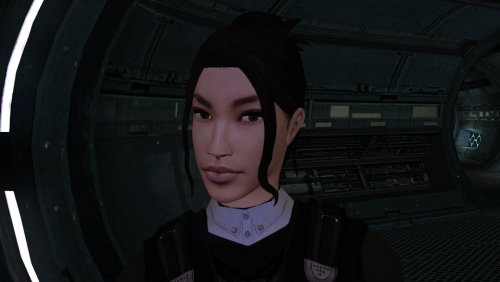
The mod replaces the PFHA02 model and textures. To Install 1. Download: PFHA02 2. Copy all files to the Knights of the Old republic's Override folder. (Example location - C:\Program Files (x86)\Steam\steamapps\common\swkotor\Override) 3. When/if prompted to overwrite files, press okay. 4. If you like the mod; leave a comment or endorse! (It would be much appreciated) Made with love.2 points -
Version 1.6
4,882 downloads
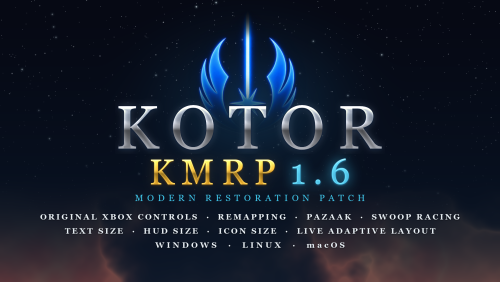
KMRP - KOTOR MODERN RESTORATION PATCH 1.6 Any resolution, properly scaled UI, text and HUD sizes of your choice, controller support and engine fixes for KOTOR 1 Any resolution | 800x600 to 8K | 4:3 | 16:10 | 16:9 | 21:9 | 32:9 | Windows, macOS and Linux ━━━━━━━━━━━━━━━━━━━━━━━━━━━━━━━━━━━━━━━━ NEW IN 1.6 The biggest update since 1.0, for Windows, Linux and macOS. Over 1.5 or 1.5.1, run the installer and press Upgrade: it keeps your settings, and there is no need to restore first. The original Xbox controls. LB pauses, RB switches party member, the triggers change target, X queues, Y flourishes, B disengages, and Start opens the menus where you left them. Every button can be remapped. Pazaak, swoop racing and the gun turret with a controller, as on the Xbox. Text Size and Font. Four text sizes in Graphics Options, and HD Font, the game's own font redrawn sharp, as the new default. Original Font, and Modded Font for fonts in your Override folder, are there too. HUD Size and Icon Size. Every part of both HUDs, and feat, power and skill icons, larger or smaller. Live Adaptive Layout. 73 of the game's 85 menu layouts are laid out as the game runs, a mod's included, so GUI mods are no longer forced to 640x480. Mods keep their changes. A mod's copy of a file KMRP also changes keeps both, and the mod wins where they disagree. No menu flashing on NVIDIA, and Windows Auto HDR and RTX HDR keep working. Movies and Alt-Tab. 16:9 movies on ultrawide screens, no screen reset after a movie, and Alt-Tab in full screen comes back at once. A 57 MiB installer instead of 140, every resolution ready before the first start, and Apply New Settings to change an option without installing again. A native Linux installer, and the Mac version updated to 1.6, now for the Mac App Store game as well. Marked Empty Containers by ShaeMyName, on by default. The full list is in the changelog on GitHub. ━━━━━━━━━━━━━━━━━━━━━━━━━━━━━━━━━━━━━━━━ WHAT IS KMRP? Vanilla KOTOR was built around fixed pixel sizes and interface layouts designed for resolutions such as 640x480. On modern displays this causes tiny text, overlapping list entries, undersized icons, broken map scaling and other interface problems. KMRP fixes these problems in the game engine itself. One installer, one click, and one click to undo everything. It changes how the game looks, fits and controls, and nothing about its story, quests or balance. ━━━━━━━━━━━━━━━━━━━━━━━━━━━━━━━━━━━━━━━━ SINCE 1.5 No resolution to choose. The game starts at your display's own resolution. Its Screen Resolution setting lists every size and refresh rate your display supports, and a change takes effect at once, with no restart and no patching again. Controller support, built in. A controller works on every screen, with the right button pictures for your pad (Xbox, PlayStation, Switch or Steam Deck), rumble and a Controller Layout screen. Xbox-style HUD. Modelled on the console version. On by default, can be switched off. Above 60 frames per second. An option installs D3M0's High FPS Fixes, switched on by itself above 60 Hz. swkotor.exe is not rewritten. On Windows the changes are applied in memory each time the game starts, through KOTOR Patch Manager's runtime. ━━━━━━━━━━━━━━━━━━━━━━━━━━━━━━━━━━━━━━━━ WHAT IT FIXES Every shape from 4:3 to 32:9 is covered, from 800x600 up to 8K: 66 common resolutions have menus built for them, and any other size gets menus fitted to it. ━━━━━━━━━━━━━━━━━━━━━━━━━━━━━━━━━━━━━━━━ PLATFORMS Windows: the Steam, GOG and disc 1.03 versions. The installer checks the game's file before doing anything and refuses any other build. Linux: a native installer (AppImage) for the game under Proton, or the Windows installer through Protontricks. SteamOS is tested and working. No Steam Deck itself was tested. macOS: the Steam game and the Mac App Store game, on Intel and Apple Silicon Macs, with its own installer. The Linux and macOS installers are on the GitHub release page. ━━━━━━━━━━━━━━━━━━━━━━━━━━━━━━━━━━━━━━━━ INSTALLATION Install other content mods (K1CP, K1R and so on) first. Start the game once so its settings file exists. Run the KMRP installer and press Start Patching (Upgrade over an older KMRP). There is no resolution to pick. To change an option later, change it in Advanced Settings and press Apply New Settings. To undo everything, run it again and press Restore Original. Linux and SteamOS: run the AppImage, or the Windows installer with protontricks-launch --appid 32370, then set KOTOR's controller layout in Steam to Gamepad. Otherwise the game gets no controller. KOTOR Patch Manager: KMRP's two patches are listed there, and other patches can be added beside them. ━━━━━━━━━━━━━━━━━━━━━━━━━━━━━━━━━━━━━━━━ INSTALLER OPTIONS Controller support, and with it the Xbox-style HUD High FPS Fix (D3M0's High FPS Fixes) HD item icons Map-note corrections (Derslok) Marked Empty Containers (ShaeMyName) Driver compatibility for lighting, fog and shadows on modern graphics cards (Synchro's K1 Modern Driver Compatibility 2.0.1) ━━━━━━━━━━━━━━━━━━━━━━━━━━━━━━━━━━━━━━━━ COMPATIBILITY KMRP 1.0 was tested with KOTOR 1 Community Patch 1.10.0 and KOTOR 1 Restoration 1.2. KMRP 1.5.1 was tested with KOTOR 1 Community Patch 1.10.0 and with the Polish translation. Files that other mods put in the Override folder always win over KMRP's. Since 1.6, a mod's menus are laid out for your screen like the game's, and a mod's copy of a file KMRP also changes keeps both sets of changes. ━━━━━━━━━━━━━━━━━━━━━━━━━━━━━━━━━━━━━━━━ CREDITS Bundled work is included with its authors' permission or under its licence. Full notices are in the repository. ━━━━━━━━━━━━━━━━━━━━━━━━━━━━━━━━━━━━━━━━ SOURCE AND CHANGELOG github.com/RayesDiyab/KMRP-KOTOR-Modern-Restoration-Patch Licence: GPL-3.0. Unofficial; you must own the game.1 point -
Version 1.0.0
267 downloads
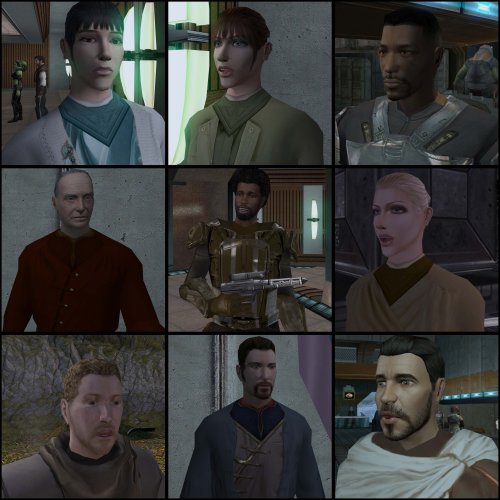
===================================================== [TSL] Lily's NPC Overhaul - HD Models & Added Diversity ===================================================== Mod for Knights of the Old Republic II - The Sith Lords Author: Lily File Name: NPC_Overhaul.zip Latest Version: 1.0 --- 1. DESCRIPTION: Tired of nearly every basic human NPC looking the same? This mod overhauls the human NPC (commoner) appearances in KotOR II. Heads: - Tweaks several of the models to adjust hair and fix some UV mapping. - 39 head textures are included, 35 reworked and 4 extra ones. They look much more distinct than the vanilla ones. - The heads are more evenly distributed across characters so, for example, 75% of white male heads were previously "white male 1" and now it should evenly by spread across all of the white male heads. - Ralon on Dantooine is given his unique appearance that I guess they made and forgot to give him... Clothing: - 11 updated clothing texture sets for the standard male and female commoner outfits. --- 2. INSTALLATION: Run Install.exe and select your KotOR 2 game directory. There are 2 installation options. - Heads: includes 39 updated heads with unique looks and gives human NPCs more unique appearances. - Clothing: includes 11 updated clothing textures for both male and female NPCs. These two options are independent and can be installed in either order, or separately. A "backup" folder is created by the installer in the same directory. Don't delete it if you plan to uninstall later. --- 3. UNINSTALLATION: Run Install.exe, select your KotOR 2 directory, and use the "Tools > uninstall/restore backup" option to revert all changes made by this mod. --- 4. KNOWN ISSUES: If you have already visited Dantooine, Ralon may not have his updated appearance. You should use a save from before arriving. If you find any bugs or problems, please report them. --- 5. MOD COMPATIBILITY: Should be compatible with all mods other than ones that also attempt to change commoner NPC appearances. Compatible with TSLRCM. Do not use the Steam Workshop for KotOR. It will almost certainly end with compatibility issues. --- 6. SUPPORT: My mods are free to use. You do not need to pay for them, but if you would like to say thanks, you can buy me a coffee! --- 7. PERMISSIONS: Please let me know if you plan on using any of the files in my mod for your own mod. The answer is "yes you may", but I would like to know what you are doing with it! Do not directly reupload this mod anywhere else. --- 8. THANKS: - Dark Hope - Uses assets from her various commoner head mods. MOST of the clothing uses Dark Hope's textures. Pretty much all credit for the clothing portion of this mod goes to her other than swapping her alternate textures into the additional slots that KotOR II uses! Thank you! https://deadlystream.com/profile/16561-dark-hope/content/?type=downloads_file&change_section=1 https://deadlystream.com/files/file/2516-npc-clothing-m/ https://deadlystream.com/files/file/2515-npc-clothing-f/ - Vurt - Some of the clothing textures - redrob41 - Original model fixes - Fred Tetra - KotOR Tool - Cortisol - Holocron Toolset & HoloPatcher - Fair Strides - TSLPatcher - seedhartha - KotOR Blender THIS MODIFICATION IS NOT SUPPORTED BY BIOWARE/OBSIDIAN ENTERTAINMENT OR LUCASARTS OR ANY LICENSORS/SPONSORS OF THE MENTIONED COMPANIES. USE THIS FILE AT YOUR OWN RISK.1 point -
Version 1.6
6,025 downloads
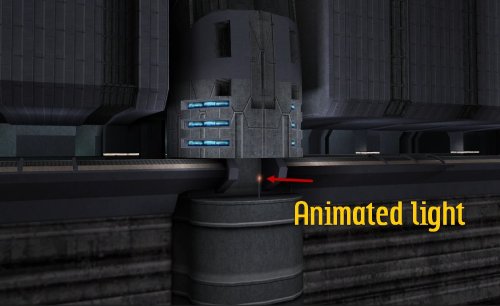
Swoop platform models repairs =============== By ZobiZob ------------------ Description There are notoriously some problems with most of the levels geometry, models and textures. They are not ultra noticeable, but once you see it, you can't unsee it. As i am working on a custom module using the swoop platform geometry, i decided to fix some of these problems, and also add numerous details like venting effects, animated light and distant swoop riders with upscaled textures for their bikes + different colors for riders. The full pack also displays your swoop in the module. Fixed music changes from 1.5 with version 1.6. Installation 3 options, either the full pack with the swoop you use during the race displayed, no swoop bike displayed and also an option without the doors. 1) Use the holopatcher.exe included and you're ready to go. If you're not satisfied with an option or the other, you can always come back and reinstall the desired option. Known Bugs and Incompatibilities Everything should be fine. If you replace the m03af.git file after installing the doors that i added in the distance will disappear. The upscaled textures only affect the swoop bikers and won't change the textures for Niktos/swoopgang creatures. Permissions You are free to incorporate this into any of your work without asking, just credit me and shiningredHD for the upscaled textures (swoop riders, swoop bikes). Acknowledgements All materials and copyrights belong to LucasArts, and Bioware. Upscaled textures from ShiningRedHD. I own none of the materials, and I'm not making any money out of this mod. This mod is not to be distributed for profit, either.1 point -
Version 1.0.0
7,153 downloads
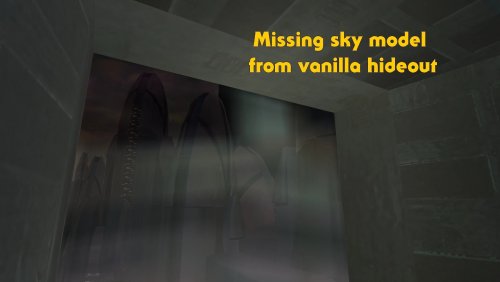
High quality skyboxes model fixes v1.0 By Zobizob Description: Kexikus released this amazing skyboxes mod : High quality skyboxes, but while i was working on the models, i noticed there was a little problem with Taris exteriors. Some lights from the buildings were not animated anymore. While i was at it, i also noticed there was a problem with the hideout skybox (not caused by the mod tho, just a missing object in the model from vanilla). Everything is fixed now. Work done and disclaimer : All the vanilla lights animations from Taris buildings are animated again The skybox in the hideout is fixed Install Kexikus mod first, then drop my files into override and replace when asked. Credit: Kexikus for the original High quality skyboxes mod. Kotor discord channel for insights on developping mods for this awesome game. Permissions: You shall not use this into your own work without asking Kexikus authorization, as he is the original authors. I only fixed the models, nothing else. Legal: THIS MODIFICATION IS PROVIDED AS-IS AND IS NOT SUPPORTED BY BIOWARE/OBSIDIAN ENTERTAINMENT, LUCASARTS, DISNEY OR ANY LICENSERS/SPONSORS OF THE MENTIONED COMPANIES. USE OF THIS FILE IS AT YOUR OWN RISK AND THE ABOVE MENTIONED COMPANIES OR THE AUTHOR IS NOT RESPONSIBLE FOR ANY DAMAGE CAUSED TO YOUR COMPUTER FOR THE USAGE OF THIS FILE.1 point -
Version 1.0.0
45 downloads
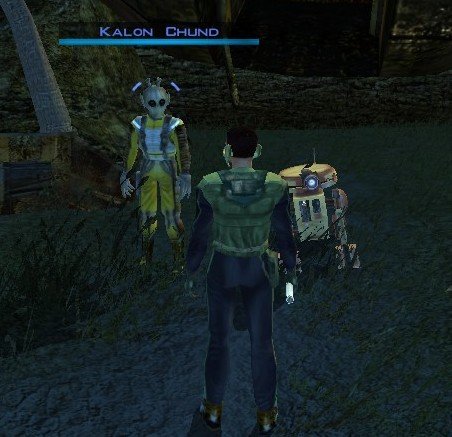
Stranded Merchant Game: KOTOR 1 Author: Dodrari Kaan Version: 1.0.0 GitHub: https://github.com/danielstegink/Kotor.StrandedMerchant We get a lot of stuff on the Rakata homeworld, most of which we don't need. It's kind of annoying since it bogs down our inventory and we don't get to buy any more cool stuff. Enter a new NPC on the Nameless World: Kalon Chund, a stranded merchant hiding in the safety of the crashed starship outside the Elder's settlement. He has a huge inventory for you to choose from, and his assistant Scrapper is more than happy to buy any junk you've accumulated over the course of the game. Instructions Use the TSLPatcher Permissions Use this mod however you want. Just make sure to credit me. Compatibility This mod uses GFF to modify the area outside the Elder's settlement (unk_m41ab), removing the ship parts and one of the plasma vents. Any mods that affect the same area may not be compatible. Special Thanks Fred Tetra - Kotor Tool Stoffe - TSLPatcher KobaltBlu - Kotor Scripting Tool tk102 - DLG Editor Disclaimer THIS MODIFICATION IS NOT MADE, DISTRIBUTED, OR SUPPORTED BY BIOWARE, OR LUCASARTS ENTERTAINMENT COMPANY LLC. ELEMENTS TM & © LUCASARTS ENTERTAINMENT COMPANY LLC AND/OR ITS LICENSORS.0 points
