

Leaderboard



Popular Content
Showing content with the highest reputation on 05/29/2026 in Files
-
Version 1.1.0
86 downloads
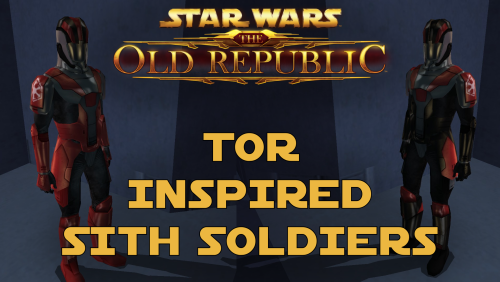
TOR Inspired Sith Soldiers A Mod for Star Wars Knights of The Old Republic and Star Wars Knights of The Old Republic 2 Author: N-DReW25 1.1.0 Release Date: 15.05.2026 Installation: This mod comes in two versions which each version having three sub-versions. The two versions are the "Normal Version" which is the default texture resolution and the "HD Version" which is the high quality texture resolution version. Inside both folders, these three sub-versions exist for both the Normal and the HD Version. The TOR Logo version: Adds TOR inspired Sith Soldiers with the logo of the TOR era Sith Empire on their shoulders. The Kotor Logo version: Adds TOR inspired Sith Soldiers with the logo of the Kotor era Sith Empire on their shoulders. The No Logo version: Adds TOR inspired Sith Soldiers without no logos on their shoulders. Select which version you want and copy "N_SithSoldier01.tga" and "N_SithSoldier02.tga" into your Override folder. Delete the files "N_SithSoldier01.tpc" and "N_SithSoldier02.tpc" if they exist in your Override. Uninstallation: Delete the "N_SithSoldier01.tga" and "N_SithSoldier02.tga" files from your Override folder. Description: The idea for this mod came from the Revenge of Revan mod. In the hypothetical event that the plot of ROR has the Player confront the Sith Empire from TOR 300 years prior to their major appearance in TOR, I would need to create enemies for the player to fight. For ROR's Imperial Soldiers, I had two options - port the Imperial Soldiers from the TOR MMO, or make my own Imperial Soldiers. By reskinning the Kotor Sith Soldiers to resemble Imperial Soldiers, I have both made a convincing enemy for the Player to fight and did so in the laziest way possible. In the ROR mod, should these Imperial Soldier skins be used for enemies, the lore reason as to why they resemble Sith Soldiers is that, like how Revan duplicated the Leviathan ship via the Star Forge, he duplicated Kotor-era Imperial Soldier armor via the Star Forge which would produce white Imperial Soldier armor which is what the Sith Soldiers wore in Kotor. This excuse can be used as we don't know exactly where and/or how Revan designed the Sith Soldier armor - the Rakatans certainly didn't as they don't have Human proportions. And as to why the Imperial Soldiers in TOR don't resemble the ROR Imperial Soldiers, like how Phase I Clone Trooper Armor evolved into Phase II Clone Trooper Armor, the ROR Imperial Soldier Armor design would evolve into the TOR Imperial Soldier Armor design within the next 300 years. I decided to release these skins to the public as any appearance of actual Sith Empire forces would take years of ROR development to reach that point, if they even appear at all, so why should these cool skins go to waste rotting on my hard drive when you might want to use them in your Kotor game instead. Known Bugs: This mod shouldn't have bugs but if you find any please report them to me on Deadlystream. Incompatibilities: Would be incompatible with any mods which modify "N_SithSoldier01.tga" and "N_SithSoldier02.tga" or add "N_SithSoldier01.tpc" and "N_SithSoldier02.tpc". This mod is fully compatible with Star Wars Knights of the Old Republic 2: The Sith Lords. Permissions: Do NOT claim credit for this mod and do not use assets from this mod without my permission. Thanks to: Bioware: For such an amazing game and for making The Old Republic which inspired this mod! Sith Holocron: For upscaling my textures! Fred Tetra: For Kotor Tool! Everyone who downloads the mod! Legal: THIS MODIFICATION IS NOT SUPPORTED BY BIOWARE/OBSIDIAN ENTERTAINMENT, LUCASARTS, DISNEY OR ANY LICENSERS/SPONSORS OF THE MENTIONED COMPANIES. USE OF THIS FILE IS AT YOUR OWN RISK AND THE ABOVE-MENTIONED COMPANIES OR THE AUTHOR IS NOT RESPONSIBLE FOR ANY DAMAGE CAUSED TO YOUR COMPUTER FOR THE USAGE OF THIS FILE.1 point -
Version 1.1
260 downloads
All maps x4 upscaled to HD Vanilla Maps HD (K1) upscales the original KOTOR 1 map textures while keeping the vanilla look intact. The maps are high res (2k) and much sharper. All maps were upscaled 4x using Topaz Gigapixel. Main features Upscaled vanilla map textures. 4x Topaz Gigapixel upscale. Installation instructions Copy the Override folder into your main Knights of the Old Republic directory. Replace files if prompted.1 point -

Version 3.7
1,026 downloads
VANILLA PLANETS HD A VANILLA-FAITHFUL ENVIRONMENTAL TEXTURE OVERHAUL ━━━━━━━━━━━━━━━━━━━━━━━━━━━━━━━━━━━━ OVERVIEW ━━━━━━━━━━━━━━━━━━━━━━━━━━━━━━━━━━━━ Vanilla Planets HD is an environmental texture upscale for Star Wars: Knights of the Old Republic II — The Sith Lords. The mod upscales the game’s planet, area, environmental, screen, display, and panel textures using Topaz Gigapixel at up to four times their original resolution. The goal is to keep KOTOR II as close to its original visual style as possible while making the textures cleaner, sharper, and more detailed. I created this mod because I wanted an HD environmental overhaul that preserved the original materials without making surfaces excessively reflective or glossy. There are no ReShade presets, lighting edits, shader changes, or major visual redesigns. FEATURES ━━━━━━━━━━━━━━━━━━━━━━━━━━━━━━━━━━━━ • Planet and area textures upscaled at up to 4x resolution • All major environments included • Screens, displays, monitors, and panels included • Ebon Hawk interior and exterior included • Optimized TPC textures • Vanilla-faithful appearance • Separate add-ons for TSLRCM and the KOTOR 2 Community Patch INCLUDED AREAS ━━━━━━━━━━━━━━━━━━━━━━━━━━━━━━━━━━━━ Peragus and the Harbinger Telos Ebon Hawk Interior and Exterior Dantooine Dxun Onderon Nar Shaddaa Korriban Malachor V Shared planet and environmental textures Screens, displays, monitors, and panels DOWNLOADS ━━━━━━━━━━━━━━━━━━━━━━━━━━━━━━━━━━━━ There are three files total. MAIN FILE The complete Vanilla Planets HD texture overhaul. This file is required for all users. TSLRCM ADD-ON Additional textures for users of The Sith Lords Restored Content Mod. Requires the Vanilla Planets HD main file and TSLRCM. KOTOR 2 COMMUNITY PATCH ADD-ON Additional textures for users of the KOTOR 2 Community Patch. Requires the Vanilla Planets HD main file and the KOTOR 2 Community Patch. INSTALLATION ━━━━━━━━━━━━━━━━━━━━━━━━━━━━━━━━━━━━ UPDATING FROM A PREVIOUS VERSION If you are updating from a previous version of Vanilla Planets HD, delete the following files from your override folder if they are present: DAN_blst03.tpc DAN_fall.tpc DAN_gobo1.tpc DAN_gobo2.tpc DAN_LBms.tpc DAN_leaf02.tpc DANfx_mots.tpc KOR_lightbeams.tpc DXN_treeline2.tpc PLC_Water01b.tpc After removing these files, install the new version normally using the instructions below. MAIN FILE 1. Download and extract the Vanilla Planets HD main file. 2. Copy the included override folder into your main KOTOR II installation directory. 3. replace files if prompted. ADD-ONS If you use TSLRCM or the KOTOR 2 Community Patch, install the corresponding Vanilla Planets HD add-on after installing the main file. If you use both TSLRCM and the KOTOR 2 Community Patch, install the TSLRCM add-on first, followed by the KOTOR 2 Community Patch add-on. Replace files when prompted. Highly Recommended After Installation After installation, download and install Remove Duplicate TGA-TPC. Run the included .bat file and delete any duplicate TGA files. IMPORTANT The TSLRCM and KOTOR 2 Community Patch files are add-ons and are not standalone downloads. Always install the Vanilla Planets HD main file first. SKYBOXES AND BACKDROPS ━━━━━━━━━━━━━━━━━━━━━━━━━━━━━━━━━━━━ Vanilla Planets HD does not replace the game’s major skyboxes, distant backdrops, or cockpit window views. These assets were intentionally left untouched because Kexikus has already created excellent high-resolution skybox and backdrop mods, while tjsase has created a dedicated mod for the cockpit views. The following mods are highly recommended: High Quailty Skyboxes II TSL Backdrop Improvements TSL HD Cockpit Skyboxes COMPATIBILITY ━━━━━━━━━━━━━━━━━━━━━━━━━━━━━━━━━━━━ Vanilla Planets HD is compatible with most gameplay, character, interface, bug-fix, and audio mods. Conflicts may occur with other planet or environmental texture overhauls that replace the same files. When two mods contain textures with the same filename, the files installed last will take priority. CREDITS ━━━━━━━━━━━━━━━━━━━━━━━━━━━━━━━━━━━━ Obsidian Entertainment and BioWare — Original KOTOR II textures and assets ━━━━━━━━━━━━━━━━━━━━━━━━━━━━━━━━━━━━ VANILLA PLANETS HD The original worlds of KOTOR II in higher definition.1 point -

Version 1.3
4,958 downloads
From the original thread on Lucasforums: K-GFF (GFF Editing Utility) v1.3.0 (Jan 8, 2008) Yet another GFF Editor... This one features some extra support for KotOR/TSL namely in the form of VECTOR and ORIENTATION fields. These field types, as you may recall, were not present when GFFEditor.exe was published on Bioware's web site. Consequently certain GFF files (eg.: .git, .ifo) would become corrupted by editing. K-GFF supports these fields, hence you will no longer need to use CamEdit if you edit a module's .git file. Support for StrRef fields (Field Type: 18) has also been added for Jade Empire modding as of v1.1.9. Another enhnacement over GFFEditor is the support for multiple CEXOLOCSTRING substring editing. It is now feasible for instance to publish a .dlg file with localized strings that is readable in all languages. Other little features include: rudimentary support for BINARY fields (you can import and export these fields to files to perform hex editing), Cut/Copy/Paste of nodes, optional TLK file integration so you can translate StringRefs if you choose.1 point -
Version 1.0.0
92 downloads
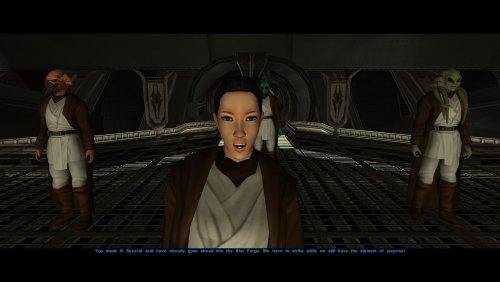
Description I love the Kotor 2 style jedi robes, who doesn't? its probably THE jedi robe used in modlists now, and yet I think the black collar in JC's original kotor 2 mod looks weird to me. Luckily two mods came out that fixed that issue, Heyoranges collar fix mod and Shems Cloak revival retexture. Then I realized that DarthParametric's JC's cloaked jedi mods still have the collar problem, meaning they'll look out of place with the texture replacements. This mod is moreso an override patch to replace DarthParametrics JC's cloaked roebs to match with whatever collar fix you choose Installation: YOU MUST INSTALL JC'S CLOAKED MOD AND DARTHPARAMETRICS JEDI MODS FOR MY MOD TO WORK: -JC's Fashion Line I: Cloaked Jedi Robes for K1 -Diversified Jedi Captives on the Star Forge (Also install TSL Robes compatibilty patch in the optional files) -Jedi Diversity on the Star Forge -Dark Jedi Wear Robes After the mods are installed, its just a simple override loose file process, all you have to do is download and extract this mod, and pick the specific folder of the mod your using (Or all if thats the case), select the folder of which collar fix your using, and drag the files into your override folder in the swkotor folder and override all files when prompted to Recommended mods: I highly suggest you pick either Heyoranges collar fix mod or Shems Cloak revival retexture, as they give JC's cloaked robe collars and they just overall look nice. I've made two seperate folder for whatever texture your using for whatever mod you chose to use. Thigns to note: I chose to do the simple gloved brown robe textures cause thats what was originally used for DarthParametrics mods. It may be a little hard to tell texture file is which, so refer to the images (Or look at Shems Cloak revival retexture or Heyoranges collar fix to pick which one you prefer more) Credits: - JCarter426 for his amazing Jedi cloaked mod -DarthParametric for his awesome jedi mods -heyorange for his collar fix retexture and giving me the insperation to make this patch -N-DReW25 for giving me permission to use Shenms Cloaked Revival textures for this patch0 points