


Stanlej95
-
Posts
14 -
Joined
-
Last visited
Stanlej95's Achievements


-
Animation in a room's mdl not playing
Stanlej95 replied to Stanlej95's topic in General Kotor/TSL Modding
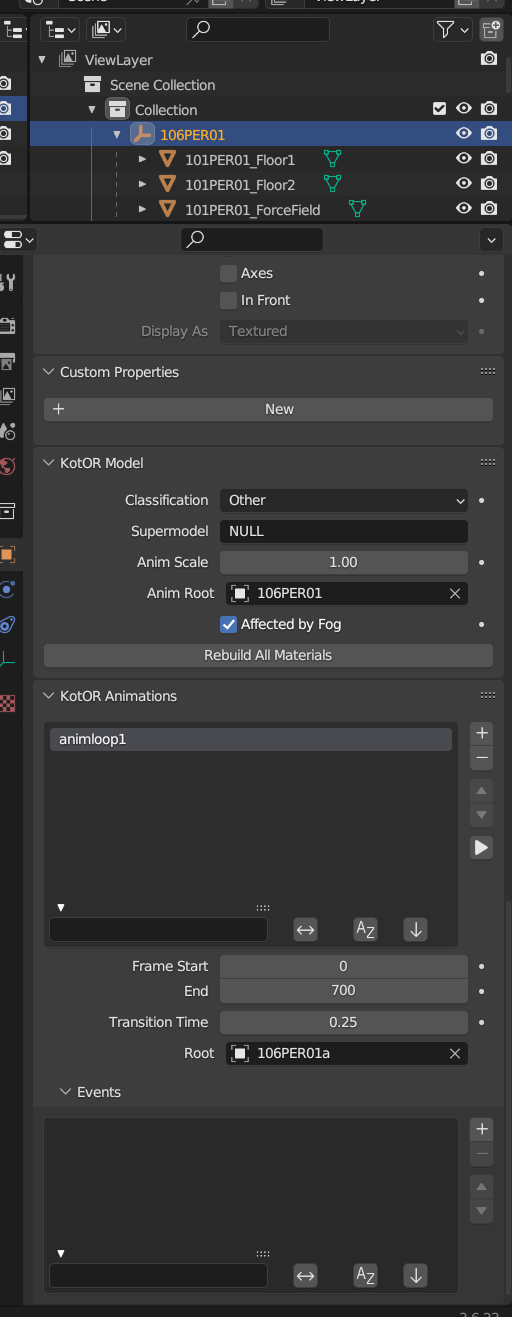
That's an interesting point, I never noticed that the hangar itself has a position controller. I think the problem is with nesting the movable elements under shuttle parent because if every movable object node is on the same level under 106PER01a the nesting problem and hangar position controller does not appear and the structure in mdledit looks fine. But what is the point of having movable wings that are not attached to the shuttle? 🤔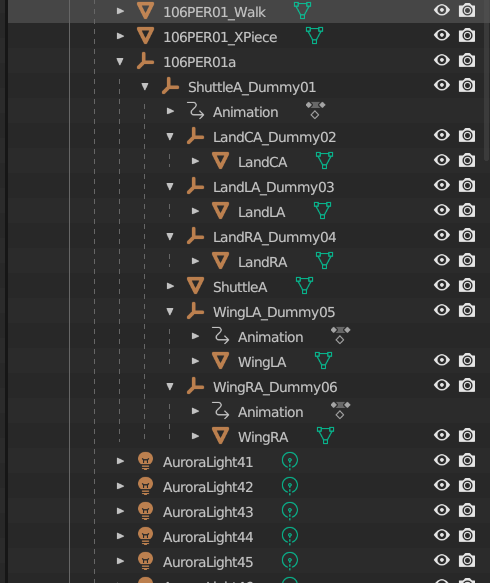
-
Animation in a room's mdl not playing
Stanlej95 replied to Stanlej95's topic in General Kotor/TSL Modding
In the meantime I managed to fix the crash on exiting the module. Leaving what worked for me here. I removed every placeable, creature, script, sound, dialogue, etc from .mod and placed it in dedicated folder named as my module tag in override (/override/ph1). So the only files left in .mod are mdls, are, ifo, git, vis, lyt and doors, placeables and sounds wich were initially cloned from the original module. -
Animation in a room's mdl not playing
Stanlej95 replied to Stanlej95's topic in General Kotor/TSL Modding
Sure, here are my shuttle and room blender files. I'm also attaching more screens and complete room files from for more context. Shuttle.blend hangar.blend swkotor2 2026-11-14 11-28-34-64.bmp swkotor2 2026-11-14 11-28-37-96.bmp swkotor2 2026-11-14 11-28-49-80.bmp 106PER01.mdl 106PER01.mdx 106PER01.wok Here is a quick video with detailed behavior of the model in game. swkotor2 2026-11-14 11-34-25-37.mp4 -
Stanlej95 changed their profile photo
-
Animation in a room's mdl not playing
Stanlej95 replied to Stanlej95's topic in General Kotor/TSL Modding
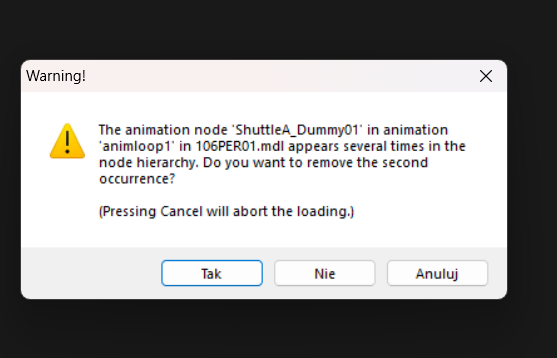
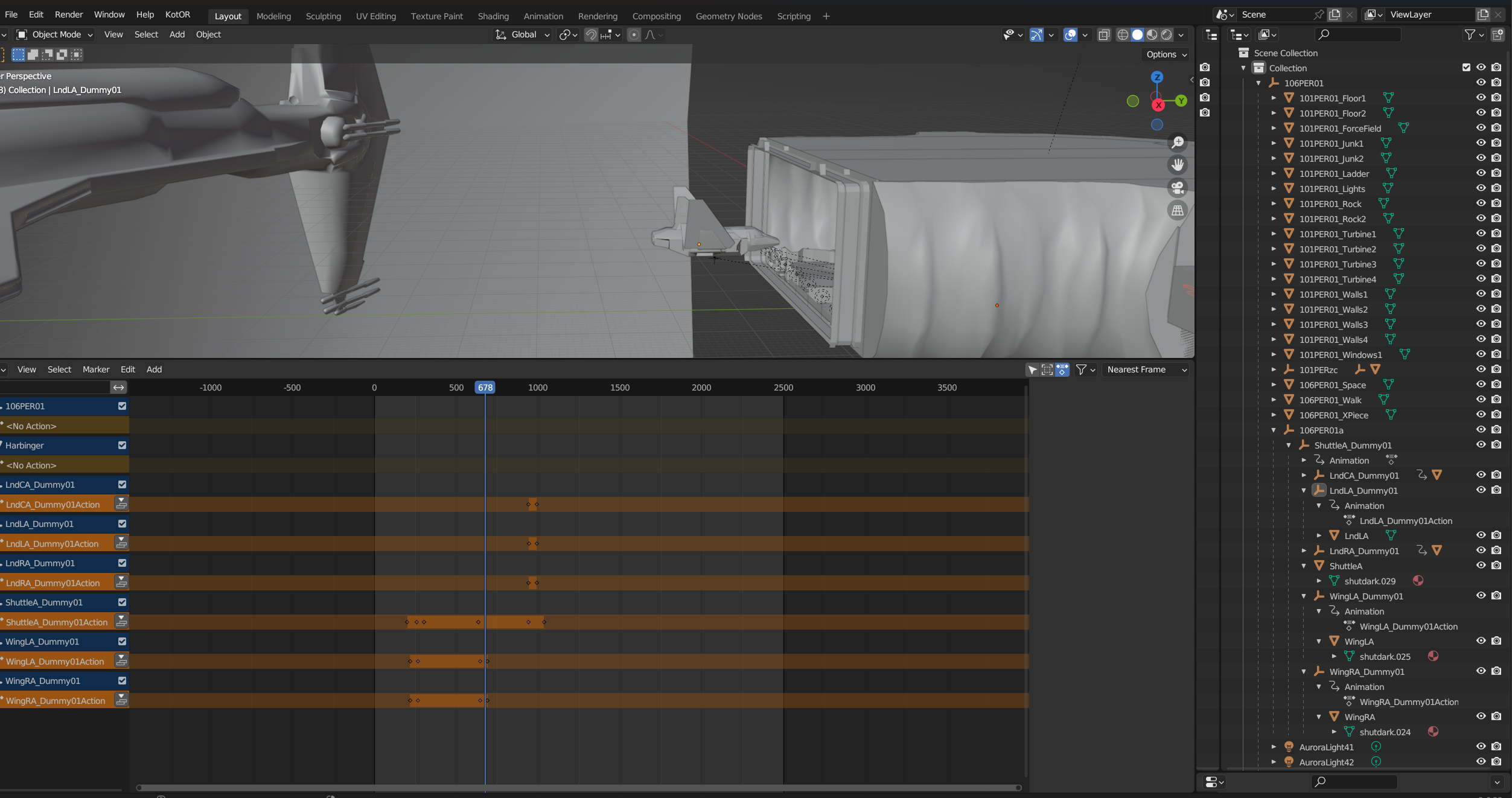
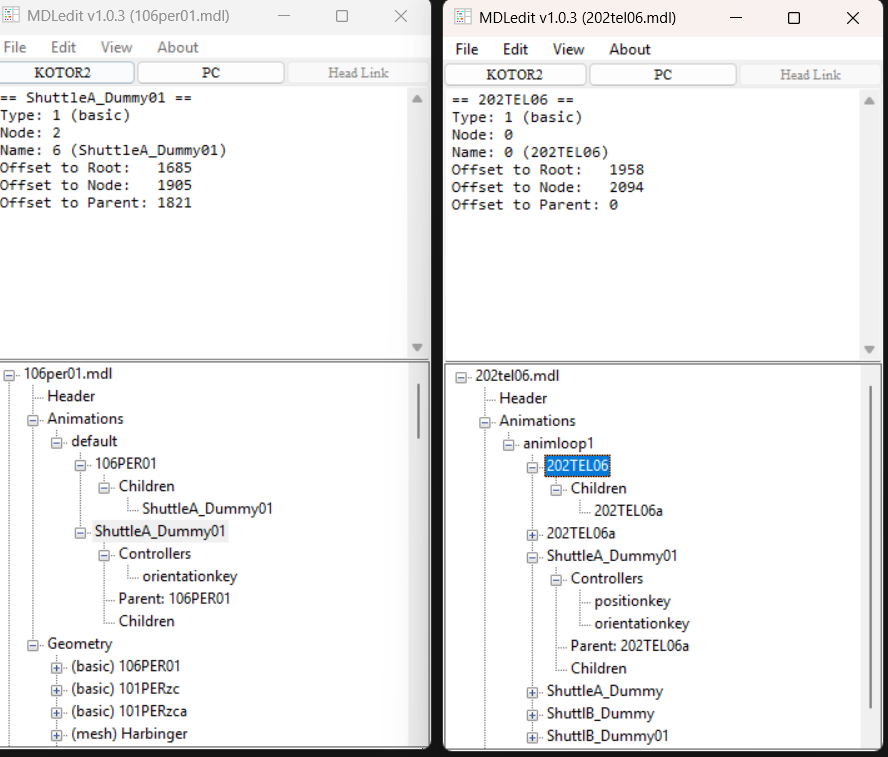
@DarthParametric Thanks, adding the 106PER01a node and putting animated elements in it did the trick. But it created another issue. I want my shuttle to fold wings and retract it's landing gear. I extracted a high-res shuttle from the .utp and separated all parts, put them under their own dummy nodes and moved them to the correct places along with meshes pivot points. I animated keyframes and in Blender everything works smoothely. But in-game the animations work but every moving element beyond the fuselage is rotating and moving in relation to the shuttles main dummy node instead of their own. I tried applying transforms in blender, renaming nodes, meshes and so on. When I open the room model in MDLEdit it gives me this warning and confusing tree structure even though in Blender the hierarchy seems proper. swkotor2 2026-11-14 08-23-37-07.bmp swkotor2 2026-11-14 08-23-33-94.bmp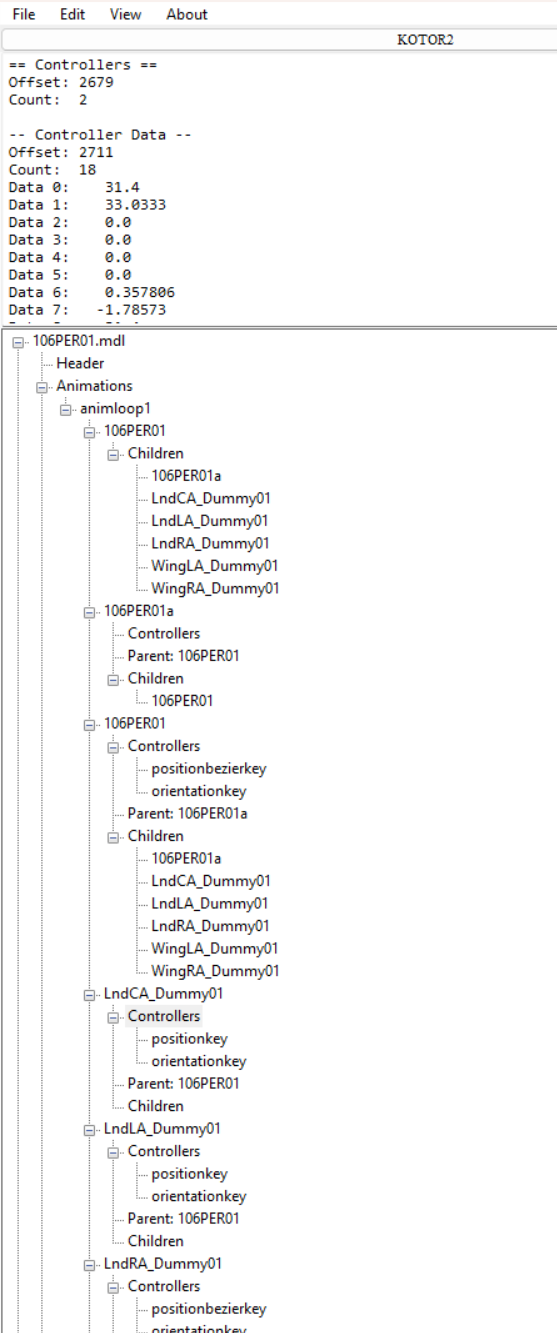
-
Animation in a room's mdl not playing
Stanlej95 replied to Stanlej95's topic in General Kotor/TSL Modding
Thanks for the help with the animation, I give it a shot as soon as I can. If it works I'll come back with the confirmation for future modders with the same problem. As for Holocron - adding instances in Designer, saving and editing files like .dlg, .are. ifo .utc and saving through it caused my module to eventually crash on exit, whether I load another module from a save or leave through transition. It crashes on loading new module always about 10% of the progress bar done. When I launch the game I can change modules as much as I want but visiting my cloned module just once causes the next module - no matter what it is - to crash during loading screen. If I enter my module then exit to main menu I can enter any module once again. I suspect Holocron because the problem started to occur after adding placeables, creatures and waypoints. -
Animation in a room's mdl not playing
Stanlej95 replied to Stanlej95's topic in General Kotor/TSL Modding
And what about GIT editing, as in placing utp, utc, utw files on the map? You use KBlender for this too or just edit object instances via GFF editor and manually enter the coordinates, rotation etc.? Genuine question. I use Holocron for about a month now - as I gradually get to know the basics of Kotor modding - specifically because of this instant visual feedback while placing objects, changing them and so on. I already see it's lacking in many areas and causes crashes and I'd like to learn the proper workflow and start to root out the Holocron Completely and stop relying on it. (sorry for the offtop) -
Animation in a room's mdl not playing
Stanlej95 replied to Stanlej95's topic in General Kotor/TSL Modding
@DarthParametric Thanks for the quick reply. I made mistake in the topic the function i used in onEnter script was PlayRoomAnimation("106per01", ANIMATION_ROOM_SCRIPTLOOP01); Does this "a" suffix is just a cosmetic, arbitrary convention thing or is it actually a flag that the game engine specifically looks for to play the animation? Do you maybe have a thought on this ohter issue of Holocron Designer displaying removed mesh of the Ebon Hawk and not displaying added models like the Harbinger and the shuttle? Is it cache related issue or does my room somehowe connects to the vanilla 106PER module and confuses the assets? -
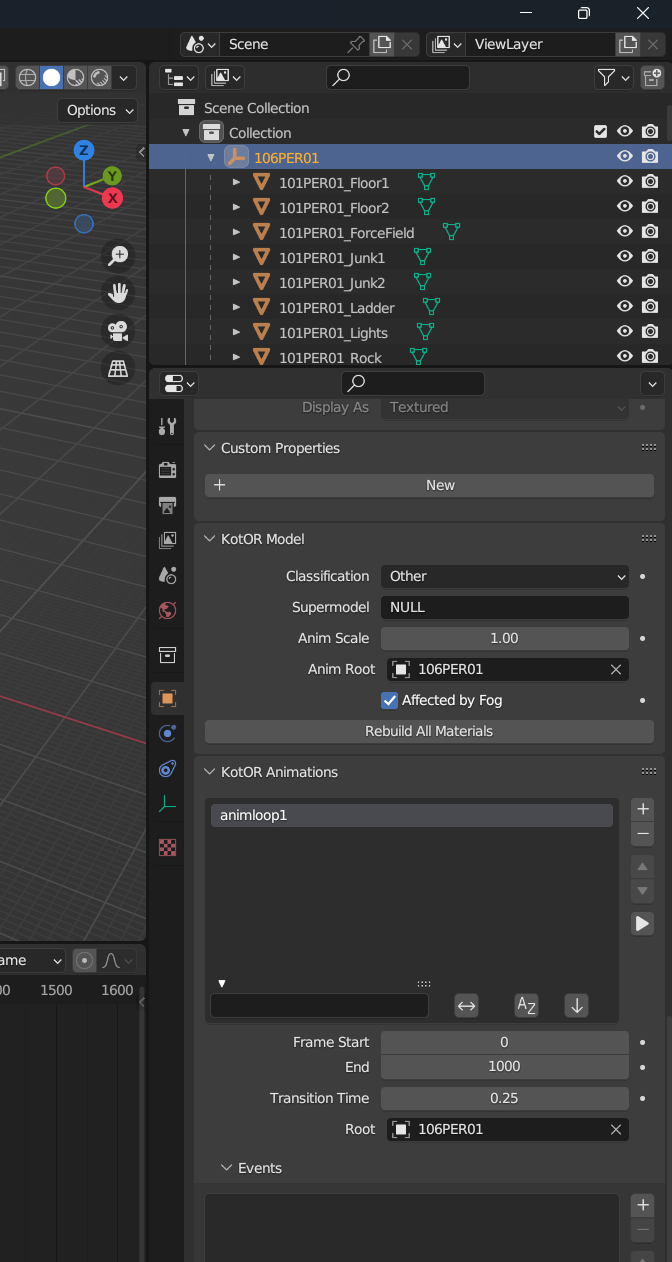
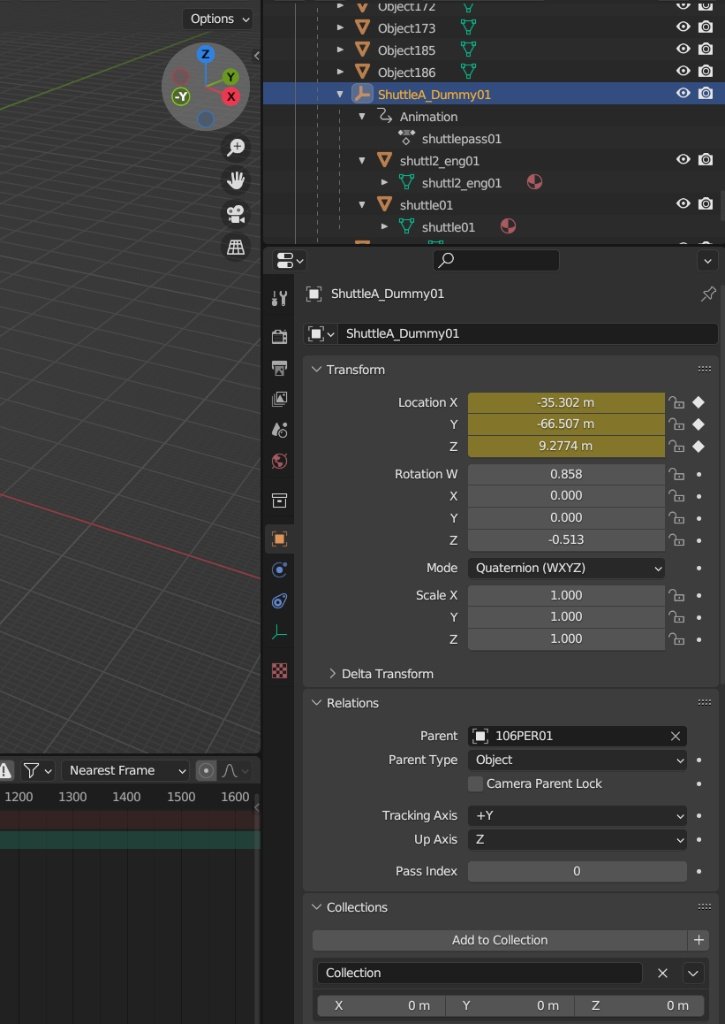
I modified one of the rooms in my custom module ph1 i cloned from 106per. I extracted the harbinger model from another modules room mdl grabbed it's textures and placed it outside the peragus hangar. I removed ebon hawk from the hangar patched up the walkmesh and fixed the lightmaps. Cleared the minimap of ebon hawk silhouette. I also added a shuttle from telos module and animated it in blender with kotor addon. The animation doesnt play in game but when i open the rooms mdl file in mdleditor it shows the animation. I tried variety of names for Kotor Animation input in blender: animloop01, scriptloop01, default etc. The shuttle correctly spawns on the first keyframe but it refuses to move. I also copied different shuttle with it's already existing vanilla animations and it to refused to move even though it did in original module. I tried forcing the animation with onEnter script: PlayRoomAnimation("scriptloop01", 1); and variations with animation constant SCRIPTLOOP01 (even though it's just an int that equals "1") I inserted all keyframes on the dummy node conatining shuttle meshes. The node is a child directly to a 106PER01 node (The module is cloned with Holocron so the rooms prefixes stayed vanilla instead of "ph1". The shuttle refuses to move no matter what I do. Also I don't know if this is related to this issue but Holocron Module Designer still shows the Ebon Hawk even though it is removed from the mdl completely and doesn't appear in the game.
-
Cloning modules via Holocron Toolset?
Stanlej95 replied to Stanlej95's topic in General Kotor/TSL Modding
Update: @vault13deathclaw solution with missing minimap worked like a charm, thanks! -
Cloning modules via Holocron Toolset?
Stanlej95 replied to Stanlej95's topic in General Kotor/TSL Modding
Thanks I'll check it out asap Does leaving models names (.mdl, .mdx, .wok) and rooms names in .lyt, .vis and .are with default 101PER prefix, even though my module tag and id is "PA1" can produce any other unpredictable behavior? Is manually copying the original module with MDLops and decompiling/editing/compiling binaries for each and every file, title etc. is overkill? Will Holocron clone suffice? Also why does the streamvoice folder gets ignored? -
Hi, I came across some problems with a module cloned from "101PER". I named my cloned module "pa1" and changed all relevant strings, ids and names to the new name. The game doesnt seem to properly find my custom .wav in "streamvoice/pa1", but they work if placed directly in "streamvoice/". Also bark bubbles doesn't appear even though the audio and lipsynch is playing, the text is missing. The .dlg is configured properly with no replies and conditional displaying of entries. Is it some conflict with the vanilla module? Do I have to manually add this new module to some in-engine database like specific .2da? Video Game Saves My custom npc works on original modules and the bark text is displaying. Maybe I'm missing something crucial with setting up such a cloned module? I edited .are and .ifo, .lyt, and .vis to match "pa1". The rooms and models inside .erf, .lyt and .vis are still named 101PERxxx instead of pa1xxxx if this is important. Warp commands, scripts e.g. patrol, animations, normal dialogues are working fine on the cloned module, but I suspect a conflict between the vanilla module "101PER".
-
Custom voice files not playing (Holocron Toolset)
Stanlej95 replied to Stanlej95's topic in Modding Tools
An update: I managed to properly link and play custom VOs by putting them straight to "streamvoices/" not module specific folder. Maybe someone will have similar problems so I leave my entire proccess that works for me: This is the pipeline that worked for my Steam version of the game. 1. Open file in Audacity. 2. Export as mp3, exact parameters that work for me are: 22050 Mhz, constatnt bitrate 96kbs, mono channel. 3. Put the file in "in" folder of SithCodec and run encode_vo.bat 4. Move the file from "vo" folder of SithCodec directly to "Streamvoice" not into any subfolder. from Holocron's Designer's dlg editor to standalone DLG Editor (Holocron's couldn't play any animations or add camera filters (e. g. Droidvision, security camera, etc.). 6. Set up the conversation there using converted .wav file from 'Streamvoice" as a VO_ResRef 7. Add saved .dlg file to .mod via ERF Editor. Note: I changed all file's related to the module, npc, scripts, and dialogues names to lowercase letters and numbers only. Note 2: I Moved from Holocron's Designer's dlg editor to standalone DLG Editor (Holocron's couldn't play any animations or add camera filters (e. g. Droidvision, security camera, etc.). Also if someon have an idea why TSL's engine can't seem to find the .wav while it's in dedicated "streamvoice/[module_name]/[conversation_tag]" folder, please let me know -
Hello, I'm relatively new to modding Kotor II and playing around in Holcron Toolset. I managed to clone module 101 (Peragus Administration Level) and named it "PA1". I created a miner npc using one of the existing npcs as a template. I gave the npc ResRef of "per_mnr01" with a tag of "mnr01. Added armor and a weapon, changed appearance and managed to implement a simple patrol script using custom waypoints. I created a mnr01.dlg file, put it in my .mod and wrote a simple conversation with just one entry and one reply. The game succesfuly load my module, my npc, scripts and dialogue. The problem starts with adding a voieover file to npc's entry. I generated a line using ElevenLabs and dragged it in Audacity, then exported it as a wav with 22050 Hz, 128 kb/s and mono. Put the file through SithCodec using encode_vo.bat and put the file in "streamvoice/pa1/mnr01/pa1mnr01001.wav. Holocron loaded up mi file from streamvoice folder, and I can play preview in its dlg editor, I choose my file from voice input, ignoring the sound input and checkmark labeled exists is left unchecked. I changed my module.ifo to have VO_ID of "PA1" instead of orginal "101", the speaker tag is "mnr01". The ingame dialogue plays without sound. I tried switching to another vo e.g. Attons line from different module from Holocron dialog editor, and it plays just fine. I copied Atton's line from different module and renamed it to "pa1mnr01002" and placed it in my "streamvoice/pa1/mnr01/" folder (same file that before worked fine) and again - it shows in Holocron fine. What's weird that Atton;s line that worked when selected from different module is not working after renaming and copying to my folder so I assume file formatting is not the case. I also tested putting the soundfiles to Override and original "101" streamvoice folder. I don't know if this is important but my dialogue won't open unless type of conversation is set from "Human" to "Type 3". Also animations and expressions don't seem to work either. What could be the case, I feel like I'm checking things in circle and still missing something crucial. I even added strRef to dialog.tlk and setup a ResRef to a soundfile there, and nothing happened still.
-
Hello, I'm relatively new to modding Kotor II and playing around in Holcron Toolset. I managed to clone module 101 (Peragus Administration Level) and named it "PA1". I created a miner npc using one of the existing npcs as a template. I gave the npc ResRef of "per_mnr01" with a tag of "mnr01. Added armor and a weapon, changed appearance and managed to implement a simple patrol script using custom waypoints. I created a mnr01.dlg file, put it in my .mod and wrote a simple conversation with just one entry and one reply. The game succesfuly load my module, my npc, scripts and dialogue. The problem starts with adding a voieover file to npc's entry. I generated a line using ElevenLabs and dragged it in Audacity, then exported it as a wav with 22050 Hz, 128 kb/s and mono. Put the file through SithCodec using encode_vo.bat and put the file in "streamvoice/pa1/mnr01/pa1mnr01001.wav. Holocron loaded up mi file from streamvoice folder, and I can play preview in its dlg editor, I choose my file from voice input, ignoring the sound input and checkmark labeled exists is left unchecked. I changed my module.ifo to have VO_ID of "PA1" instead of orginal "101", the speaker tag is "mnr01". The ingame dialogue plays without sound. I tried switching to another vo e.g. Attons line from different module from Holocron dialog editor, and it plays just fine. I copied Atton's line from different module and renamed it to "pa1mnr01002" and placed it in my "streamvoice/pa1/mnr01/" folder (same file that before worked fine) and again - it shows in Holocron fine. What's weird that Atton;s line that worked when selected from different module is not working after renaming and copying to my folder so I assume file formatting is not the case. I also tested putting the soundfiles to Override and original "101" streamvoice folder. I don't know if this is important but my dialogue won't open unless type of conversation is set from "Human" to "Type 3". Also animations and expressions don't seem to work either. What could be the case, I feel like I'm checking things in circle and still missing something crucial. I even added strRef to dialog.tlk and setup a ResRef to a soundfile there, and nothing happened still.