


Reverse_Studios
-
Posts
7 -
Joined
-
Last visited
Reverse_Studios's Achievements





-
 It is strange! They could very well reference things that aren't in the vanilla game, but I don't wanna waste time looking through all that (my files are kind of a big mess right now 😅) Anyway, I have decided that I'll just try work around the issue instead of stress over the issue, and hope all goes well!
 -
Reverse_Studios changed their profile photo
-
Editing the Imperial Knight Armor Mod with GIMP
Reverse_Studios replied to redrebelzero's topic in General Kotor/TSL Modding
Have you figured it out yet? If not, were you looking for something along the lines of this? I do not know what color you want specifically (hex codes), but I tried to see what I could do with the information given. Btw, the tga files were too similar, so I couldn't tell what gender each one was so I just edited a random one. imperial_knight_recolor - prev.zip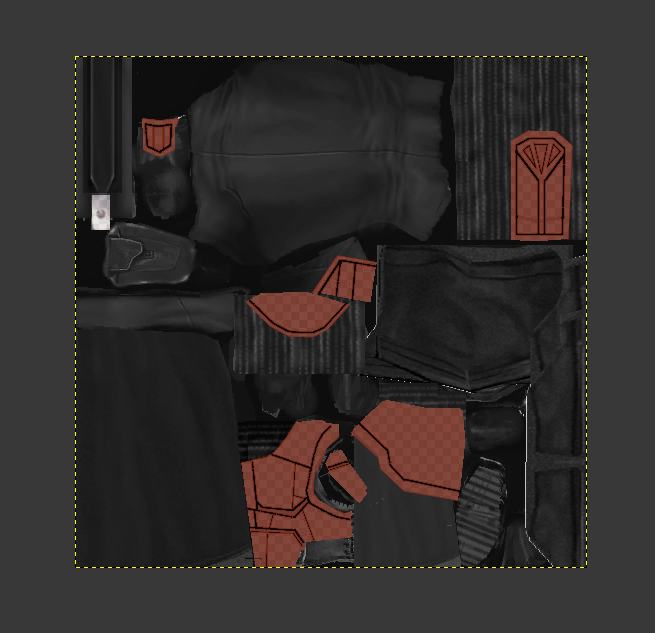
-
I am running into a very strange engine-level issue with vanilla KOTOR while developing a new module for an expansion project. I originally started building the project inside my community mod build game, which is the setup I normally use for my main playthroughs. After the project scaled, I moved to building in vanilla kotor and completely rewrote the module for vanilla kotor. Shortly after, vanilla KOTOR began refusing to load any updated resources inside the rebuilt Korriban Valley module (korr_m36aa), even when the module is fully overwritten. In that modded environment, everything works exactly as intended. The context is as follows. I have a custom NPC whose dialogue was newly marked skippable, and after speaking with him, a G-Wing ship spawns. Clicking on the G-Wing initiates a transition script I had made updated changes to. The transition script fires correctly in both versions of the game. It updates the journal and performs all of its other functions. However, in vanilla KOTOR, StartNewModule never actually transitions the player into the target module. The camera just glitches and offsets for a split second while the script performs it's other actions flawlessly. In the modded community build that i use for normal playthroughs, the transition works perfectly and the Valley’s Shadow module loads without issue. In vanilla, none of the changes inside the rebuilt m36aa module apply. The NPC's dialogue is not skippable. The updated DLG does not load. Trigger changes do not apply. Waypoint changes do not apply. The transition script fires but the module never starts. The module behaves exactly like the original unmodified m36aa with no changes to it's actual files other than the added utc for the npc, new placeables and a few new scripts. Meanwhile, the exact same rebuilt module, when placed into the modded community build, loads all changes correctly. The dialogue is skippable, the triggers work, the waypoint is correct, and the transition script successfully moves the player into the target module. I have already verified that I am loading the correct module. I overwrote the original korr_m36aa.mod file directly. The IFO, ARE, and GIT files inside the module are correct. The transition script does not reference anything from Korriban and works perfectly in the modded build. The target module is not corrupted and loads fine in the modded build. I have tested with multiple fresh saves, including saves that never visited Korriban and saves created before the module existed. I have fully restarted the game each time fixes were attempted and cleared all possible cached data. None of this changes the behavior in vanilla. At this point, the rebuilt module works perfectly in the modded community build game that i have installed on a thumbdrive (because i had to back it up when i reinstalled the game fresh to use for modding development), but vanilla KOTOR wants to be annoying for what looks like to me, no reason at all and refuses to load the updated resources inside korr_m36aa even when the module is fully overwritten with the changes. At this point, I am just trying to determine if this is just me being a dumbass and not seeing any errors, or whether this is a known engine quirk with KOTOR, or korr_m36aa specifically where the game refuses to run and load clean modules correctly, and use changes that were made to dialogue, scripts, and more, regardless if the changes were clearly made and have seemingly no errors. I don't know whether there is a known fix or workaround for vanilla refusing to load updated module resources despite a full rebuild. If no solution exists, I will pivot to having the NPC only be hosted in the Valley, but have all the vital scripts run in a different module that becomes available after talking to the NPC. Thanks, Rever$e
-
Alright. Well I'll take a second look at it in there and see if it works out. Thanks!
-
I do not know. But the one I am talking about was one I downloaded from this page when I went on a search to download tons of modding tools for this project. I made a second post on this (this one was an accidental post when I was editing it). If this is the one you are referencing, either I am blind or just didn't see it.
-
Hey everyone, I’m Rever$e (or Rever$e Studios — I use both names across most platforms). I’m relatively new to KOTOR modding, and I’m currently working on a small‑to‑medium sized expansion mod for KOTOR 1. It adds new questlines, a new character, custom items, and a few new modules. Right now I’m stuck on a problem with dialogue editing for a computer console in one of my custom ship modules. The console begins in a broken state, and after repairing it as part of a small side quest using custom plot items found in the module, it becomes a systems terminal that displays status information and quest‑related data. It functions similarly to the camera terminals in the base game, but text‑based instead. The issue I’m running into is specifically related to “Return” replies — the options that take the player back to a previous menu node. The Problem I’ve used FairStrides’ (tk102's) DLG Editor before, but it doesn’t have the linking features I need for this particular dialog. It works better for simple back‑and‑forth conversations. Because of that, I switched to Holocron Toolset, which includes a “Paste Entry as Link” feature. Edit: (I was told that it actually is able to link so I'll take a second look at it)
-
Reverse_Studios joined the community
-
(closed)